DI-2008 Hardware Manual
Controls, Indicators, and Connections
15
Once the switch closure or TTL signal is connected, activate Remote Events through WINDAQ Acquisition Software.
Events may be automatically placed on the rising or falling edge of the trigger signal. Use the menu command
Options > Remote Events + to set W
INDAQ to place event markers on low-to-high transitions of the Event input.
Use the menu command Options > Remote Events - to set W
INDAQ to place event markers on high-to-low transi-
tions of the Event input.
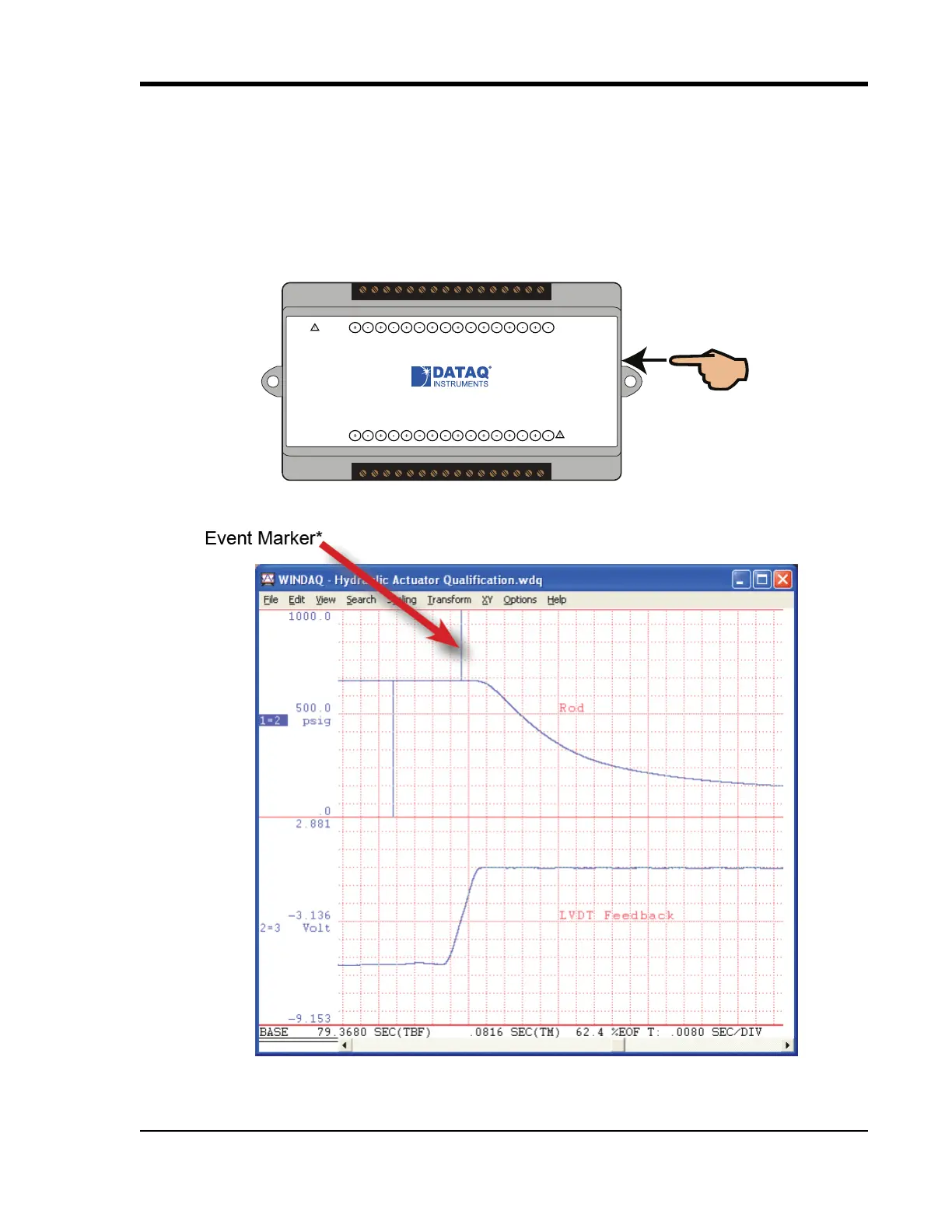
Event markers may also be placed in your data file manually by pressing the push button on the DI-2008 Instrument.
You must enable Remote Events in W
INDAQ to use the button (use the menu command Options > Remote Events
+or Options > Remote Events -).
An example event marker in a W
INDAQ data file is shown below.
*Please Note: Event Markers do not display in the real-time W
INDAQ acquisition software - they only display in the
W
INDAQ playback software (WWB). Acquisition starts go up; Event markers spike downward.
www.dataq.com
USB
CH8
CH7CH6
CH5CH4CH3CH2CH1
Download software at run.dataq.com
+15V GnD
60mA max
D0 D1 D2 D3 D4 D5 D6
DI-2008 Voltage, Thermocouple, and Pulse DAQ
Button
LED
0-30V Max
CountRateRecordEvent
120V rms max


 To Next Page