DP-50 / DP-50D / MP55-B - USERS MANUAL
INSERTED INTO THE ECR!
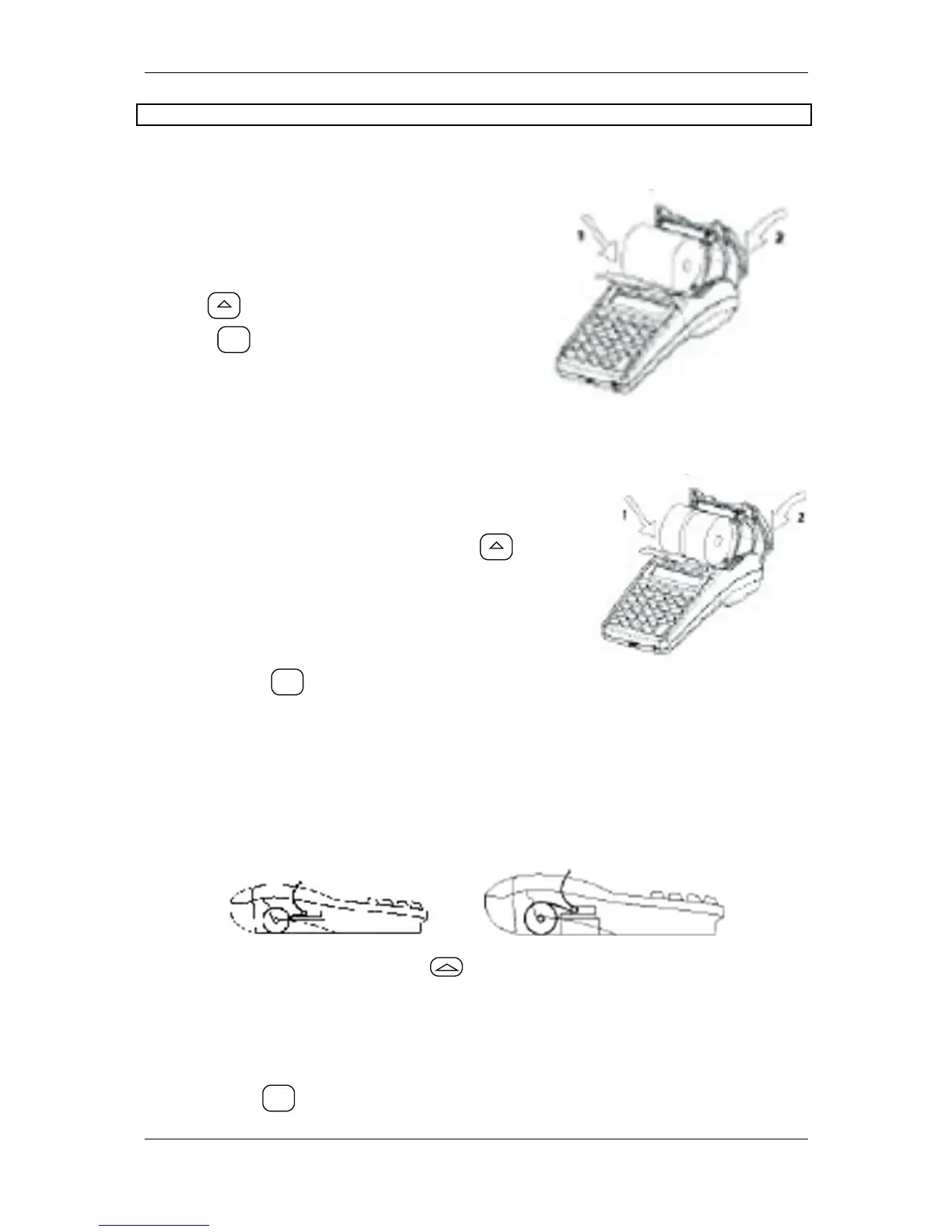
√ Loading the paper roll into DP-50
A/ Remove the printer cover;
B/ Set the paper roll as is shown in the
illustration ;
C/ Pull the paper tape out about 25-30 cm,
D/ Close the cover, to move the paper use
the key
E/ Press
.
√ Loading the paper rolls into DP-50D
A/ Remove the printer cover;
B/ Set the paper rolls as is shown in the
illustration;
C/ Close the cover, to move the paper use
D/ Pull the paper tape out about 25-30 cm,
E/ Store the tape for journal printing to the end of
the winding roll and turn the roll back to its place,
F/ Pass the main tape through the cover paper
slot and turn the cover back to its place.
G/Press the key
.
√ Loading the paper roll into MP-55B
A/ Remove the printer cover;
B/ Set the paper roll as is shown in the illustration below and pass its end through the
paper slot of the printing device until you feel resistance,
Correct Not correct
C/ To move the paper press the key till the tapes shows up over the slot,
D/ Pull the paper tape out about 25-30 cm,
E/ Pass the main tape through the cover paper slot and turn the cover back to its
place.
Press the key


 To Next Page