10
Front & rear panel descriptions
1.3.1.Front panel (CORTEX 360)
The Cortex front panel provides easily accessible site and equipment-status information without requiring the use of a
computer.
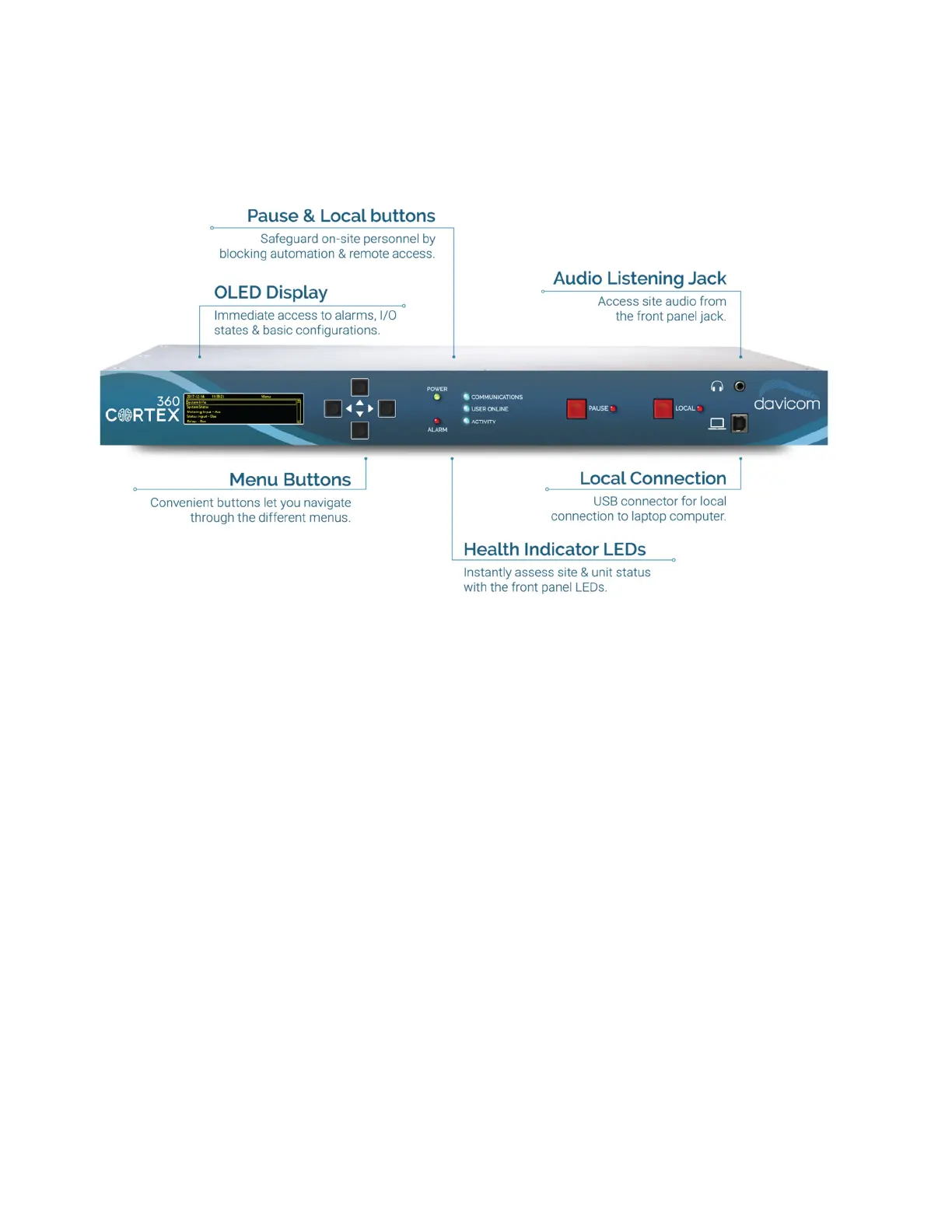
CORTEX-360 front panel
OLED Display - Under normal operation, the display is blank to conserve power. To turn it on, push any of the four menu
buttons.
Menu buttons - Four push buttons allow navigation through the different OLED menus.
POWER LED- Indicates status of the unit’s power. It is on when the unit is under rated power.
ALARM LED- Shows the Alarm status. If there is one or many alarms, the LED will be on.
COMMUNICATIONS - Shows the unit’s call-out status. It will turn on every time the unit makes an outside call (telephone,
email, SNMP Trap, etc.)
USER ONLINE - Indicates if one or more users are connected to the unit.
ACTIVITY - Indicates the health status of the CPU. This “heartbeat” flashes at a rate of one (1) pulse per second when the
unit is operating correctly.
PAUSE and LOCAL buttons- The PAUSE button stops transmission of Alarms to the outside, while the LOCAL button
blocks outside actions and control when staff is on-site for maintenance or repair work.
Headphone jack- Provides audio for monitoring purposes. It is active when audio is applied on the unit’s rear connector
audio input pins. A powered speaker can also be connected to this port.
USB port - Provides a means of connecting to the unit using a computer with the DavLink 6 software.



 To Next Page