37
4.2.3.Date, Time, and Location
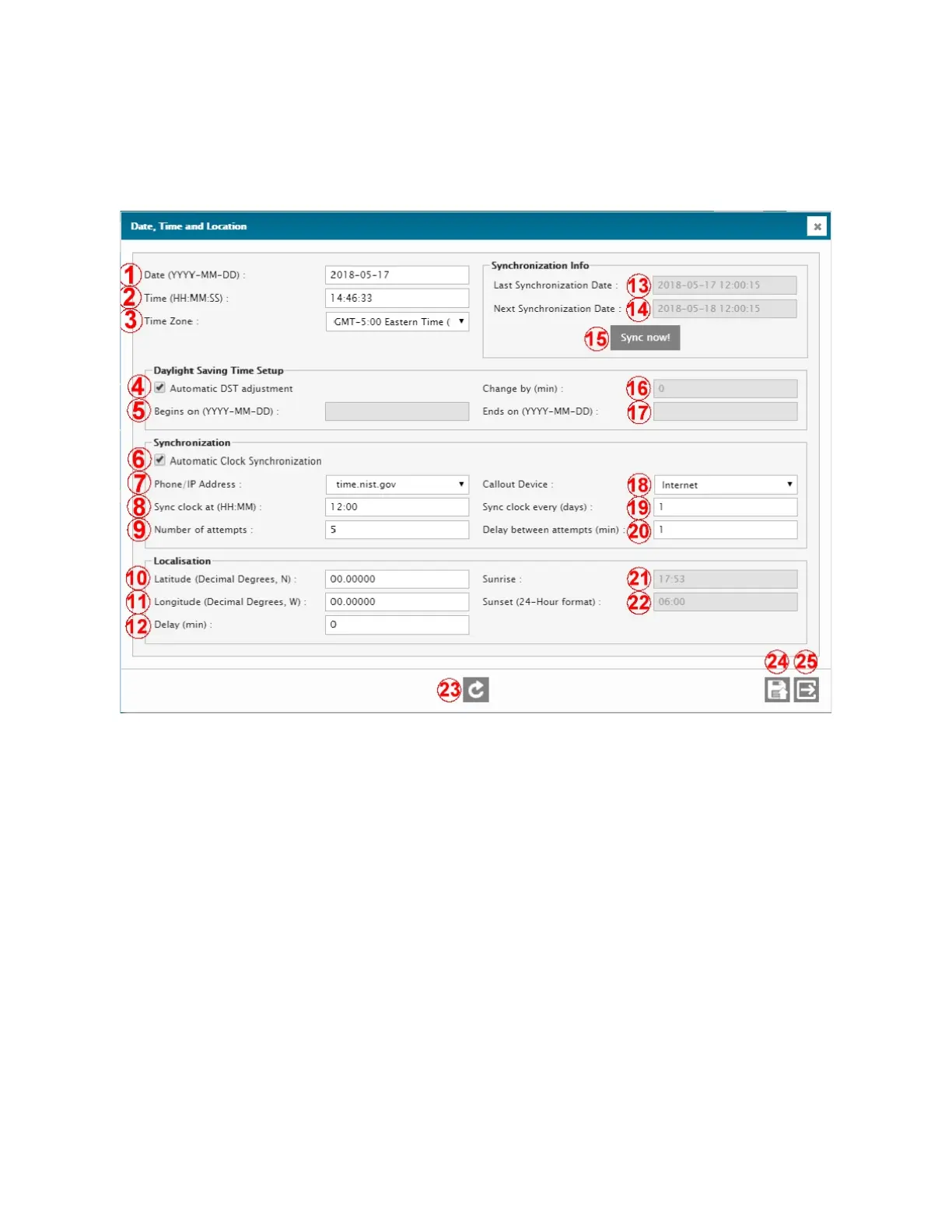
This screen contains all the settings that relate to time, time-zone, date, and location of the unit.
1 – DATE
Current date of the unit.
2 – TIME
Current time of the unit.
3 – TIME ZONE
Current time zone of the unit.
4 – AUTOMATIC DST AJUSTMENT
Automatically activate / deactivate the Daylight Saving Time on the legally set dates and times.
5 – BEGINS ON
Date at which the Daylight Saving Time period begins.
6 – AUTOMATIC CLOCK SYNCHRONIZATION
Set the clock to synchronize automatically on an external time synchronization service.
7 – PHONE / IP ADDRESS
Means by which the Automatic Clock Synchronization will take place, either by phone (internal modem required) or
by IP.
8 – SYNC CLOCK AT
Daily clock sync time.
9 – NUMBER OF ATTEMPTS
Number of attemps the unit will try to sync its clock in the event of a sync failure.
10 – LATITUDE
North or south latitude location of the unit, in decimal degrees.
11 – LONGITUDE



 To Next Page