29
3.2. Menus
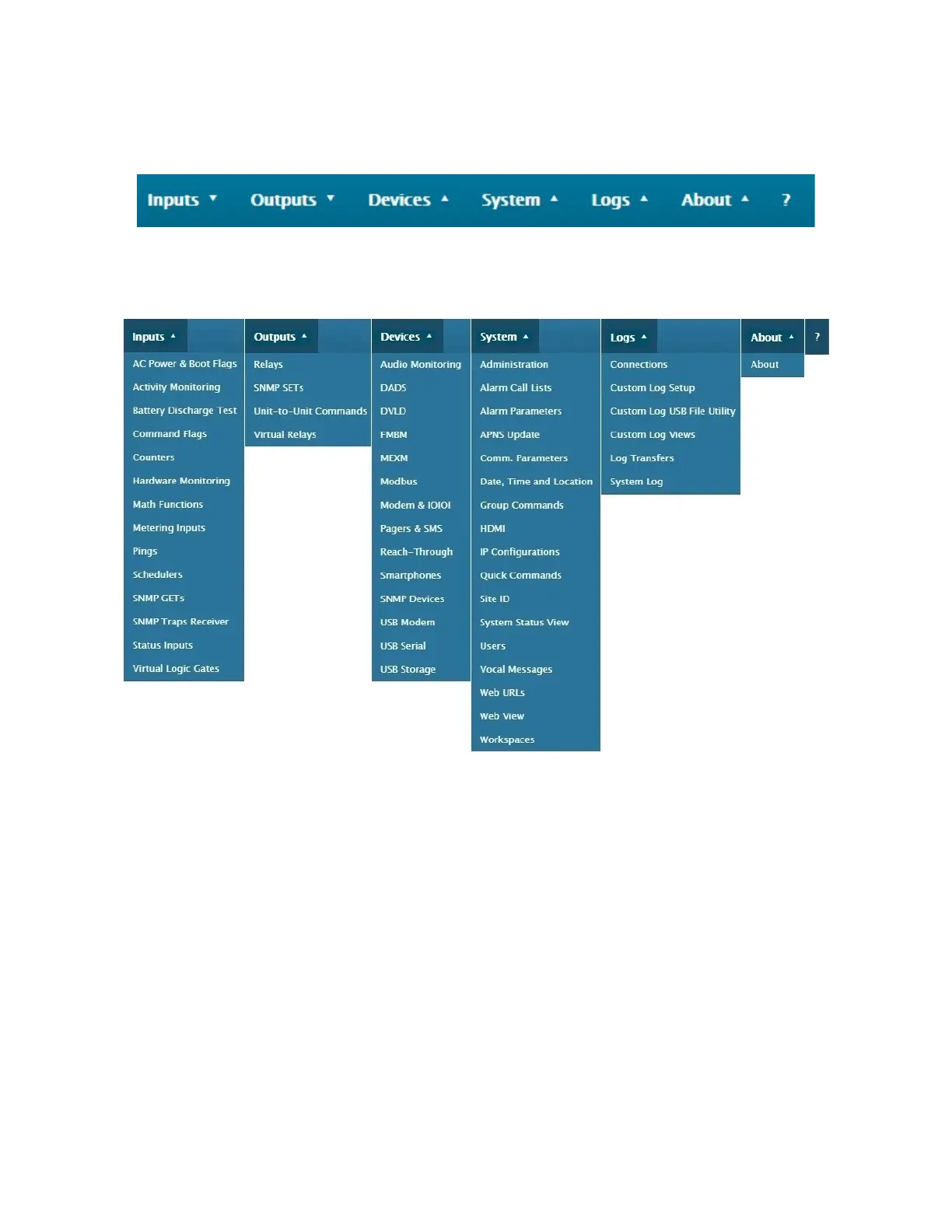
The main menu is at the top upper left. It provides access to all of the unit’s configuration, settings, and views.
Each of the 6 top menu categories gives access to visualization screens for: Inputs, Outputs, Devices, System, Logs,
and About. Within each of these visualisation screens, a configuration icon allows direct access to the item’s setup screen.
INPUTS - Everything that is considered or defined as an input is found here: Metering (or analog) inputs, Status (or digital)
inputs, Virtual Logic Gates (VLG), SNMP GET (read), SNMP Traps (receive), Math Functions, Pings (receive), Schedulers
(timers), Commands Flags inputs (to receive UUC’s or Unit to Unit Commands), as well as several others.
OUTPUTS - Everything that is considered or defined as an output is found here: Relays, Virtual Relays, SNMP SET (write),
and Unit-to-Unit Commands.
DEVICES - This section provides access to the setup of external equipment, accessories, and I/O expansion that can be
connected to a Cortex unit.
SYSTEM - This section allows administration and management of settings such as: access, views, rights, and commands
related to the unit itself and to its users.
LOGS – This section contains everything for setting up, managing and viewing the different logs as well as the current user
connections.
ABOUT - Provides the unit’s software and hardware version.



 To Next Page