22
Main
Normal Reversed
max
0dB
Input
Sens.
RDNet
Link Active
Remote
Preset
Active
Data
In
Data
Out
Balanced
Audio
Input
Output
Xover/Link
ON
Limiter
Signal
Status
USB Data
Service
DESIGNED & DEVELOPED
IN ITALY
2,5
3,5
1,5
3,0
2,0
4,0
1,0
4,5
0
Xover
MODE
Subwoofer
Polarity
100
70
80
110
90
100
70
80
110
90
Service/
User
Xover/Link [Hz]
Subwoofer
Delay
[ms]
Link
MODE
P
U
S
H
P
U
S
H
P
U
S
H
8
1
5
9
6
3
2 4 7
SUB 915 - SUB918 Code 420120322 REV. 1.0
INPUT, OUTPUT AND CONTROL SECTION
English
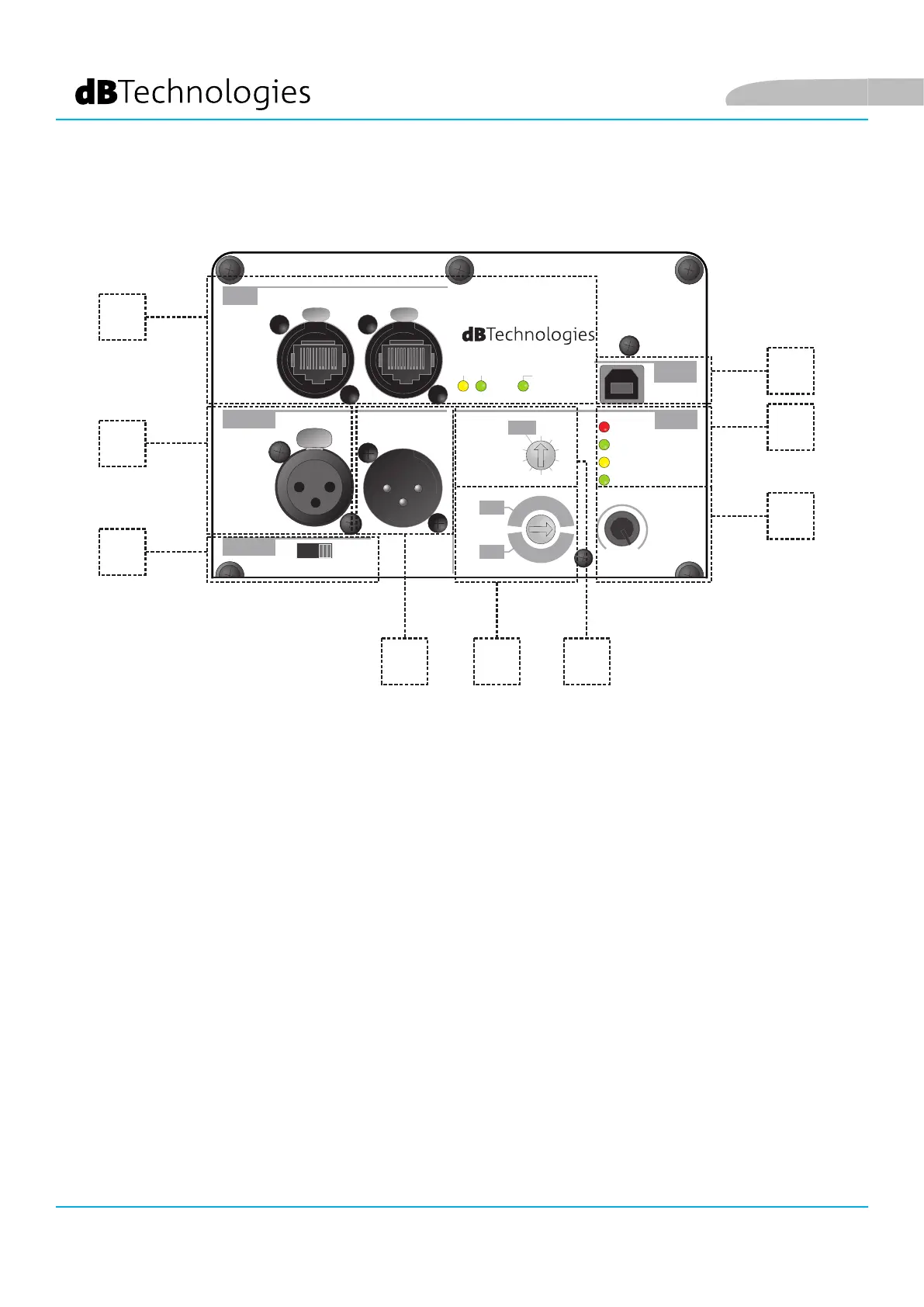
1. INPUT
XLR (balanced) input connector. For further details concerning connection, refer to INPUT CONNECTIONS AND
AUDIO DAISY CHAIN.
4. Xover/Link rotary
Selector that allows setting the cut-off frequency based on the selected mode (Link/Xover). It acts on the
daisy-chained signal from Xover/Link Output connectors.
5. Subwoofer Polarity selector
Selector that allows adjusting the Polarity (Normal or Reverse)
3. Input Sensitivity
Rotary control to adjust the input sensitivity.
2. OUTPUT
XLR (balanced) output connector. Select the cut-off frequency based on the Xover/Link mode using the
relevant rotary control. For further details concerning connection, refer to INPUT CONNECTIONS AND AUDIO
DAISY CHAIN.
6. LED (Limiter, Signal/ON)
Indicator LEDs. The Limiter LED turns on when the internal protection circuit is triggered, while Signal/ON
indicates subwoofer power-up as well as the presence of an input audio signal.


 To Next Page