25
Balanced
Audio
Input
Output
Xover/Link
PPUUSSHH
PPUUSSHH
PUSH
12
3
SPEAKER
SUBWOOFER
MIXER
Balanced
Audio
Input
Output
Xover/Link
P
U
S
H
P
U
S
H
PUSH
12
3
SPEAKER
SUBWOOFER
MIXER
Balanced
Audio
Input
Output
Xover/Link
P
U
S
H
P
U
S
H
PUSH
12
3
SPEAKER
SUBWOOFER
MIXER
MIXER
Balanced
Audio
Input
Output
Xover/Link
P
U
S
H
P
U
S
H
PUSH
12
3
SPEAKER
SUBWOOFER
MIXER
Balanced
Audio
Input
Output
Xover/Link
PPUUSSHH
PPUUSSHH
PUSH
12
3
SPEAKER
SUBWOOFER
MIXER
Balanced
Audio
Input
Output
Xover/Link
PPUUSSHH
PPUUSSHH
PUSH
12
3
SPEAKER
SUBWOOFER
MIXER
MIXER
SUB915 - SUB918 Code 420120322 REV. 1.0
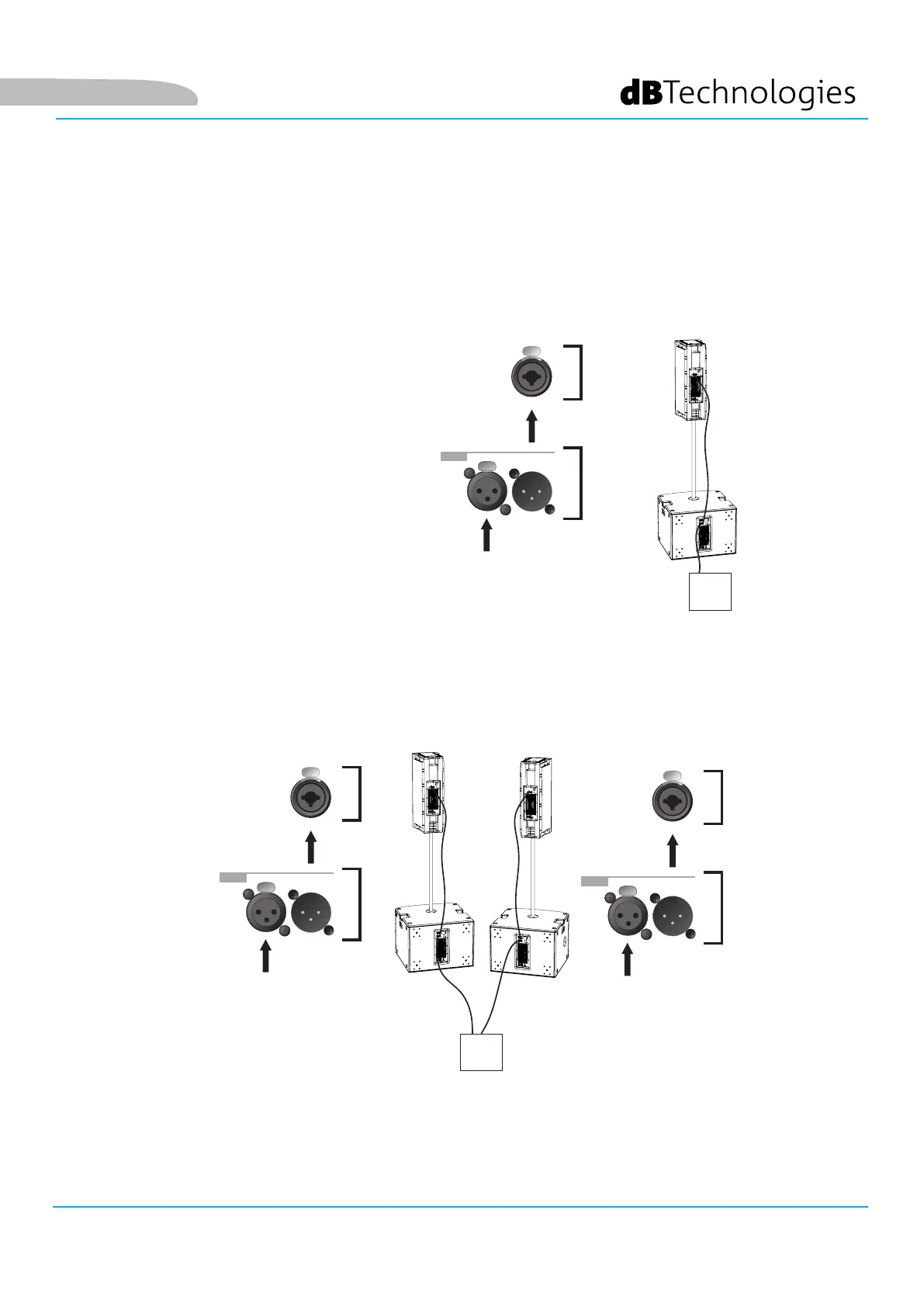
INPUT CONNECTIONS AND AUDIO DAISY CHAIN
Two example gures are shown for
illustrative purposes only.
In the event of a connection between
subwoofer and speaker:
1. Connect mixer output to
subwoofer input connector
2. Connect subwoofer output
connector to speaker input.
3. Set subwoofer OUTPUT XOVER/
LINK [4] to XOVER, in order
to daisy-chain a signal to the
speaker having a crossover
frequency that can be selected
with the Xover/Link rotary
control [Hz]
English


 To Next Page