USER'SMANUALOFEMBEDDEDDIGITALVIDEORECORDER
Page 18 of 27
Bitratemode :Choosetherightbitratemodeyouneed:"constantbitrate"meanssystemencodingvideoas
user‐definedbitrateandframerate."Variablebitrate"meanssystemencodingaccordingto
user‐definedimagequalityandvideoframerate,butbitrateisautomaticallyadjustedbythesystem
dependingonthevideo
screen."Averagebirtrate"meanssystemautomaticallyadjustedfluctuationas
user‐definedbitrate.
Encodeformat:Encodingresolutionsdefinedbyuser'need (QCIF)176*144/(CIF)352*288/(HD1)576*288/
(D1)704*576
Bitrate:Usersselecttheencodingbitrateasneeded.Thehigherbitrate,thebetterimagebutwithlargedisk
space.
Quality:Imagequality,useridentified.
Framerate :Usersselectthevideoframerateasneeded.Thehigherframerate,thebetterimagebutwith
largediskspace.
Copyto :Selectthetargetchannelontherightof"copyto"button,click"copyto"&''ok"thensystemwill
set
thecurrentchannelsetupinformationtoothertargetvideochannel.Clickbutton"cancel",thesetup
informationisnon‐savedbuttoexit.
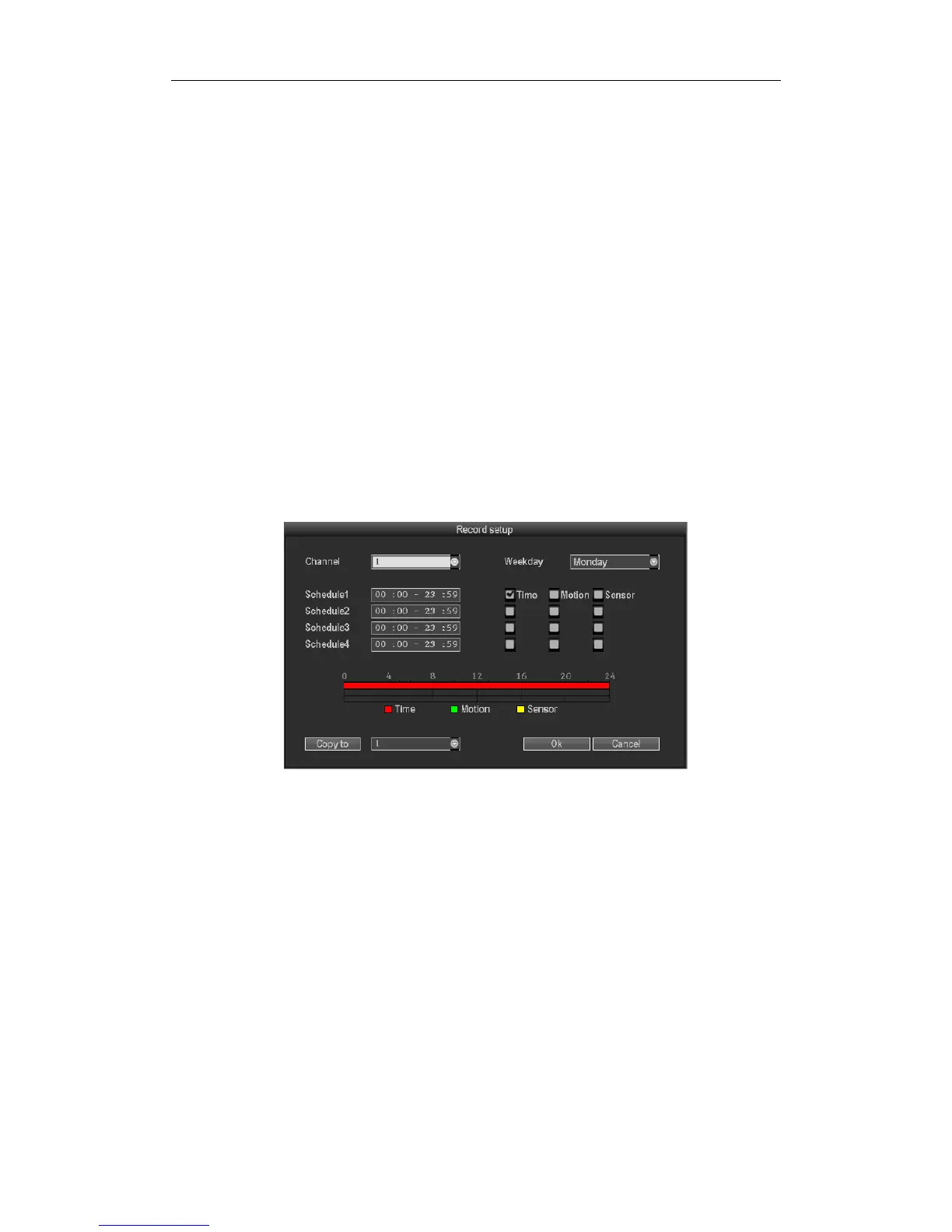
3.8.3.3Recodesetup
Select“Recordsetup”insystemsetup.
Channel :ChoosetherightCHasneededbyclickingtheinvertedtriangle
Weekday:Choosetherightdayasuser'sneed,"ALL"meansalldaysinaweek.
Recordmodeandtime :Everytimeslotcansetdifferentrecodingmodeinall4
timeslot."Time"recording
withredcolor,"Motion"recordingwithgreencolor,"Sensor"recordingwithyellowcolor;“√"means
working,“□”meansinvalid.Thebottompartshastimesstatusdisplay,wholeschedulefromtime0~24
hours
Copyto :Selectthetargetchannelontherightof
"copyto"button,click"copyto"&''ok"thensystemwillset
thecurrentchannelsetupinformationtoothertargetvideochannel.Clickbutton"cancel",thesetup
informationisnon‐savedbuttoexit.



 To Next Page