USER'SMANUALOFEMBEDDEDDIGITALVIDEORECORDER
Page 21 of 27
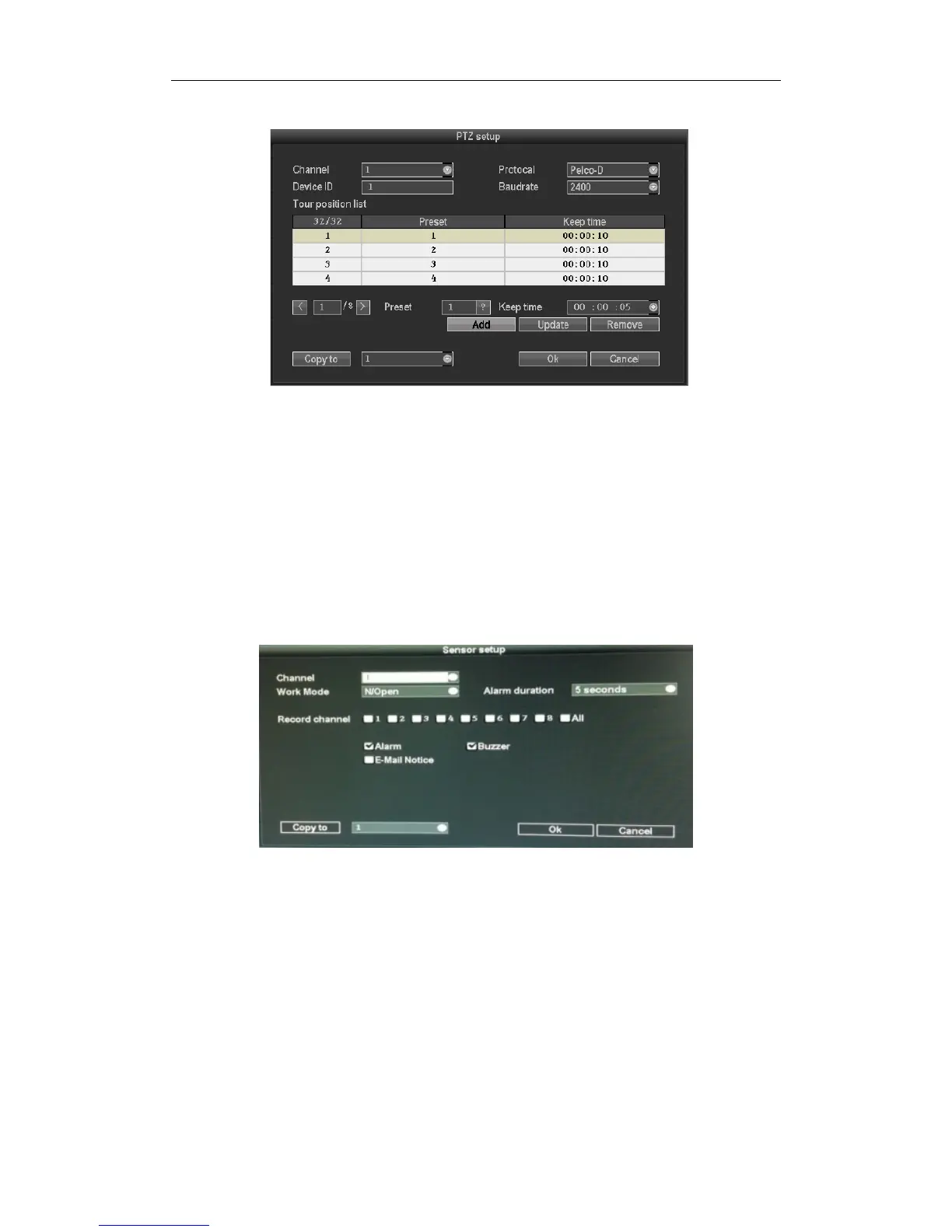
3.8.3.7PTZControl
Select”PTZsetup”in“systemsetup”
Channel:Choosetherightchannel,clicktheselectboxtochoose
Protocal:TheselectedonemustbethesamewiththeoneofPTZcamera.
DeviceID:Inputtheaddressofappointeddecoder.
Baudrate:ChoosethematchedoneofthePTZcamera.
Copyto:
Choosetheobjectrouteintherightselectbox,clickthebuttonofcopysetting,thentheinformationof
settingwillbeshowed,whichalsocanbeappliedinotherobjectroutes.
Afterthesetting,clickthebuttonofsuretoexitwithsavingsavethechanges,orclickthe
buttonof“cancel”to
exitwithoutsaving.
3.8.38Sensorsetup
Insystemsetup,choose"PTZsetup",entersettinginterface
Channel:Choosetherightchannel,clicktheselectboxtochoose
Workmode:Settingtostartalarmornot
Alarmduration:Setupalarmdurationtime
Recordingchannel:Whenalarmistriggered,channelneededtoberecorded
Alarm:“√”enablealarm,“□”closealarm
Buzzer:“√”startbuzzer,“□”closebuzzer
E‐Mailnotice :“√”meansE‐Mailvalid,“□”meansE‐Mailinvalid
Copyto:Choosethetargetchannelintherightselectbox,click"copyto",thesettinginformation
willbeapplied
tootherchannel.
Afterthesetting,click"OK"toexitwithsavingsavethechanges,orclick"cancel"toexitwithoutsaving.



 To Next Page