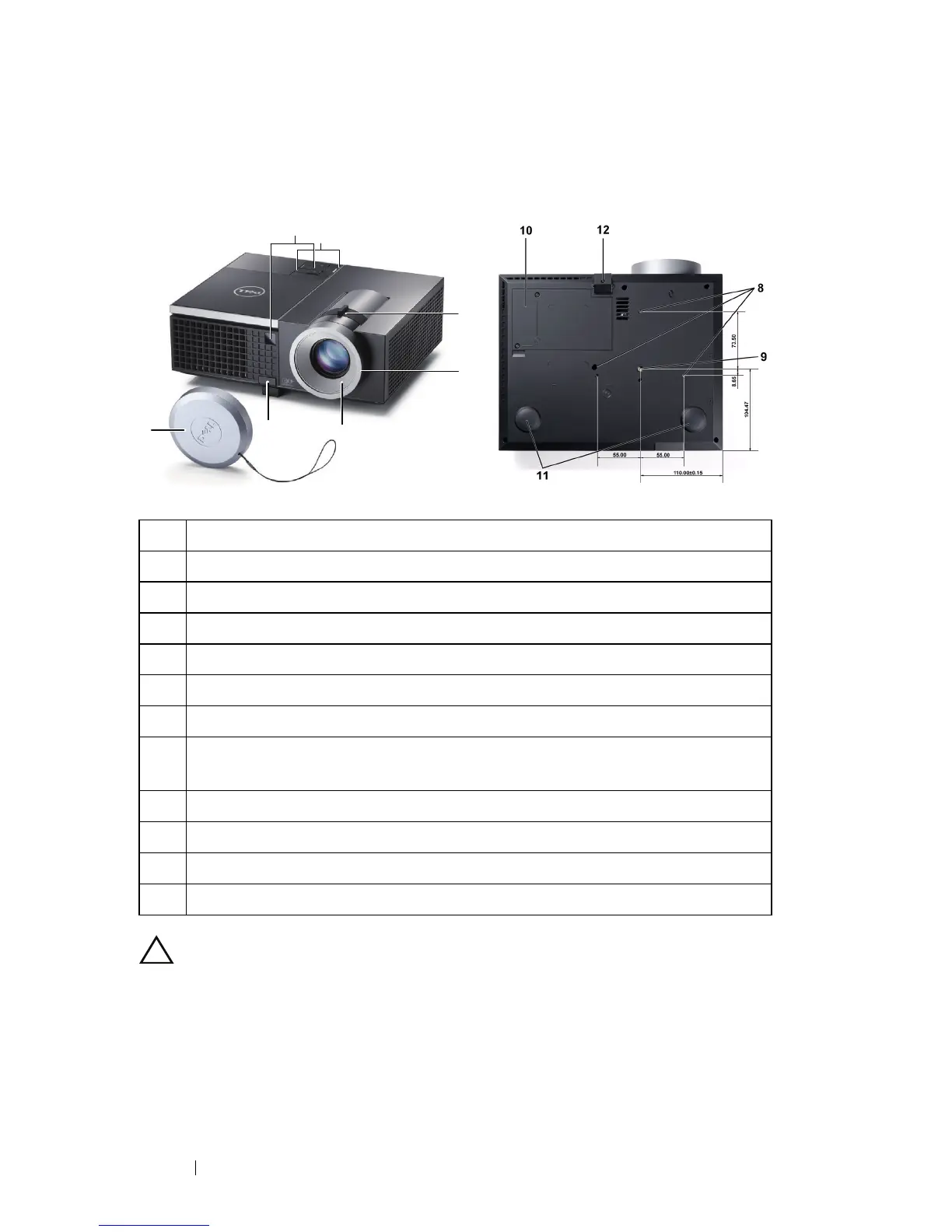
8 Your Dell Projector
About Your Projector
CAUTION: Safety Instructions
1
Do not use the projector near appliances that generate a lot of heat.
2
Do not use the projector in areas where there is an excessive amount of dust. The
dust may cause the system to fail and the projector will automatically shut down.
3
Ensure that the projector is mounted in a well-ventilated area.
4
Do not block the ventilation slots and openings on the projector.
1 Control panel
2 Zoom tab
3 Focus ring
4 Lens
5 Elevator button for height adjustments
6 IR receivers
7 Lens cap
8 Mounting holes for wall mount: Screw hole M3 x 6.5 mm depth.
Recommended torque <8 kgf-cm
9 Mounting hole for tripod: Insert nut 1/4"*20 UNC
10 Lamp cover
11 Tilt adjustment wheel
12 Elevator foot
1
2
3
4
6
5
7
Top View
Bottom View



 To Next Page