EasyManua.ls Logo

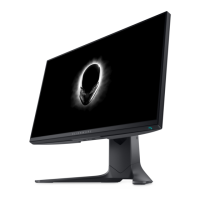
Dell Alienware AW2523HF - User Manual

Dell Alienware AW2523HF
63 pages
Print Icon
To Next Page IconTo Next Page
Loading...
Monitor Model: AW2523HF
Regulatory model: AW2523HFt
Alienware 25 Gaming Monitor -
AW2523HF
Users Guide

Table of Contents

Question and Answer IconNeed help?

Do you have a question about the Dell Alienware AW2523HF and is the answer not in the manual?

Summary

Safety Instructions

About Your Monitor

Monitor Overview and Features

Covers package contents, product features, and identifying monitor components.

Technical Specifications

Details screen, electrical, physical, and environmental characteristics of the monitor.

Connectivity and Setup

Explains port assignments, USB, Plug-and-Play, and pixel policy for the monitor.

Ergonomics and Handling

Focuses on user comfort, workstation setup, and safe handling procedures.

Maintenance Guidelines

Cleaning Your Monitor

Provides instructions and warnings for cleaning the monitor screen safely.

Setting Up The Monitor

Stand Assembly and Adjustments

Guides on attaching the stand and adjusting its tilt, swivel, and height.

Connecting and Securing the Monitor

Details connecting cables, securing with a lock, and VESA wall mounting.

Operating The Monitor

Basic Controls and OSD Navigation

Explains power, joystick, front controls, and OSD menu usage.

Advanced Features and Settings

Covers AlienVision, OSD warnings, resolution, Auto HDR, and display adjustments.

Using AlienFX Application

Installation and Usage Guide

Covers prerequisites, installation, and navigating the AlienFX interface.

Troubleshooting

Diagnostics and Common Problems

Explains self-tests, diagnostics, and identifies common issues and solutions.

Specific Issues and Solutions

Addresses FreeSync, product-specific, and USB problems.

Appendix

Regulatory Information and Support

Provides compliance notices and contact information for support.

Summary

Safety Instructions

About Your Monitor

Monitor Overview and Features

Covers package contents, product features, and identifying monitor components.

Technical Specifications

Details screen, electrical, physical, and environmental characteristics of the monitor.

Connectivity and Setup

Explains port assignments, USB, Plug-and-Play, and pixel policy for the monitor.

Ergonomics and Handling

Focuses on user comfort, workstation setup, and safe handling procedures.

Maintenance Guidelines

Cleaning Your Monitor

Provides instructions and warnings for cleaning the monitor screen safely.

Setting Up The Monitor

Stand Assembly and Adjustments

Guides on attaching the stand and adjusting its tilt, swivel, and height.

Connecting and Securing the Monitor

Details connecting cables, securing with a lock, and VESA wall mounting.

Operating The Monitor

Basic Controls and OSD Navigation

Explains power, joystick, front controls, and OSD menu usage.

Advanced Features and Settings

Covers AlienVision, OSD warnings, resolution, Auto HDR, and display adjustments.

Using AlienFX Application

Installation and Usage Guide

Covers prerequisites, installation, and navigating the AlienFX interface.

Troubleshooting

Diagnostics and Common Problems

Explains self-tests, diagnostics, and identifies common issues and solutions.

Specific Issues and Solutions

Addresses FreeSync, product-specific, and USB problems.

Appendix

Regulatory Information and Support

Provides compliance notices and contact information for support.

Dell Alienware AW2523HF Specifications

General IconGeneral
Screen Size24.5 inches
Resolution1920 x 1080 (Full HD)
Panel TypeIPS
Aspect Ratio16:9
Contrast Ratio1000:1
Color Gamut99% sRGB
Refresh Rate240 Hz
Response Time0.5ms (GtG)
Brightness400 cd/m²
Connectivity1x DisplayPort 1.4, 2x HDMI 2.0, 4x USB 3.2 Gen 1, 1x USB 3.2 Gen 1 (upstream), 1x 3.5mm audio out
AMD FreeSyncYes
Viewing Angle178°
VESA MountYes (100x100mm)

Related product manuals