Using AlienFX application | 55
Navigating the AlienFX window
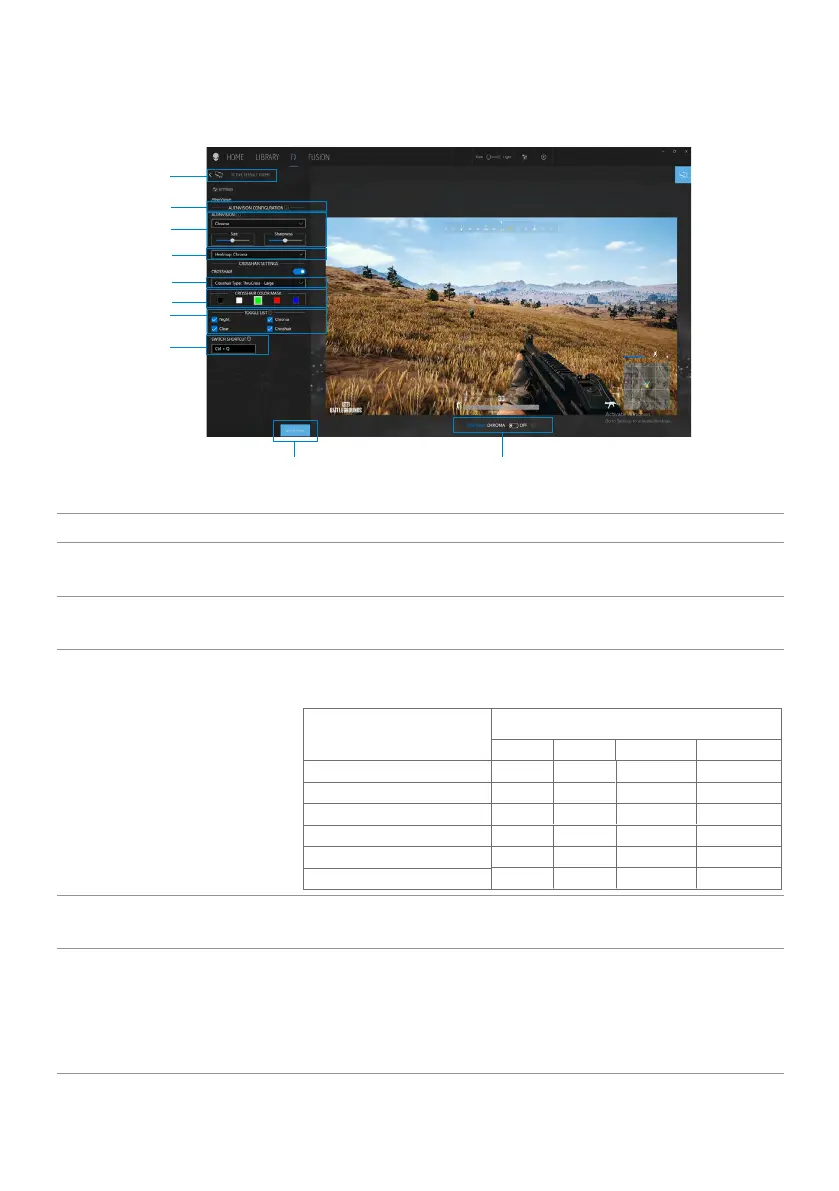
In the AWCC home screen, click FX in the top menu bar to access the home screen
of AlienFX.
1
6
7
8
4
5
3
2
The following table describes the functions and features on the home screen:
No. Functions Descriptions
1 CREATE NEW
THEME...
Click
and then enter a name in the text box to add a
theme.
2
ALIENVISION
CONFIGURATION
This list is dynamically configured based on the
supported ALIENVISION on the monitor.
3
ALIENVISION
Select the ALIENVISION between Night, Clear,
Chroma, or Crosshair.
Features
Capability
Night Clear Chroma Crosshair
Viewing Windows Size √ √ √ NA
Crosshair √ √ √ √
Crosshair Type √ √ √ √
Color Mask √ √ √ √
Sharpness (Polarized) √ √ √ NA
Heatmap NA NA √ NA
4
Heatmap
Select the Chroma, Ironbow, White hot, Black hot,
Sepia, Arctic, Outdoor Alert, Rainbow HC.
5
Crosshair Type
Select the Dot, Cross - Small, Cross - Large, BarCross
- Small, BarCross - Medium, BarCross - Large,
ThruCross - Small, ThruCross - Medium, ThruCross
- Large, Square - Small, Square - Medium, Square -
Large.












 To Next Page