22 | About your monitor
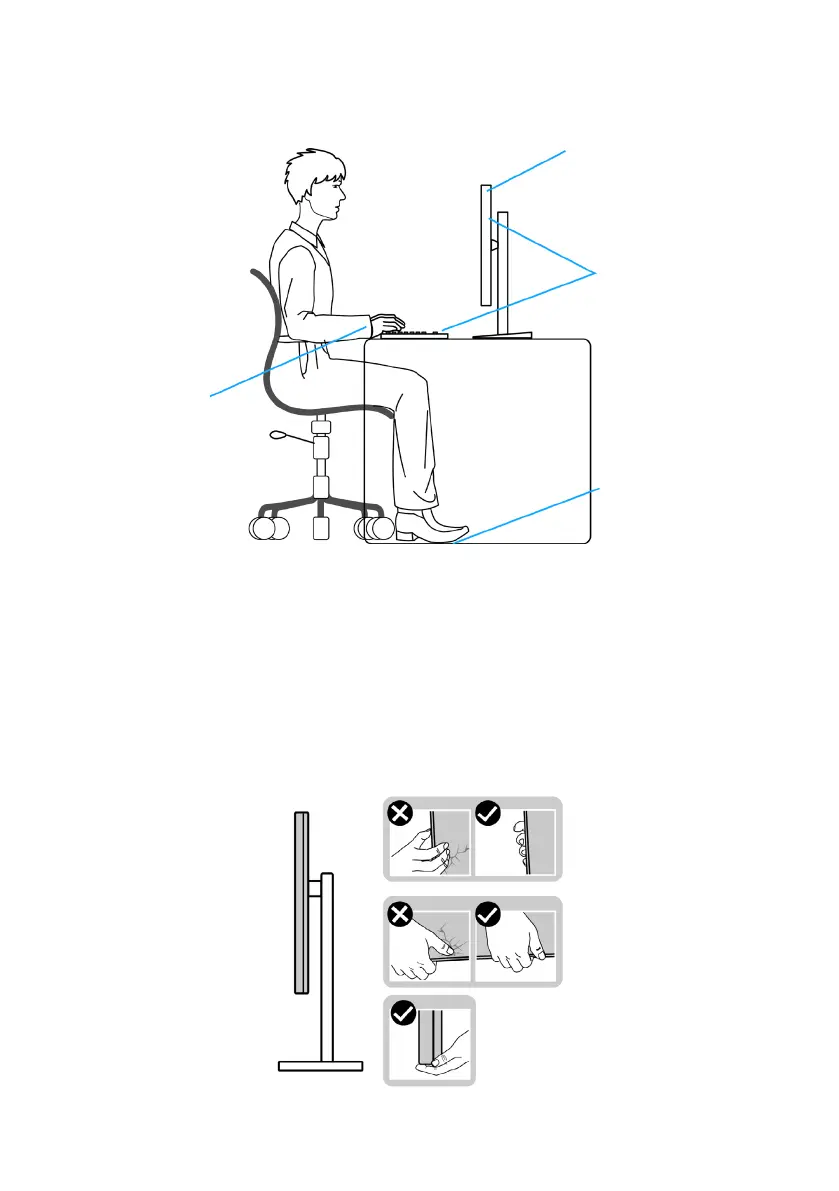
• Keep the area under your desk clear of obstructions and cables or power
cords that may interfere with comfortable seating or present a potential trip
hazard.
monitor screen at or
below eye level
monitor and
keyboard
positioned
directly in front
of the user
feet at on the
oor
wrists relaxed
and at
Handling and moving your display
To ensure the monitor is handled safely when lifting or moving it, follow the
guidelines mentioned below:
• Before moving or lifting the monitor, turn off your computer and the monitor.
• Disconnect all cables from the monitor.
• Place the monitor in the original box with the original packing materials.
• Hold the bottom edge and the side of the monitor firmly without applying
excessive pressure when lifting or moving the monitor.












 To Next Page