EasyManua.ls Logo

Dell Alienware M17X R2 - Page 43

Dell Alienware M17X R2
118 pages
Print Icon
To Next Page IconTo Next Page
To Previous Page IconTo Previous Page
Loading...
043
043
/
CHAPTER 10: PALM REST
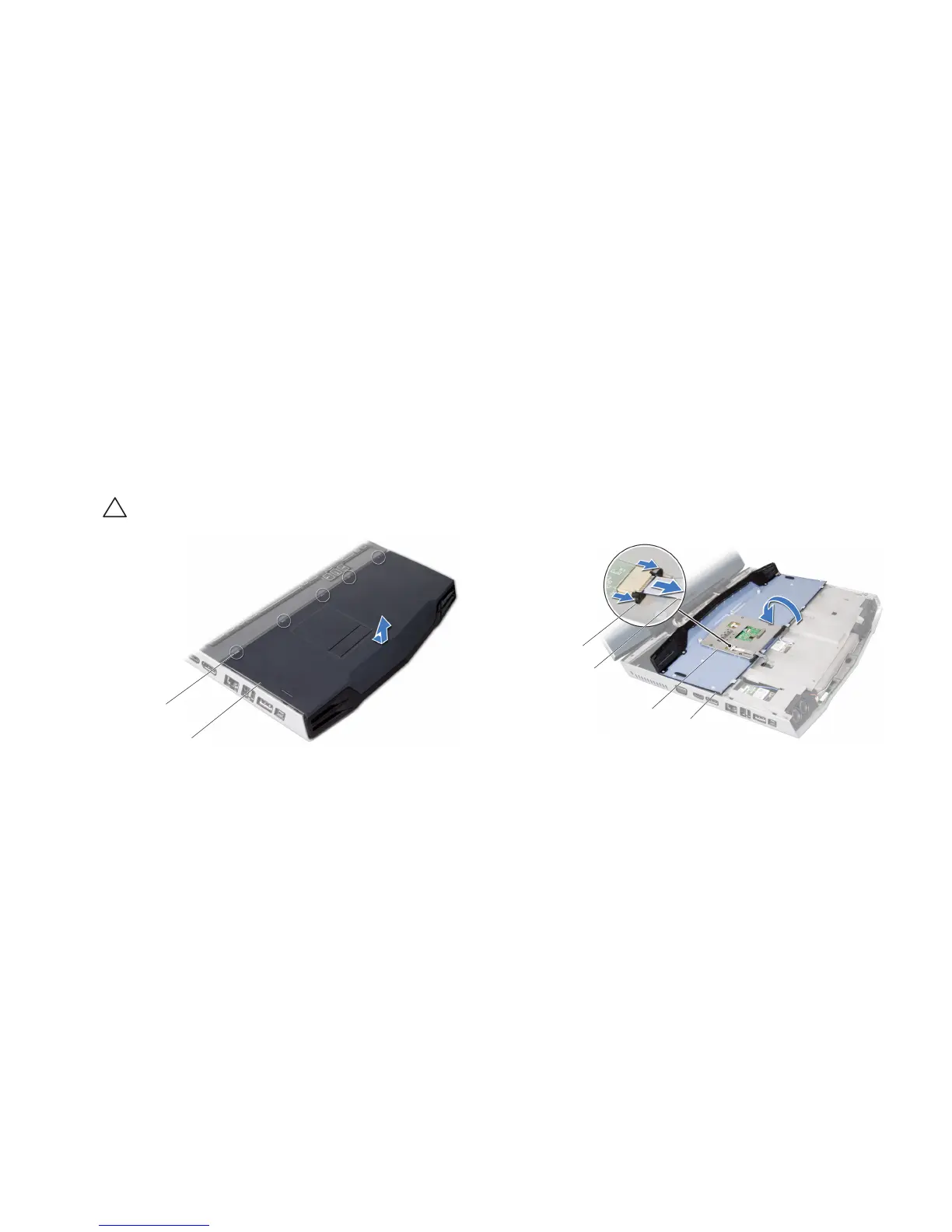
Turn the computer over and slide the palm rest out as shown in the 4.
illustration.
CAUTION: Be extremely careful when removing the palm rest. e palm
rest along with the cable that connects the touch pad to the system
board connector are very fragile.
2
1
1 tabs (5) 2 palm rest
Ease the palm rest up until you see the cable that connects the touch pad to 5.
the system board connector.
Turn the palm rest over and pull the tabs on the touch pad connector to 6.
disconnect the cable from the touch pad connector.
Lift the palm rest o the computer.7.
4
3
2
1
1 tabs on the touch pad connector 3 touch pad
2 touch pad cable 4 palm rest

Table of Contents

Other manuals for Dell Alienware M17X R2

Related product manuals