About this task
NOTE: When installing this component, please refer to the techsheet bundled with the service kit. This is only applicable for
computers with the following Graphics Processing Unit (GPU) configurations that have Element 31 grease is applied to the CPU.
● NVIDIA GeForce RTX 4080
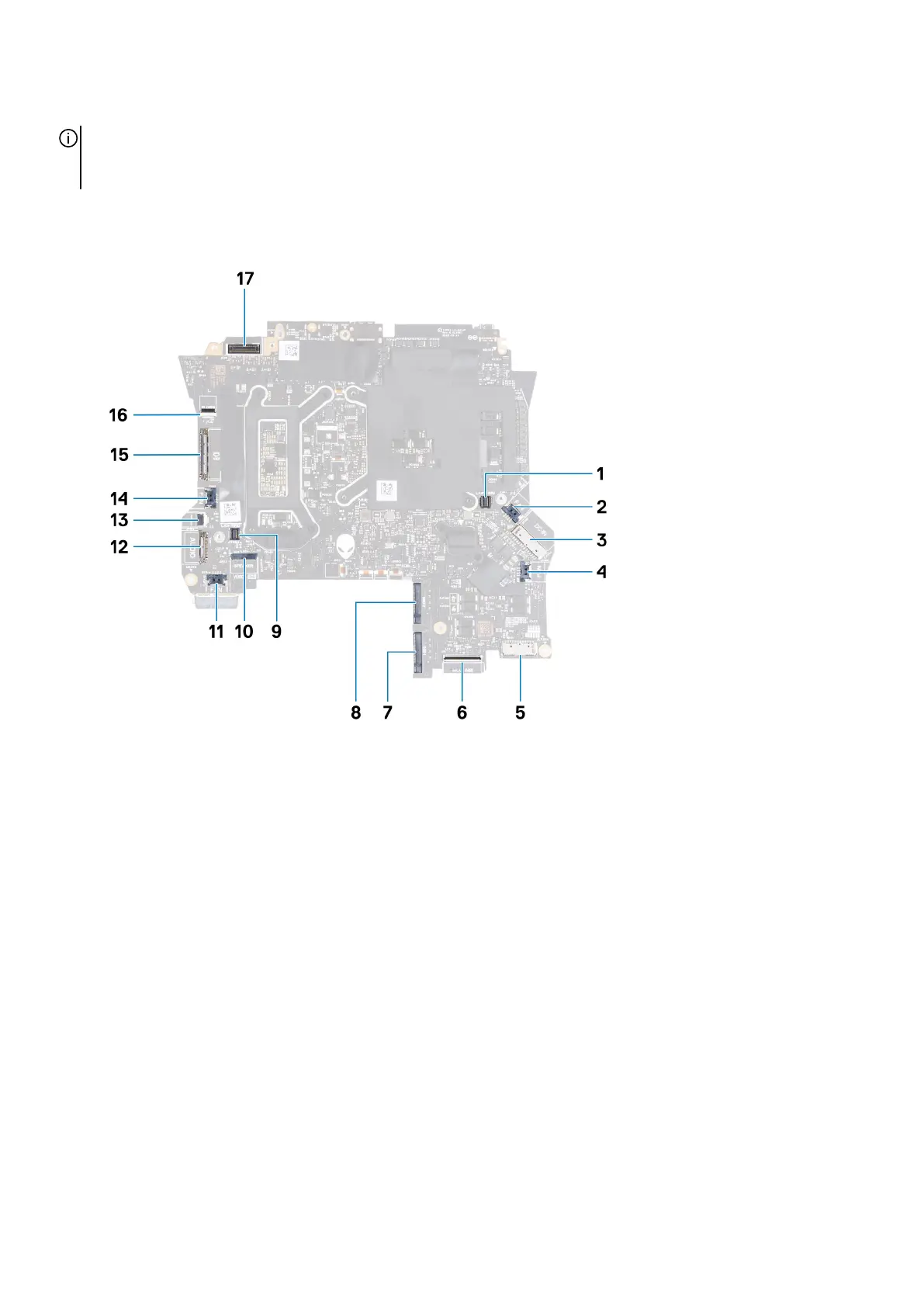
The following image indicates the connectors on your system board.
1. Right tron-light cable connector 2. Right-fan cable connector
3. Power-adapter port cable connector 4. Graphics-card fan cable connector
5. Battery-cable connector 6. Keyboard-controller board cable connector
7. Solid-state drive slot 1 (SSD-1) 8. Solid-state drive slot 2 (SSD-2)
9. Left tron-light cable connector 10. Speaker-cable connector
11. Processor-fan cable connector 12. Headset-port connector
13. Power-button cable connector 14. Left-fan cable connector
15. I/O-board cable connector 16. microSD-card reader cable connector
17. Display-cable connector
The following image(s) indicate the location of the system board and provides a visual representation of the removal procedure.
57








 To Next Page