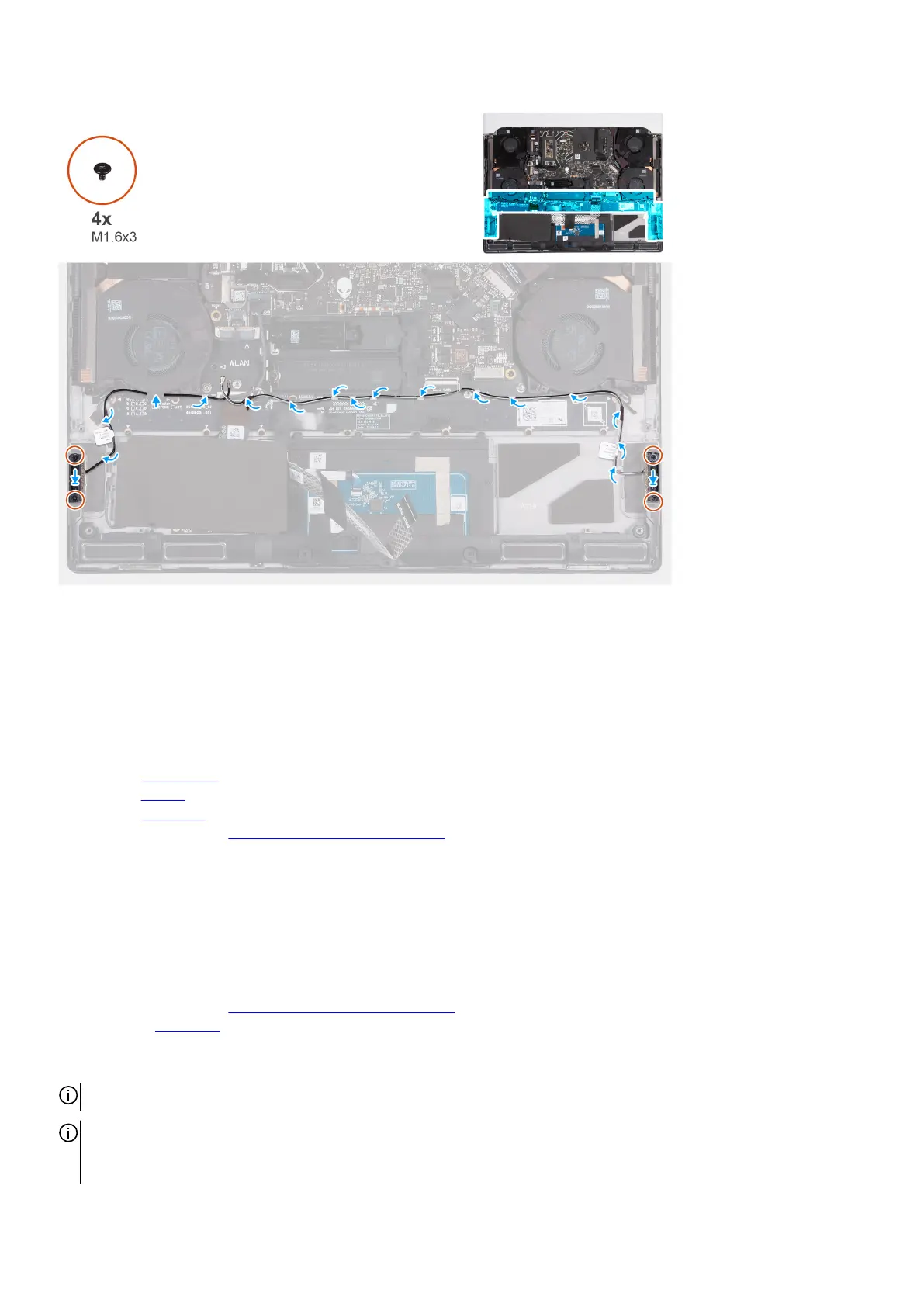
Steps
1. Align and place the left and right antennas on the slot on the palm-rest and keyboard assembly.
2. Route the antenna cables onto the routing guides on the palm-rest and keyboard assembly.
3. Adhere the tape that secures the antenna cables to the palm-rest and keyboard assembly.
4. Replace the four screws (M1.6x3) that secures the left and right antennas to the palm-rest and keyboard assembly.
Next steps
1. Install the
wireless card.
2. Install the battery.
3. Install the base cover.
4. Follow the procedure in
After working inside your computer.
Solid-state drive
Removing the M.2 2230 solid-state drive
Prerequisites
1. Follow the procedure in
Before working inside your computer.
2. Remove the base cover.
About this task
NOTE: The following procedure applies only to computers shipped with an M.2 2230 solid-state drive.
NOTE: Your computer has two solid-state drive slots (SSD-1 and SSD-2). The M.2 card installed on M.2 slot will depend on the
configuration ordered. Supported card configurations:
● M.2 2230 solid-state drive + 2230 mounting bracket
29








 To Next Page