About Your Monitor │ 11
Identifying Parts and Controls
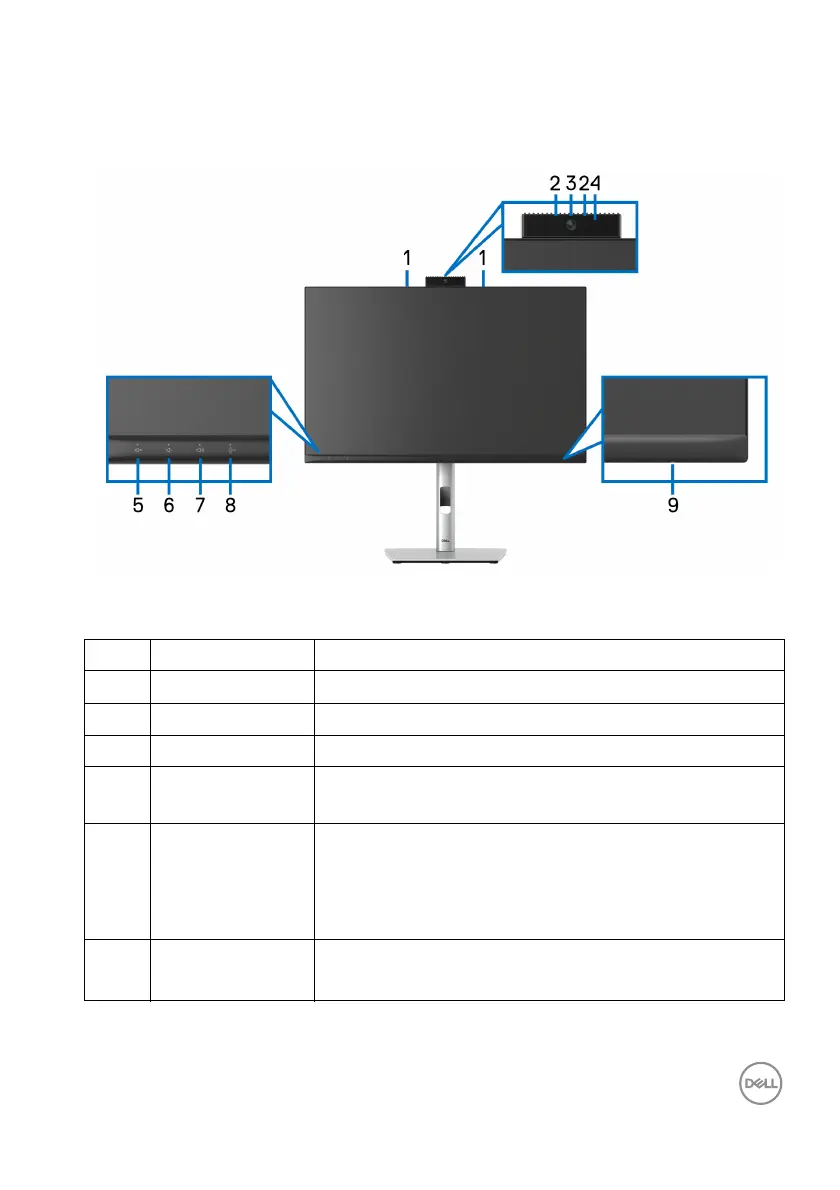
Front View
Front View with Monitor Stand
No. Description Use
1 Microphones Monitor microphones (Mic).
2 IR LED Indicator of infrared (IR).
3 Webcam lens Transmits your image in a video conference.
4 Webcam LED
indicat
or
Indicator of Webcam. It will light up in white when
webcam is in use.
5 Speaker mute &
LE
D
Press to mute and unmute speaker.
LED will light up in static white when speaker is
mut
ed.
LED will go dark when speaker is enabled/unmuted.
6 Vol ume down &
LE
D
Short press for 2 unit volume decrement.
Long press for continuous volume decrement.














 To Next Page