12 │ About Your Monitor
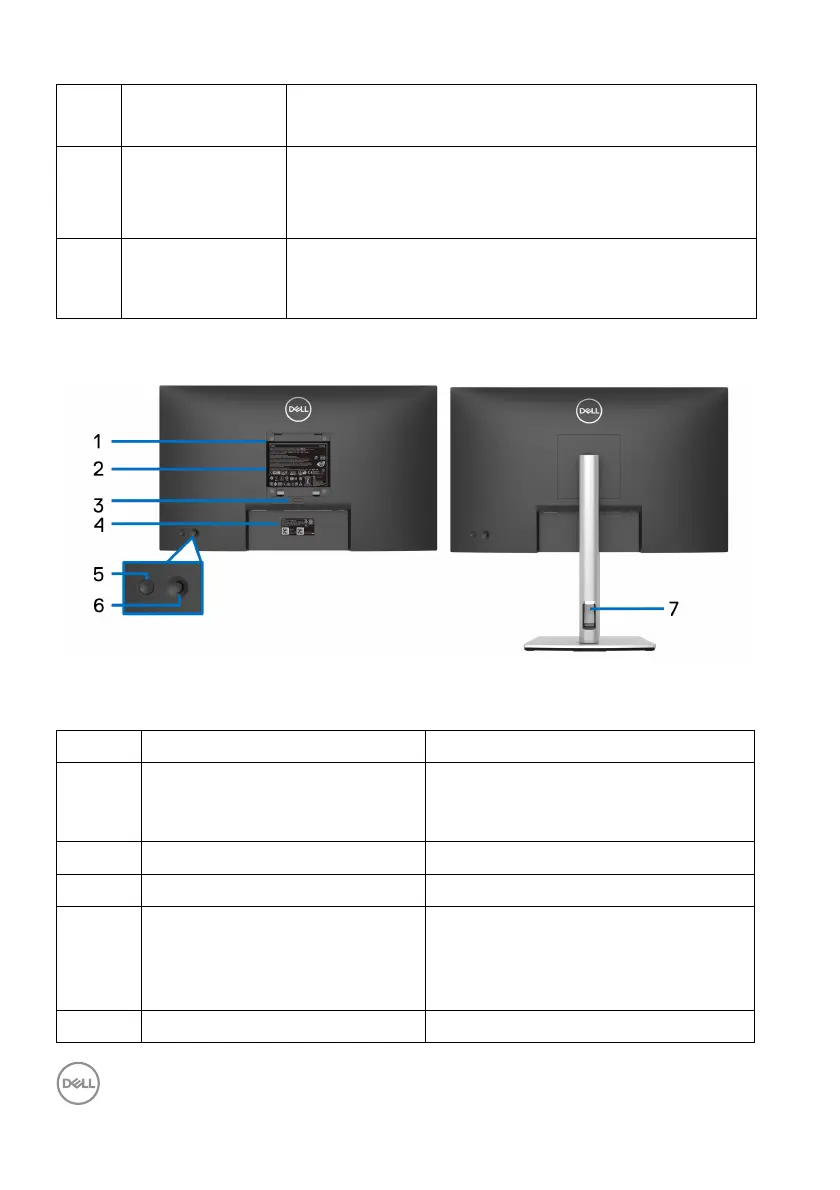
Back View
Back View with Monitor Stand
7 Vol ume up & LED Short press for 2 unit volume increment.
Long press for continuous volume increment.
8 Microphone mute
& LED
Press to mute and unmute microphone.
LED will light up in static red when mic is muted.
LED will go dark when mic is enabled/unmuted.
9 Power LED
ind
icator
Solid white light indicates that the monitor is turned
on and functioning normally. Breathing white light
indicates that the monitor is in Standby Mode.
No. Description Use
1 VESA mounting holes (100 mm
x
100 mm - behind the attached
VESA Cover)
Wall mount monitor using VESA-
compatible wall mount kit (100 mm x
100 mm).
2 Regulatory label Lists the regulatory approvals.
3 Stand release button Releases stand from the monitor.
4 Barcode, serial number, and
Service T
ag label
Contains monitor details and support
information. Refer to this label if you
need to contact Dell for technical
support.
5 Power On/Off button To turn the monitor on or off.














 To Next Page