34 │ Operating the Monitor
Contrast/
Brightness
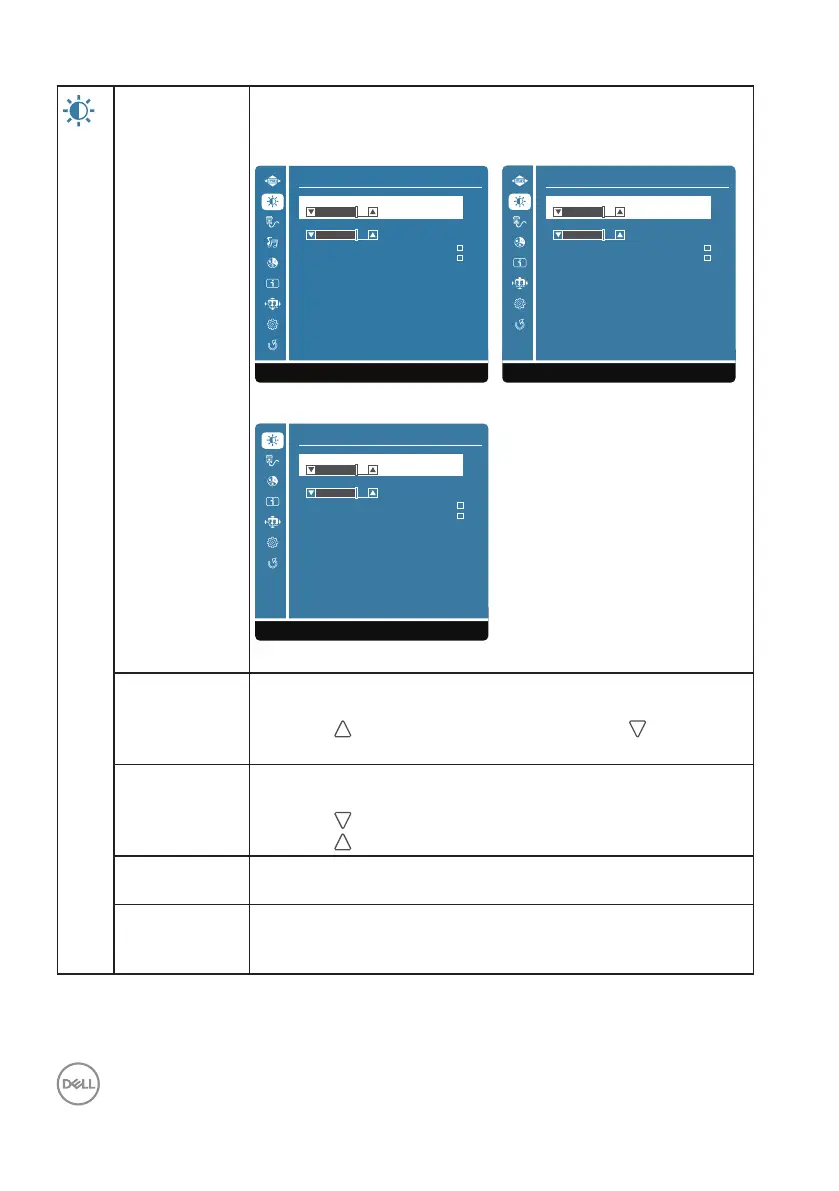
Use the Contrast/Brightness menu to adjust the Contrast/
Brightness/DCR/ECO.
D2421H D2721H
Contrast/Brightness
Brightness
DCR
75
ECO
1:Exit Select:2
Contrast
75
Contrast/Brightness
Brightness
DCR
75
ECO
1:Exit Select:2
Contrast
75
D2421DS
Contrast/Brightness
Brightness
DCR
75
ECO
1:Exit Select:2
Contrast
75
Contrast Adjust brightness first, and adjust contrast only if you need
further adjustment.
Press the key to increase contrast and press the key to
decrease contrast (min 0 ~ max 100).
Brightness Brightness adjusts the luminance of the backlight(min 0 ~ max
100).
Press the
button to decrease brightness.
Press the
button to increase brightness.
DCR To set DCR function on/off. If DCR on, brightness should be at
100 and should not be adjustable.
ECO To control ECO function on/off. If ECO on, brightness should
be at 20 and should not be adjustable. DCR should not be
adjustable.




 To Next Page