92 Removing and Installing Parts
10
Replace the computer cover (see "Replacing the Computer Cover" on page 105).
NOTICE: To connect a network cable, first plug the cable into the network port or device and then plug it into the
computer.
11
Connect your computer and devices to electrical outlets, and turn them on.
12
See the documentation that came with the drive for instructions on installing any software required for
drive operation.
Floppy Drive
CAUTION: Before you begin any of the procedures in this section, follow the safety instructions in the Product
Information Guide.
CAUTION: To guard against electrical shock, always unplug your computer from the electrical outlet before
removing the cover.
NOTE: If you are adding a floppy drive, see "Installing a Floppy Drive" on page 94.
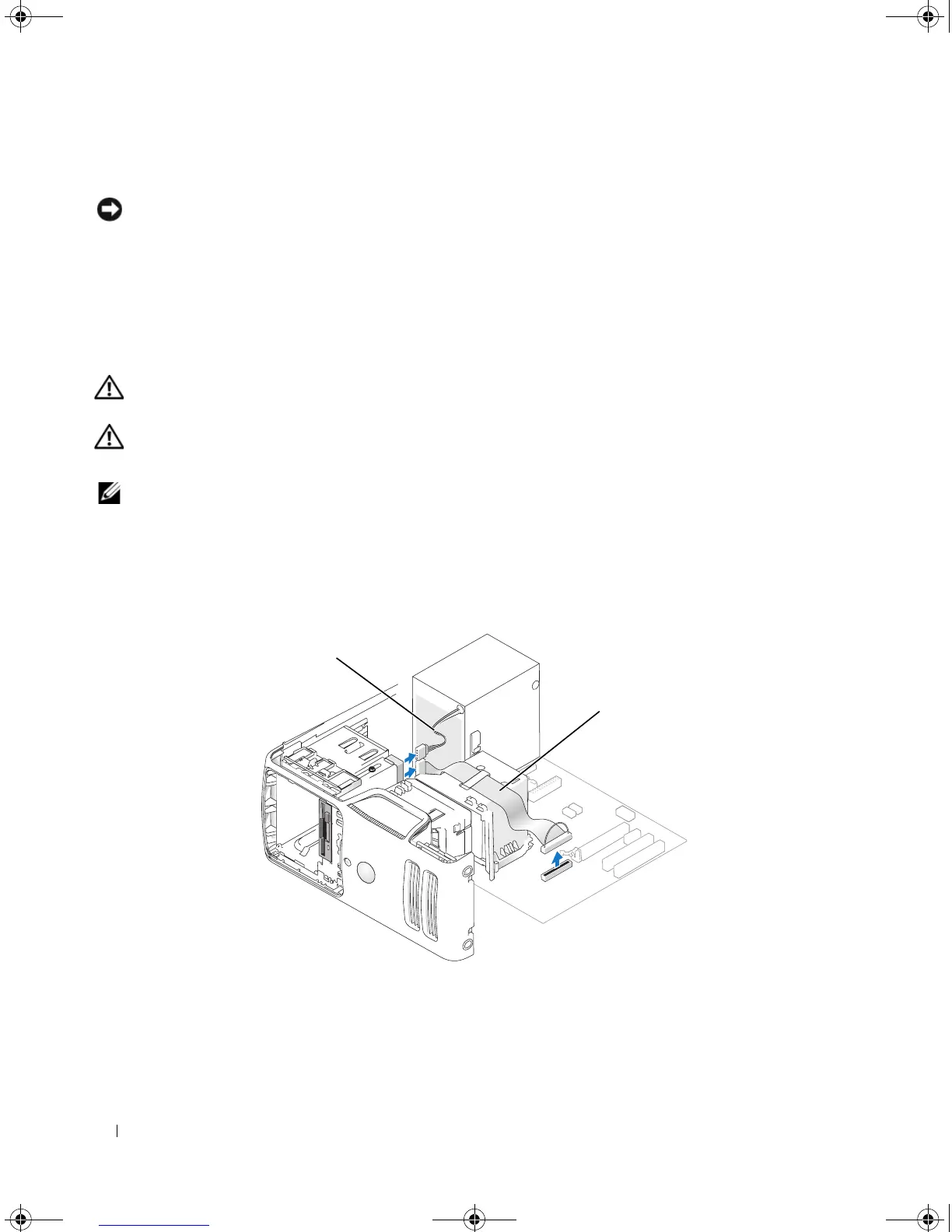
Removing a Floppy Drive
1
Follow the procedures in "Before You Begin" on page 61.
2
Remove the drive panel (see "Removing the Drive Panel" on page 81).
1 power cable 2 data cable
1
2
book.book Page 92 Monday, July 23, 2007 3:47 PM














 To Next Page