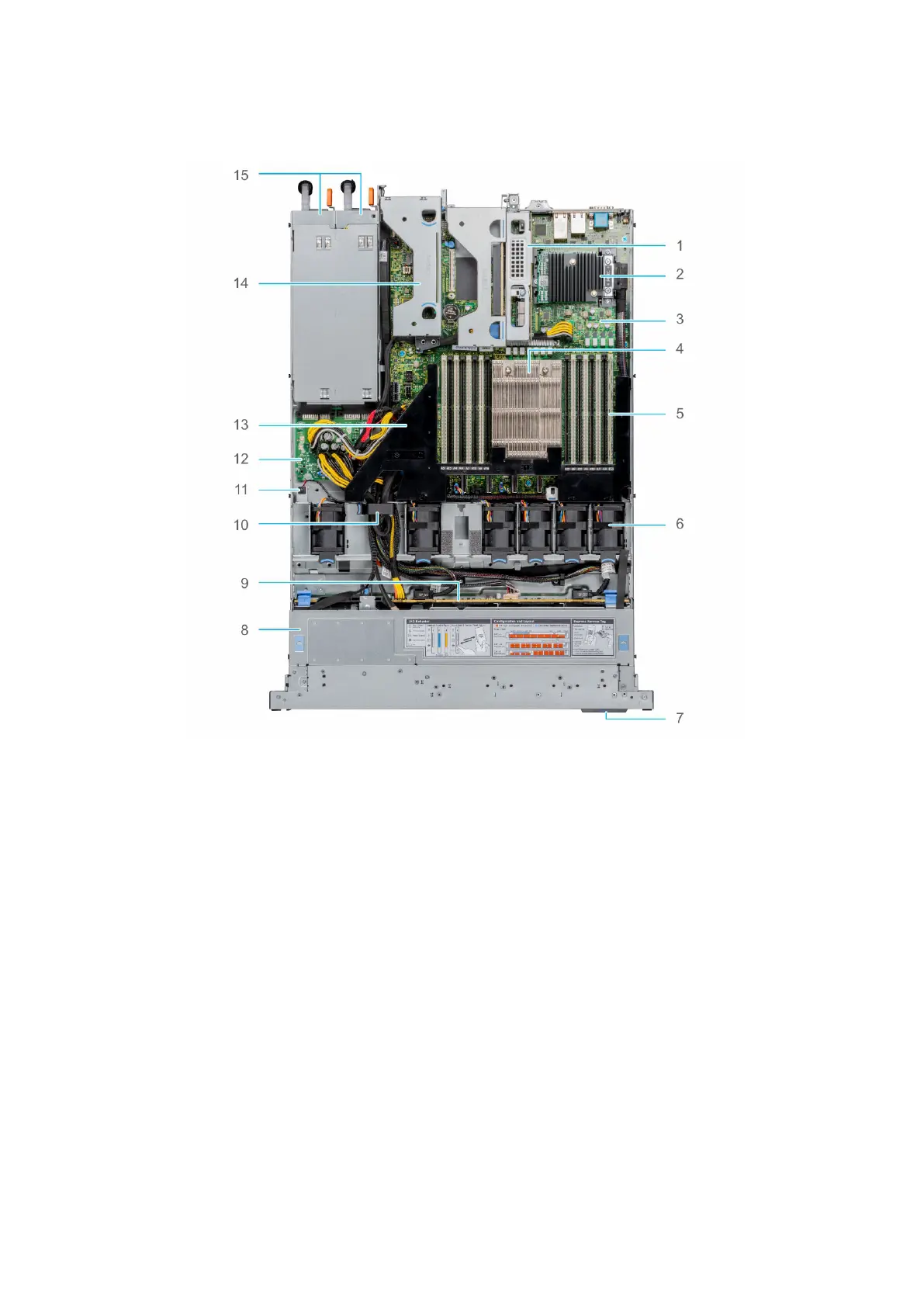
Inside the system
Figure 8. Inside the system
1.
Riser 1A 2. Mini PERC card
3. System board 4. Heat sink
5. Memory module slots 6. Fan
7. Information tag 8. Backplane cover
9. Backplane 10. Cable retention latch
11. Intrusion switch 12. Power interposer board
13. Air shroud 14. Riser 2
15. PSU 1 and PSU 2
Locating the Express Service Code and Service Tag
The unique Express Service Code and Service Tag are used to identify the system.
The information tag is located on the front of the system that includes system information such as Service Tag, Express
Service Code, Manufacture date, NIC, MAC address, QRL label, and so on. If you have opted for the secure default access
to iDRAC, the Information tag also contains the iDRAC secure default password. If you have opted for iDRAC Quick Sync
2, the Information tag also contains the OpenManage Mobile (OMM) label, where administrators can configure, monitor, and
troubleshoot the PowerEdge servers.
14
PowerEdge R6515 system overview










 To Next Page