Optional front bezel
NOTE: LCD panel is optional on the front bezel. If the front bezel has an LCD panel, see LCD panel section.
Removing the front bezel
The procedure to remove the front bezel with and without the LCD panel is the same.
Prerequisites
1. Follow the safety guidelines listed in the Safety instructions.
2. Keep the bezel key handy.
NOTE: The bezel key is part of the LCD bezel package.
Steps
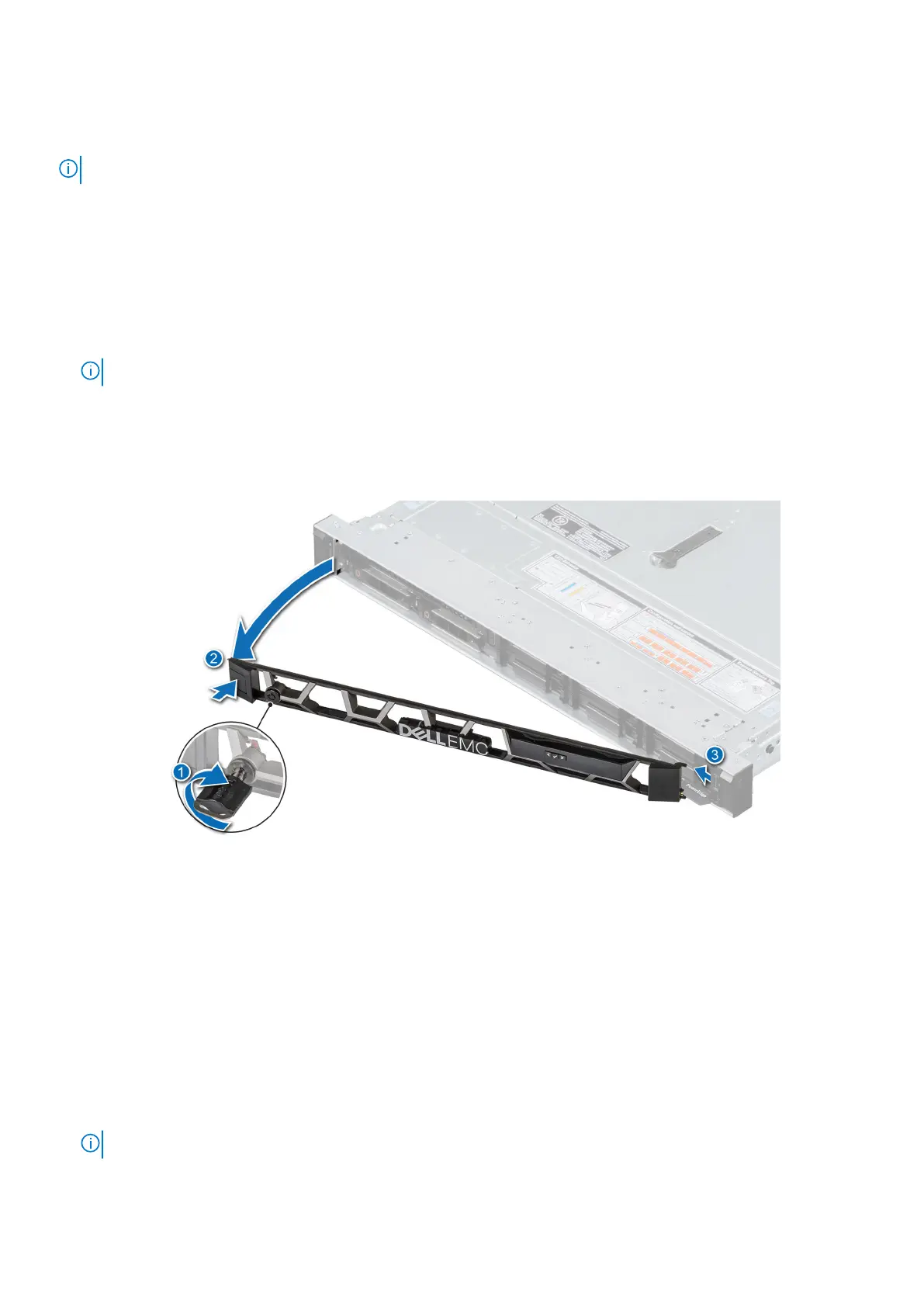
1. Unlock the bezel.
2. Press the release button, and disengage the left end of the bezel.
3. Unhook the right end, and remove the bezel.
Figure 15. Removing the front bezel with the LCD panel
Next steps
Replace the bezel.
Installing the front bezel
The procedure to install the front bezel with and without the LCD panel is the same.
Prerequisites
1. Follow the safety guidelines listed in the Safety instructions.
2. Locate and remove the bezel key.
NOTE: The bezel key is part of the LCD bezel package.
26 Installing and removing system components










 To Next Page