24
Setting up the monitor
Setting up the monitor
Connecting the stand
NOTE: The stand is not attached when the monitor is shipped from the factory.
NOTE: The following instructions are applicable only for the stand that was shipped with your monitor. If you are attaching a stand
that you purchased from any other source, follow the setup instructions that were included with the stand.
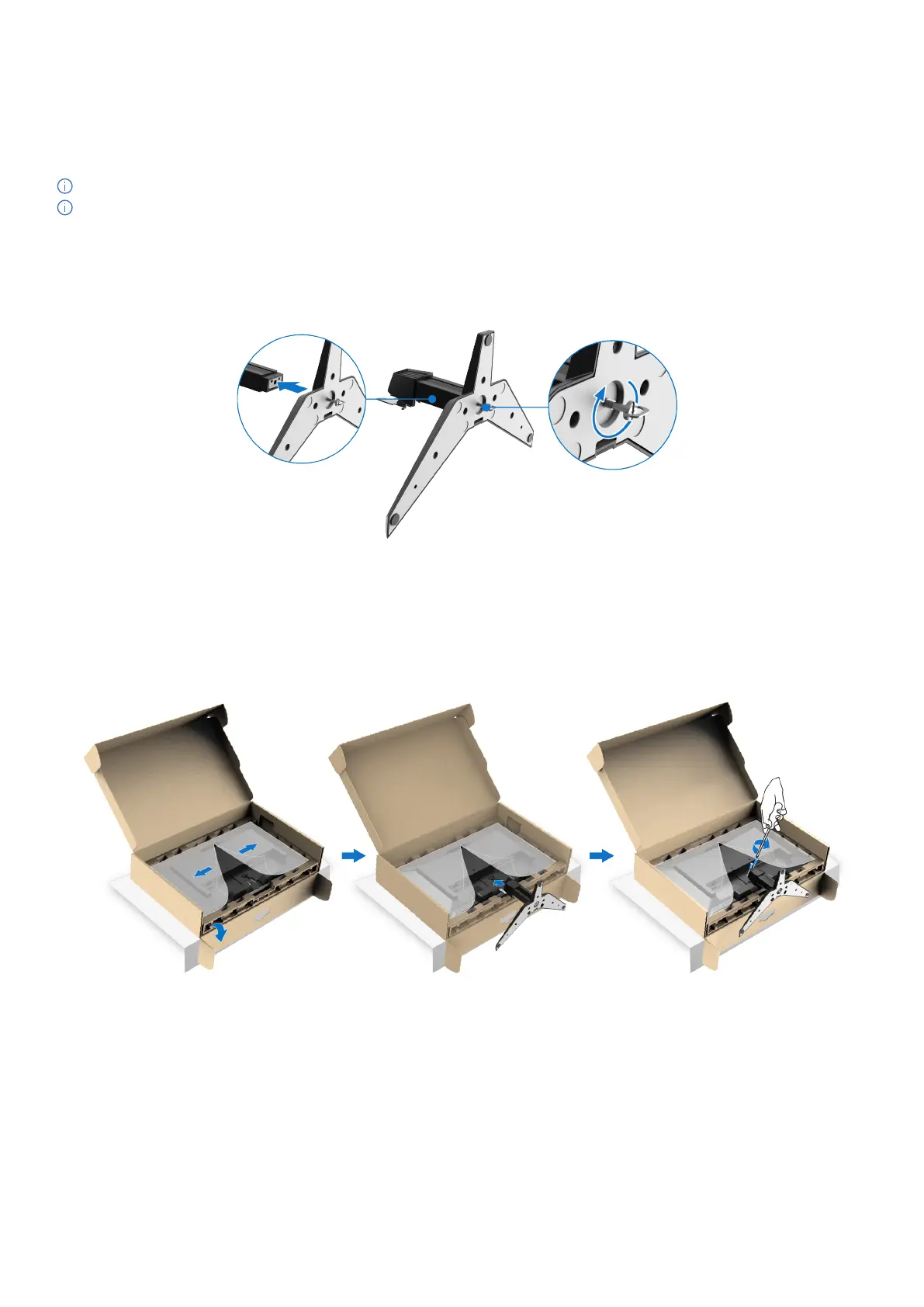
1. Assemble the stand riser to stand base.
a. Align and place the stand base onto the stand riser.
b. Open the screw handle at the bottom of the stand base and turn it clockwise to secure the stand assembly.
c. Close the screw handle.
Figure 11. Assemble the stand
2. Attach the stand assembly to the monitor.
a. Open the monitor protective cover.
b. Align the stand-riser bracket with the grooves at the back of the monitor.
c. Slide the stand assembly until it snaps into place.
d. Use a screwdriver to fully tighten the two screws to the top of the stand.
Figure 12. Attach the stand



 To Next Page