About this task
CAUTION: Remove the system board before removing the I/O daughter-board as a part of the I/O daughter-
board is underneath the system board.
CAUTION: Do not try to remove the I/O daughter-board along with the system board.
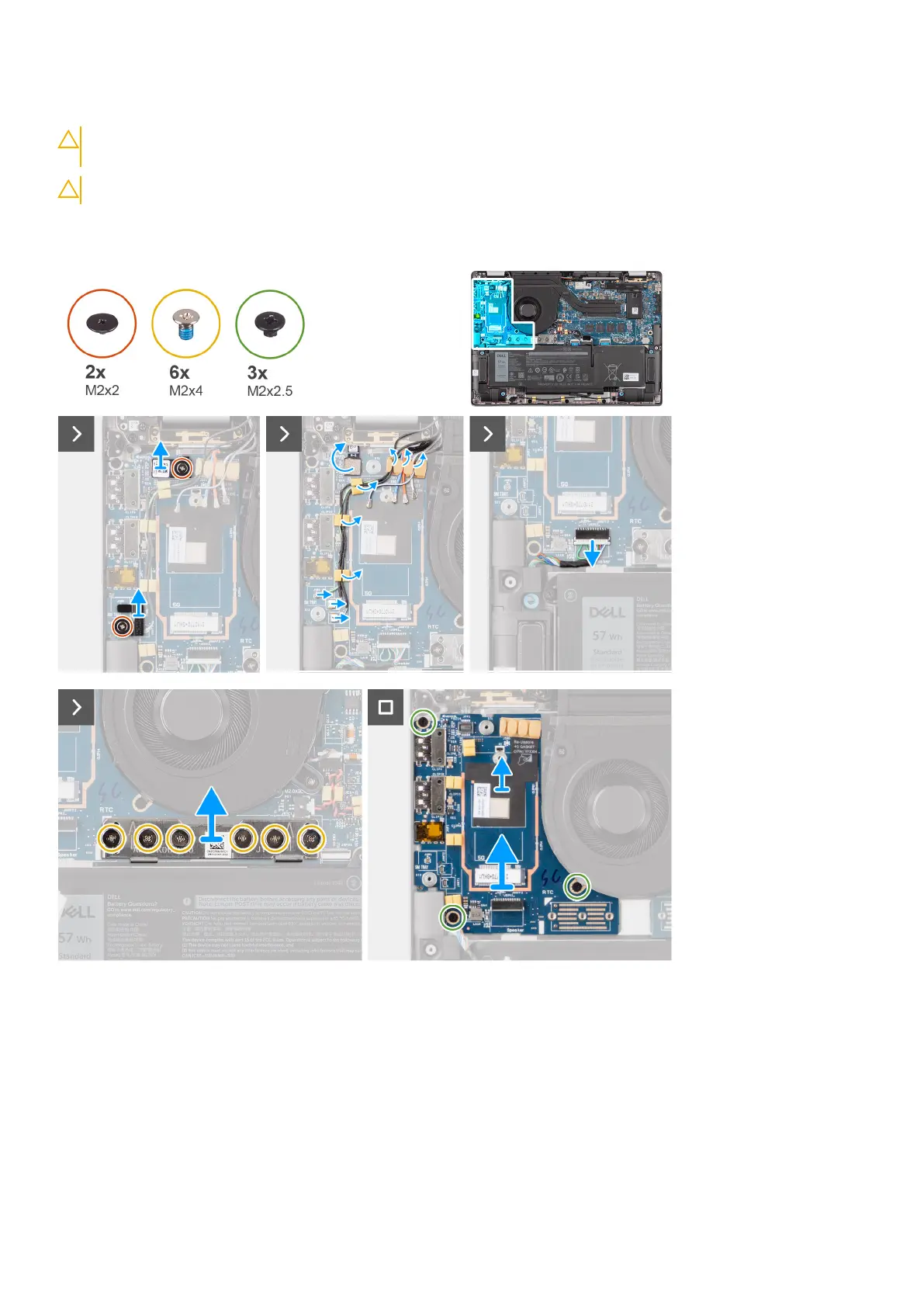
The following image indicates the location of the I/O daughter-board and provides a visual representation of the removal
procedure.
Steps
1. Remove the single screw (M2x2) screw that secures the 4G WWAN card extension bracket to palm-rest and keyboard
assembly for the models shipped with a 4G WWAN card.
2. Remove the 4G WWAN card bracket from the system for the models shipped with a 4G WWAN card.
3. Remove the single screw (M2x2) that secures the Drawin antenna cable bracket to palm-rest and keyboard assembly.
4. Remove the Darwin antenna cable bracket from the system.
5. Unroute the two darwin antenna cables, and green P-sensor cable from the routing guide on the I/O daughter-board.
6. Disconnect the antenna cables from the connectors.
7. Remove the single screw (M2x2) that secures the fingerprint reader bracket to palm-rest and keyboard assembly.
56
Removing and installing components



 To Next Page