System board
Removing the system board
Prerequisites
1. Follow the procedure in Before working inside your computer.
2. Remove the base cover.
3. Remove the M.2 2230 solid-state drive.
4. Remove the 2-cell battery or the3-cell battery, whichever is applicable.
5. Remove the heat-sink.
About this task
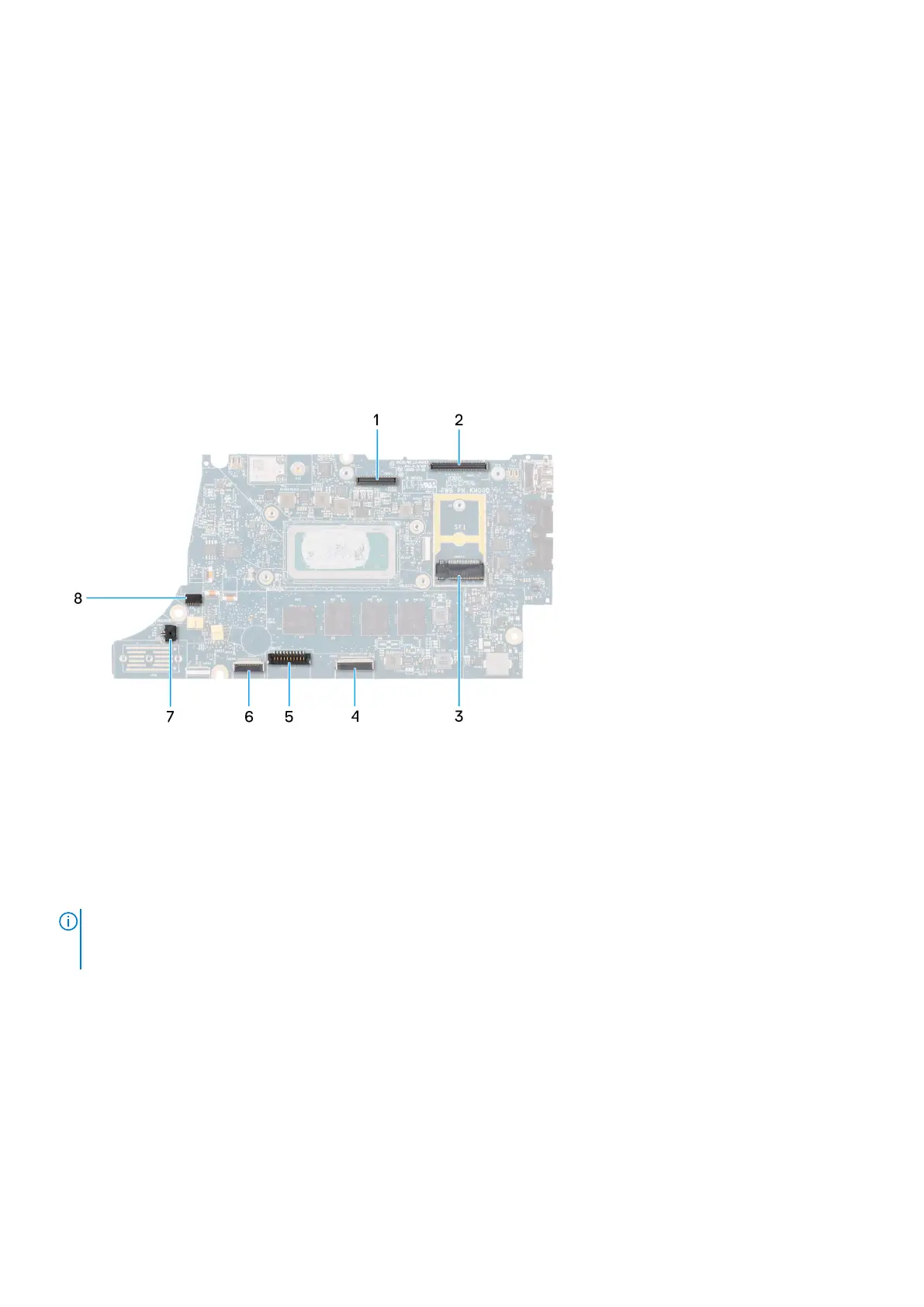
The following image indicates the connectors on your system board.
1. LCD connector
2. Touchscreen and IR-camera cable connector
3. M.2 solid-state drive connector
4. Clickpad FFC connector
5. Battery cable connector
6. USH daughter-board FFC connector
7. Coin-cell battery cable connector
8. Fan connector
NOTE:
For computers shipped without a WWAN card, a 4G/5G WWAN shielding cover and WWAN bracket (for 4G WWAN
card) is pre-installed to the computer. As a result, follow the steps in the WWAN card removal/installation section to
remove the WWAN shielding cover and WWAN bracket before removing the system board.
The following images indicate the location of the system board and provide a visual representation of the removal procedure.
Removing and installing components
47



 To Next Page