Identifier GUID-BF7F1ECA-BC62-4949-B1BE-EC64E351719E
Status Released
Removing the speakers
WARNING: Before working inside your computer, read the safety information that shipped with your computer and follow the
steps in Before working inside your computer. After working inside your computer, follow the instructions in After working inside
your computer. For more safety best practices, see the Regulatory Compliance home page at www.dell.com/
regulatory_compliance.
Identifier GUID-8F6C8850-BF7B-47F6-A71E-EA5CC601375B
Status Released
Prerequisites
1 Remove the base cover.
2 Remove the solid-state drive/Intel Optane.
Identifier GUID-FB6F82DD-CCA7-41B5-82A4-40AE96711BE5
Status Released
Procedure
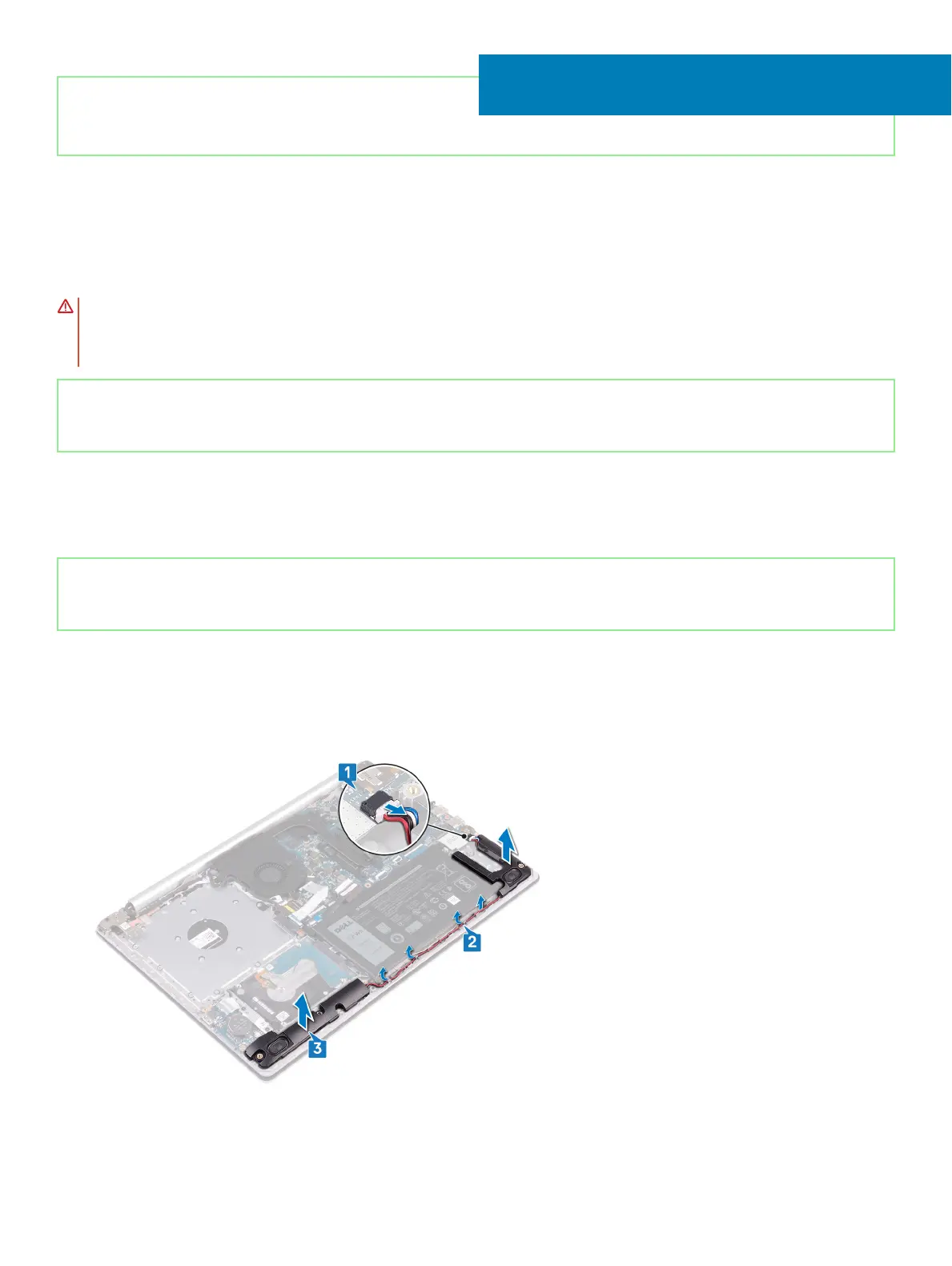
1 Disconnect the speaker cable from the system board and lift the right speaker o the palm rest and keyboard assembly.
2 Note the speaker cable routing and remove it from the routing guides on palm rest and key board assembly.
3 Lift the left speaker, along with the cable, o the palm rest and keyboard assembly.
24
Removing the speakers 51





 To Next Page