Home
Dell
Laptop
P75F
Page 96 (Post-Requisites)
Dell P75F - Post-Requisites
123 pages
Manual
Save Page as PDF
To Next Page
To Next Page
To Previous Page
To Previous Page
Loading...
Identifier
GUID-188A2F85-2E31-42BB-BA89-70434698E90E
Status
Released
P
ost
-r
equisites
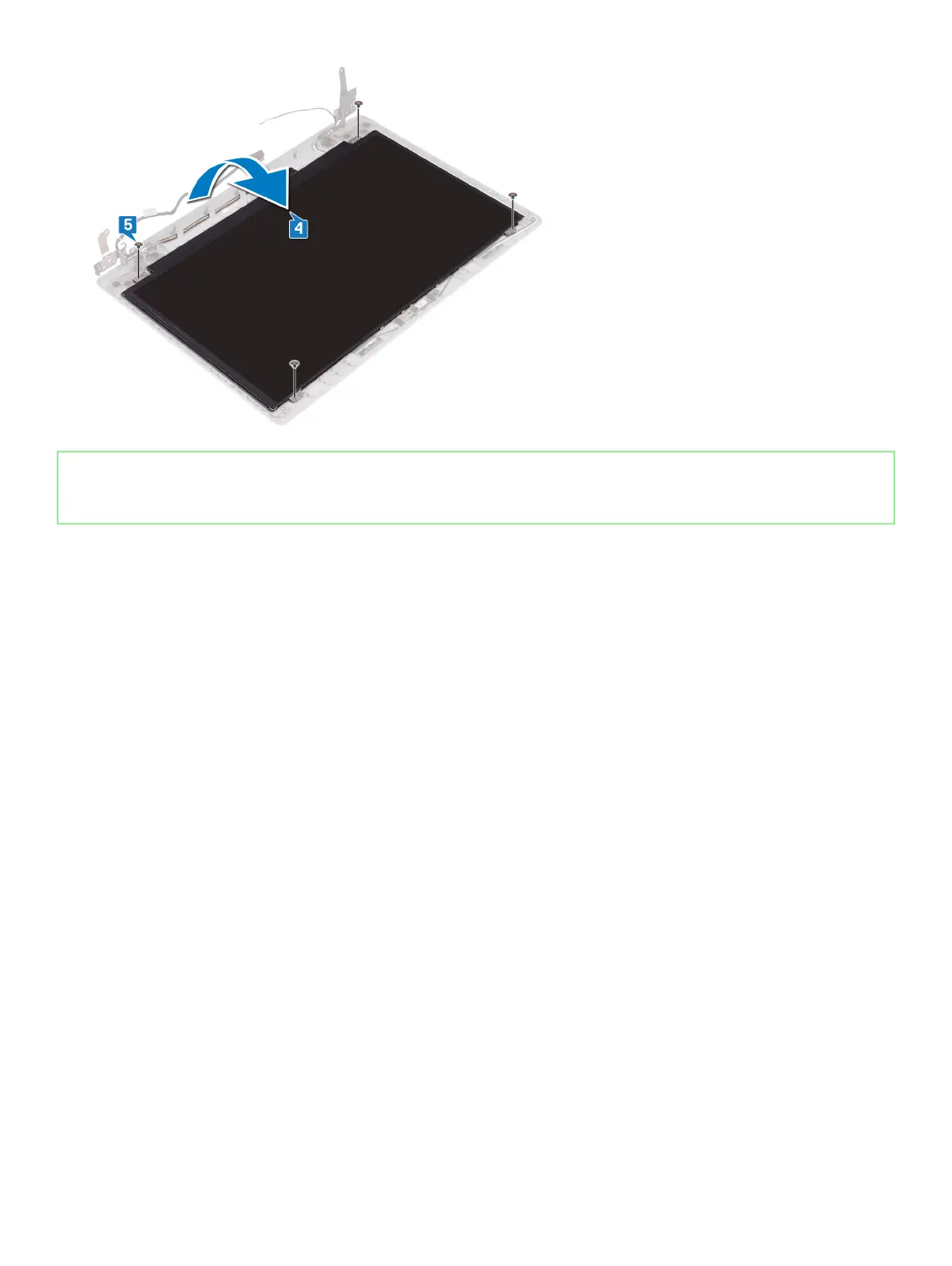
1
Replace the
displa
y bez
el
.
2
Replace the
displa
y assembly
.
3
Replace the
wir
eless car
d
.
4
Replace the
base cov
er
.
96
Replacing the displa
y panel
95
97
Table of Contents
Main Page
Table of Contents
3
Before Working Inside Your Computer
9
Before You Begin
9
After Working Inside Your Computer
10
Safety Instructions
11
Electrostatic Discharge-ESD Protection
11
ESD Field Service Kit
12
Components of an ESD Field Service Kit
12
ESD Protection Summary
13
Transporting Sensitive Components
13
Lifting Equipment
13
Recommended Tools
14
Screw List
15
Removing the Base Cover
17
Procedure
17
Replacing the Base Cover
19
Procedure
19
Removing the Battery
21
Lithium-Ion Battery Precautions
21
Prerequisites
21
Procedure
21
Replacing the Battery
23
Lithium-Ion Battery Precautions
23
Procedure
23
Post-Requisites
24
Removing the Memory Modules
25
Prerequisites
25
Procedure
25
Replacing the Memory Modules
27
Procedure
27
Post-Requisites
27
Removing the Wireless Card
28
Prerequisites
28
Procedure
28
Replacing the Wireless Card
30
Procedure
30
Post-Requisites
31
Removing the Coin-Cell Battery
32
Prerequisites
32
Procedure
32
Replacing the Coin-Cell Battery
34
Procedure
34
Post-Requisites
35
Removing the Fan
36
Prerequisites
36
Procedure
36
Replacing the Fan
38
Procedure
38
Post-Requisites
38
Removing the Solid-State Drive/Intel Optane Memory Module
39
Prerequisites
39
Procedure
39
Replacing the Solid-State Drive/Intel Optane Memory Module
41
Procedure
41
Post-Requisites
42
Removing the Hard Drive
43
Prerequisites
43
Procedure
43
Replacing the Hard Drive
45
Procedure
45
Post-Requisites
46
Removing the Touchpad
47
Prerequisites
47
Procedure
47
Replacing the Touchpad
49
Procedure
49
Post-Requisites
50
Removing the Speakers
51
Prerequisites
51
Procedure
51
Replacing the Speakers
52
Procedure
52
Post-Requisites
52
Removing the Heat Sink
53
Prerequisites
53
Procedure
53
Replacing the Heat Sink
55
Procedure
55
Post-Requisites
55
Removing the Power-Adapter Port
56
Prerequisites
56
Procedure
56
Replacing the Power-Adapter Port
58
Procedure
58
Post-Requisites
59
Removing the Display Assembly
60
Prerequisites
60
Procedure
60
Replacing the Display Assembly
63
Procedure
63
Post-Requisites
64
Removing the I/O Board
65
Prerequisites
65
Procedure
65
Replacing the I/O Board
67
Procedure
67
Post-Requisites
67
Removing the Power-Button Board
69
Prerequisites
69
Procedure
69
Replacing the Power-Button Board
71
Procedure
71
Post-Requisites
72
Removing the System Board
73
Prerequisites
73
Procedure
73
Replacing the System Board
76
Procedure
76
Post-Requisites
78
Entering the Service Tag in the BIOS Setup Program
78
Removing the Power Button with Fingerprint Reader
79
Prerequisites
79
Procedure
79
Replacing the Power Button with Fingerprint Reader
81
Procedure
81
Post-Requisites
82
Removing the Palm-Rest and Keyboard Assembly
83
Prerequisites
83
Procedure
83
Replacing the Palm-Rest and Keyboard Assembly
85
Procedure
85
Post-Requisites
86
Removing the Display Bezel
87
Prerequisites
87
Procedure
87
Replacing the Display Bezel
88
Procedure
88
Post-Requisites
88
Removing the Camera
89
Prerequisites
89
Procedure
89
Replacing the Camera
91
Procedure
91
Post-Requisites
91
Removing the Display Panel
93
Prerequisites
93
Procedure
93
Replacing the Display Panel
95
Procedure
95
Post-Requisites
96
Removing the Display Hinges
97
Prerequisites
97
Procedure
97
Replacing the Display Hinges
99
Procedure
99
Post-Requisites
99
Removing the Display Cable
101
Prerequisites
101
Procedure
101
Replacing the Display Cable
103
Procedure
103
Post-Requisites
103
Removing the Display Back-Cover and Antenna Assembly
105
Prerequisites
105
Procedure
105
Replacing the Display Back-Cover and Antenna Assembly
107
Procedure
107
Post-Requisites
107
Device Drivers
108
Intel Chipset Software Installation Utility
108
Video Drivers
108
Intel Serial IO Driver
108
Intel Trusted Execution Engine Interface
108
Intel Virtual Button Driver
109
Wireless and Bluetooth Drivers
109
System Setup
110
Entering BIOS Setup Program
110
Navigation Keys
110
Boot Sequence
111
System Setup Options
111
Clearing CMOS Settings
116
Clearing BIOS (System Setup) and System Passwords
116
Troubleshooting
117
Flashing the BIOS
117
Flashing BIOS (USB Key)
117
Enhanced Pre-Boot System Assessment (Epsa) Diagnostics
118
Running the Epsa Diagnostics
118
System Diagnostic Lights
118
Enabling Intel Optane Memory
119
Disabling Intel Optane Memory
120
Wifi Power Cycle
120
Flea Power Release
121
Getting Help and Contacting Dell
122
Self-Help Resources
122
Contacting Dell
122
Other manuals for Dell P75F
Setup And Specifications Guide
35 pages
Setup And Specifications
27 pages
Setup And Specifcations
23 pages
Setup And Speci?Cations
23 pages
Setup Guide
35 pages
Related product manuals
Dell P75F003
129 pages
Dell P75F106
123 pages
Dell P77F
23 pages
Dell P76F
93 pages
Dell P70F
78 pages
Dell P72G
103 pages
Dell P72F
143 pages
Dell P78F
78 pages
Dell P74F
121 pages
Dell P74F002
121 pages
Dell P28E
108 pages
Dell P89G
99 pages




 To Next Page