Identifier GUID-98068FC2-1C1C-46DE-B3FA-DF9D488E9BA1
Status Released
Removing the base cover
WARNING: Before working inside your computer, read the safety information that shipped with your computer and follow the
steps in Before working inside your computer. After working inside your computer, follow the instructions in After working inside
your computer. For more safety best practices, see the Regulatory Compliance home page at www.dell.com/
regulatory_compliance.
Identifier GUID-83780D17-EACE-4612-AE35-9454F6F2B6C8
Status Released
Procedure
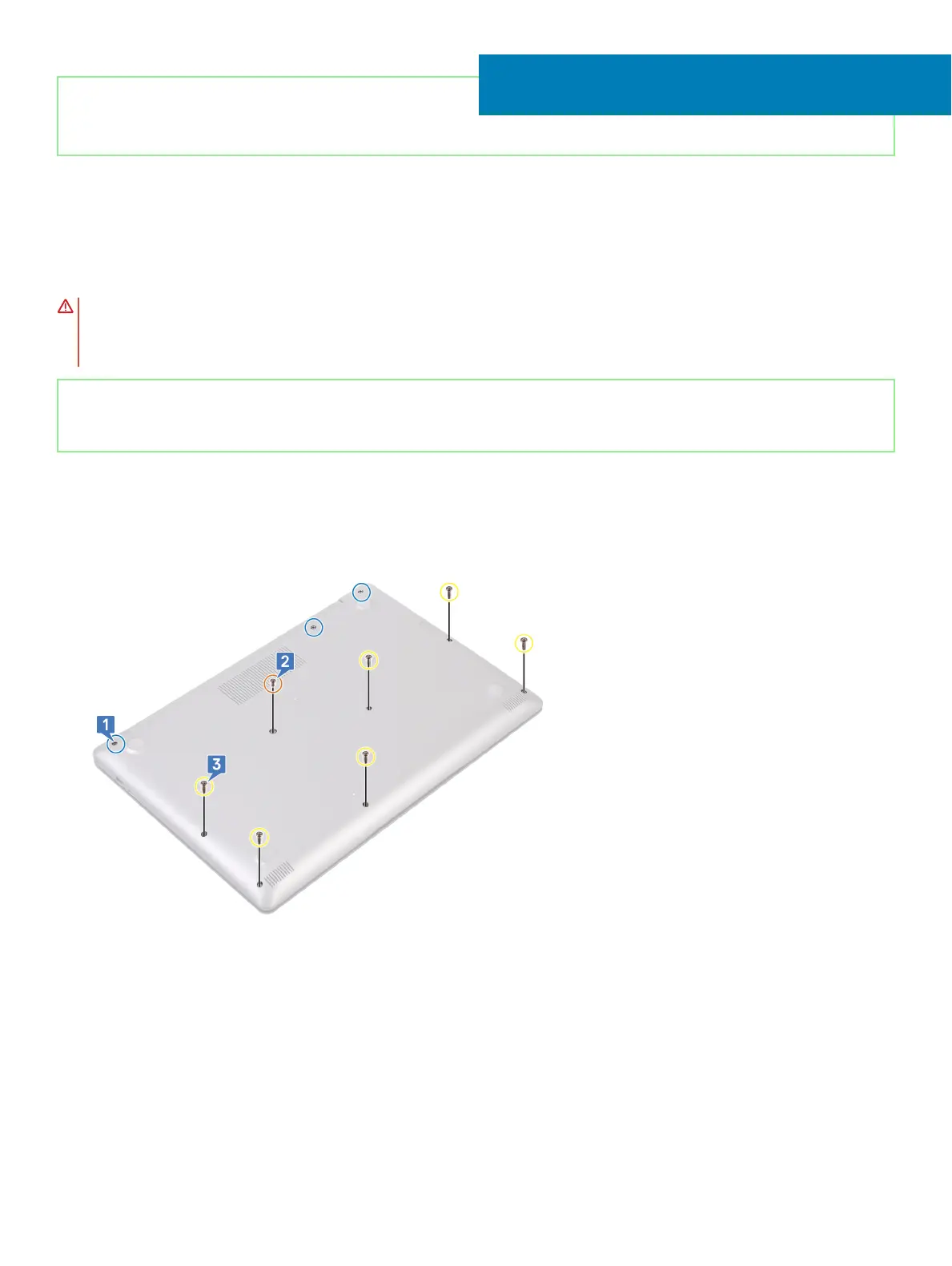
1 Loosen the three captive screws on the base cover.
2 Remove the screw (M2x4) that secures the base cover to the palm rest and keyboard assembly.
3 Remove the six screws (M2.5x7) that secure the base cover to the palm rest and keyboard assembly.
4 Pry the base cover starting from the top-left corner of the computer base.
5 Lift the base cover o the palm rest and keyboard assembly.
6
Removing the base cover 17





 To Next Page