Dell PowerConnect W AirWave 7.2 | Best Practices Guide Configuring AWMS for Global Dell PowerConnect W Infrastructure | 9
Chapter 2
Configuring AWMS for Global Dell
PowerConnect W Infrastructure
This chapter explains how to optimally configure AWMS to globally manage your Dell PowerConnect W
infrastructure, and contains the following topics:
“Disabling Rate Limiting in AMP Setup > General” on page9
“Entering Credentials in Device Setup > Communication” on page10
“Setting Up Time Synchronization” on page11
“Enabling Support for Channel Utilization & Statistics” on page11
Disabling Rate Limiting in AMP Setup > General
Enabling the SNMP Rate Limiting for Monitored Devices option above adds a small delay between each SNMP
Get request, thus the actual polling intervals will be longer than what is configured. For example, setting a 10-
minute polling interval will result in an actual 12-minute polling interval.
To disable rate limiting in AWMS, follow these steps:
1. Navigate to AMP Setup > General.
2. Locate the Performance section on this page.
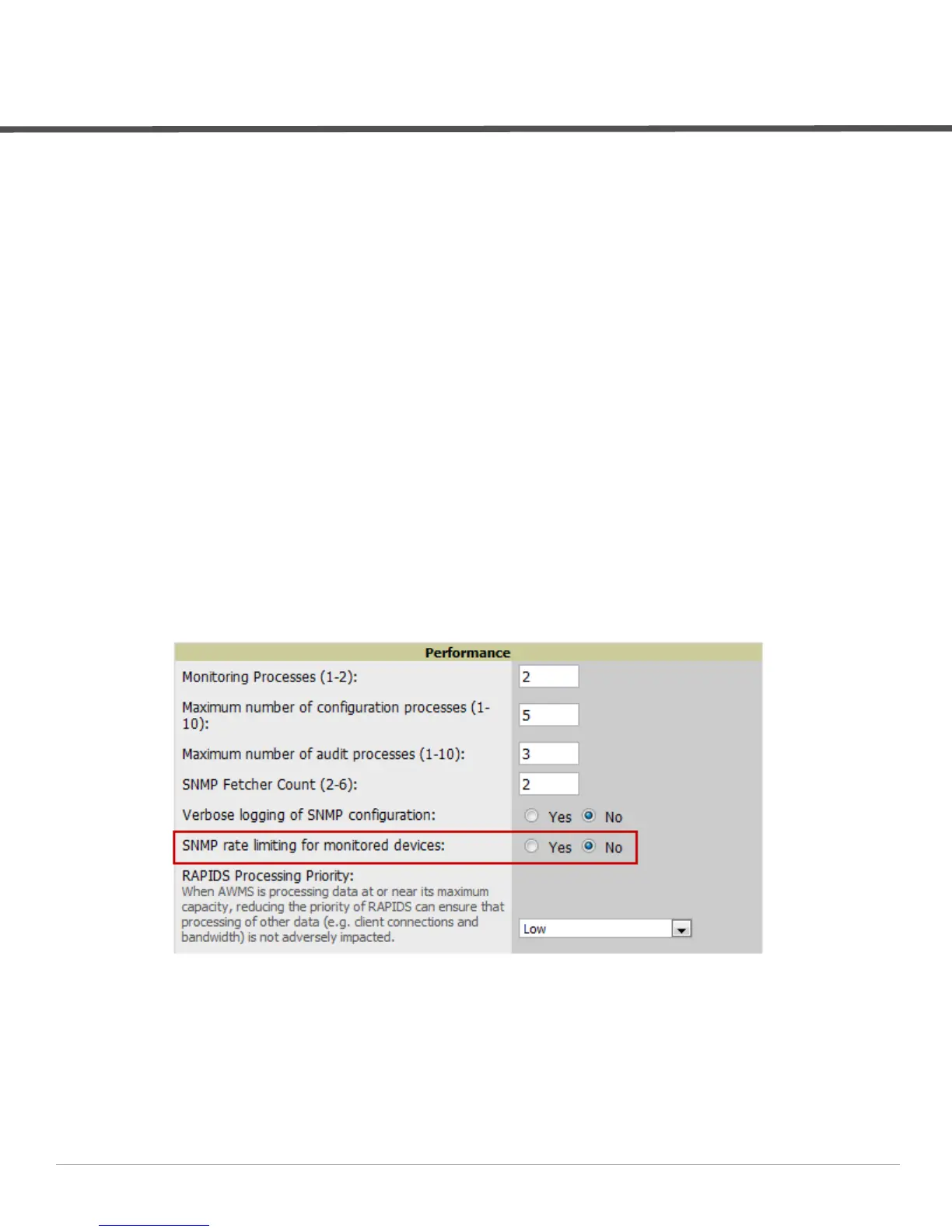
3. In the SNMP Rate Limiting for Monitored Devices field, select No, as shown in Figure 2.
4. Select Save.
Figure 2 SNMP Rate Limiting in AMP Setup > General



 To Next Page
 Loading...