10 | Configuring AWMS for Global Dell PowerConnect W Infrastructure Dell PowerConnect W AirWave 7.2 | Best Practices Guide
Entering Credentials in Device Setup > Communication
AWMS requires several credentials to properly interface with Dell PowerConnect W infrastructure. The device
discovery process requires proper global credential configuration. To enter these credentials, follow these steps:
1. Navigate to Device Setup >Communication.
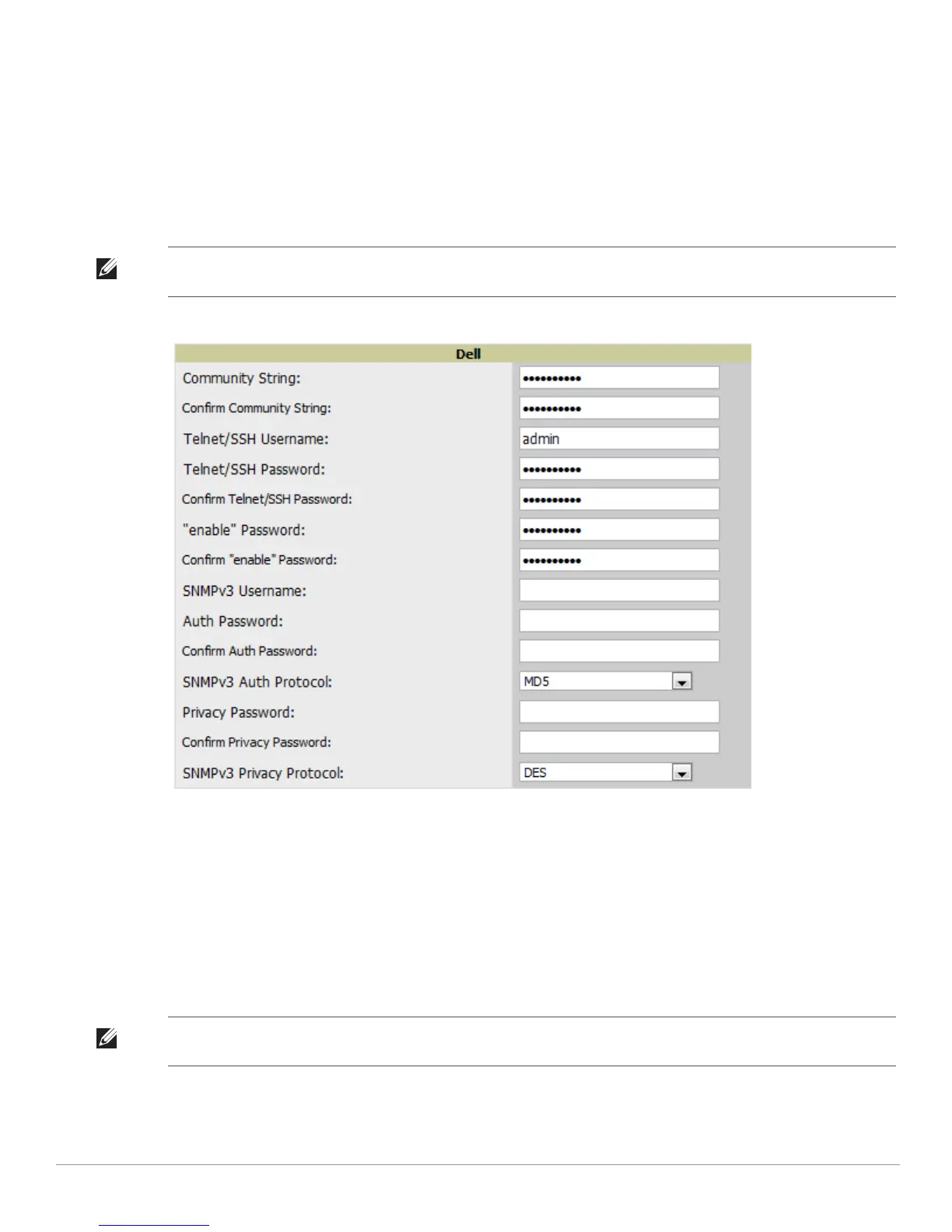
2. In the Default Credentials section, select the Edit link next to Dell PowerConnect W. The page illustrated in
Figure 3 appears.
3. Enter the SNMP Community String, which is required field for device discovery.
Figure 3 Dell Credentials in Device Setup > Communication
4. Enter the required fields for configuration and basic monitoring:
Telnet/SSH Username
Telnet/SSH Password
“enable” Password
5. Enter the required fields for WMS Offload:
SNMPv3 Username
Auth Password
Privacy Password
6. When finished, select Save.
NOTE: Be sure to note the community string, because it must match the SNMP Trap community string which is configured later in
this document.
NOTE: Auth and Privacy passwords must match because the WMS Offload command only accepts a single password that is
leveraged for both options.



 To Next Page
 Loading...