Using the Keyboard and Touch Pad 57
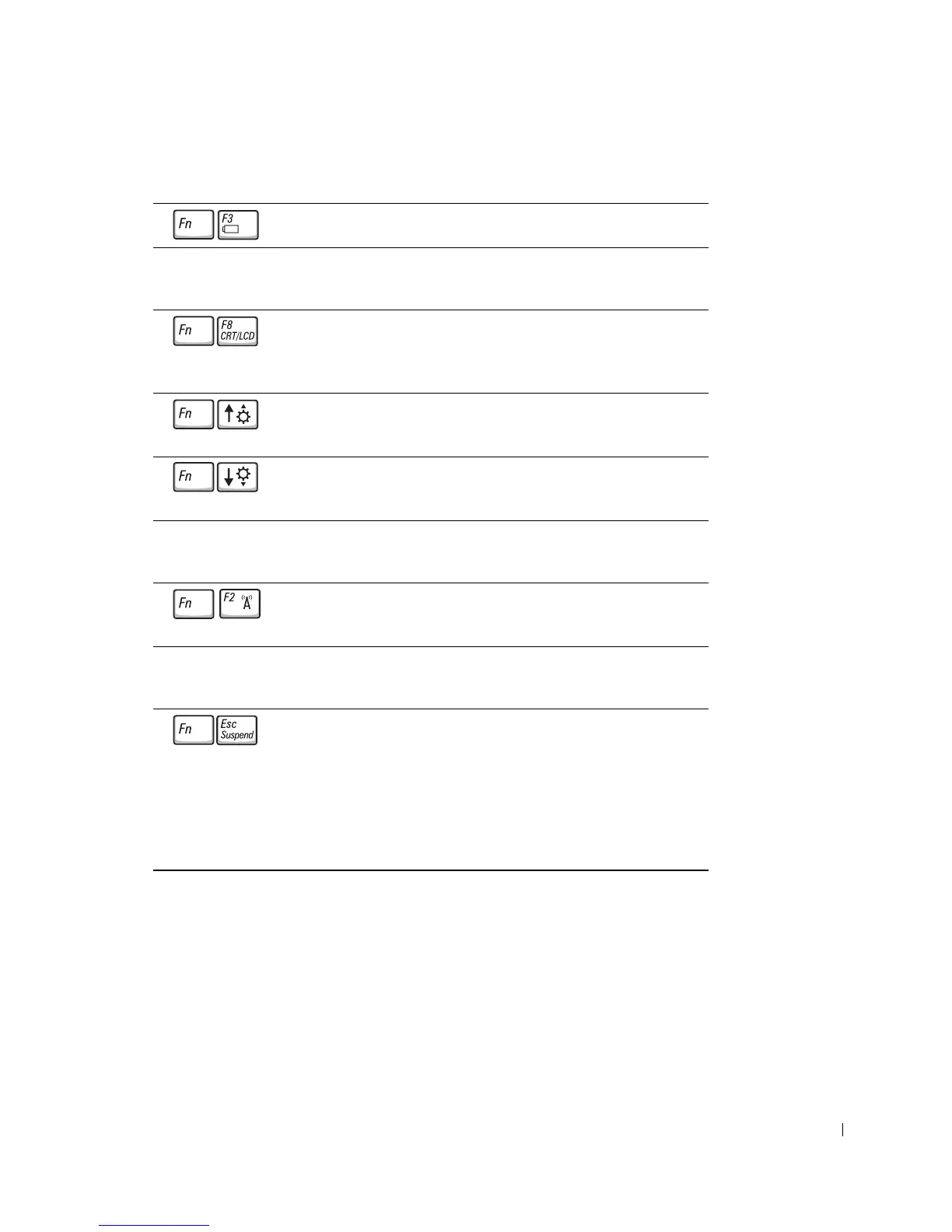
Battery
Display Functions
Radios (Including Wireless Networking and the Bluetooth™ Card)
Power Management
Displays the Dell™ QuickSet Battery Meter.
Switches the video image to the next display option.
The options include the integrated display, an external
monitor, and both displays simultaneously.
Increases brightness on the integrated display only
(not on an external monitor).
Decreases brightness on the integrated display only
(not on an external monitor).
Enables and disables radios, including wireless
networking and the Bluetooth™ card.
Activates a power management mode. You can
reprogram this keyboard shortcut to activate a
different power management mode using the
Advanced tab in the Power Options Properties
window. See "Power Management" in the Dell Inspiron
Help file for instructions. To access help, see "Finding
Information for Your Computer" on page 17.










 To Next Page