86 Solving Problems
www.dell.com | support.dell.com
Drive Problems
NOTE: For information on saving files to a floppy disk, see "Working With Files" in the
Dell
Inspiron Help
file. To access help, see "Finding Information for Your Computer" on page 17.
If you cannot save a file to a floppy drive
NOTE: The floppy drive is only available with the optional media base or D/Bay module.
ENSURE THAT AN EXTERNAL FLOPPY DRIVE IS CONNECTED TO THE
COMPUTER — Install the floppy drive in the Dell D/Bay or use the optional
USB cable to connect the floppy drive to the computer. See "Using the Dell™
D/Bay" on page 51.
ENSURE THAT WINDOWS
®
RECOGNIZES THE DRIVE — Click the Start
button and click My Computer. If the drive is not listed, perform a full scan with
your antivirus software to check for and remove viruses. Viruses can sometimes
prevent Windows from recognizing the drive. Insert a bootable disk and restart
the computer. Verify that the light is blinking, indicating normal operation.
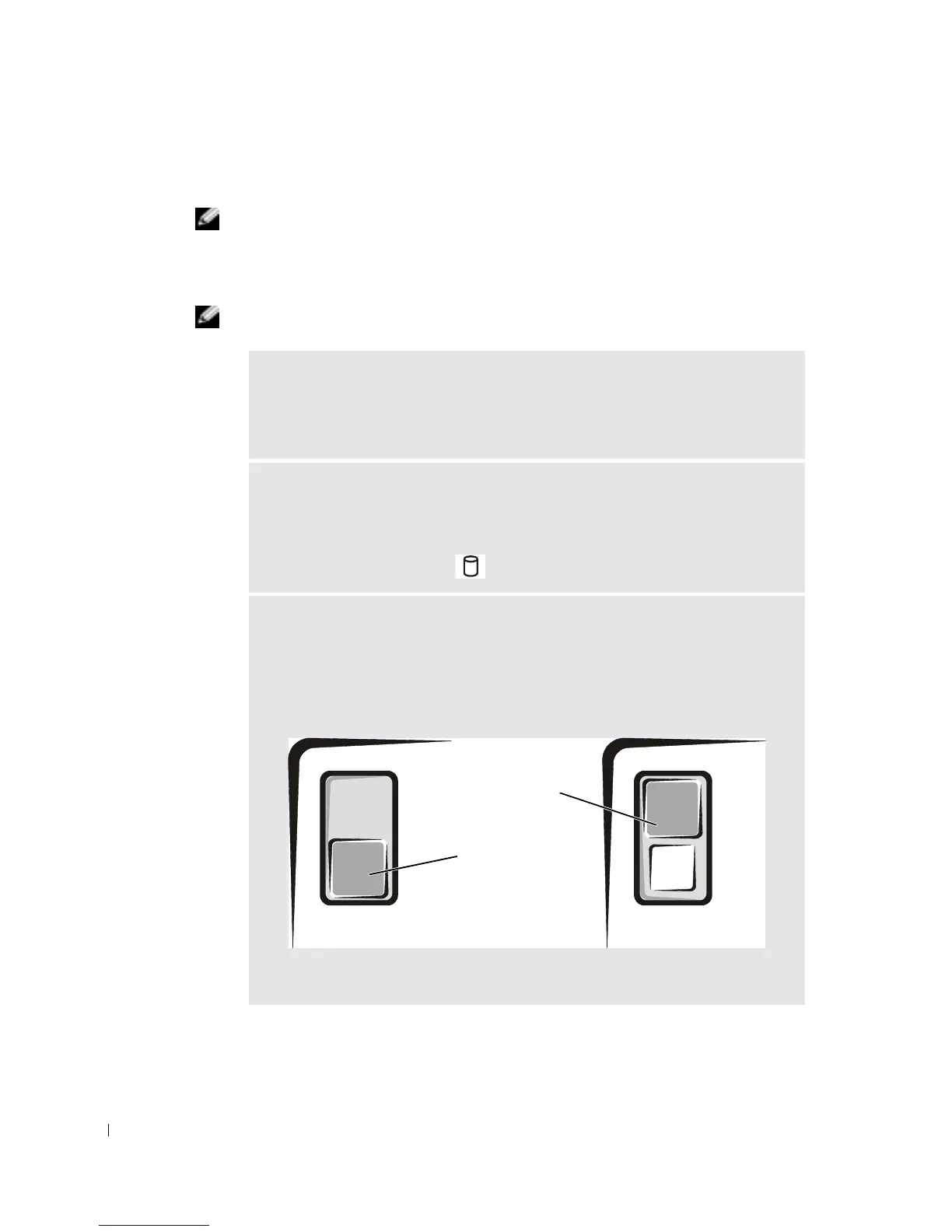
ENSURE THAT THE DISK IS NOT WRITE-PROTECTED — You cannot save
data to a write-protected disk. See the following figure.
write-protected
not write-
protected
back of floppy disk










 To Next Page