Keyboard: Dell Precision M6400 Service Manual
file:///T|/htdocs/systems/wsm6400/en/sm/keyboard.htm[11/16/2012 10:26:47 AM]
NOTICE: The key caps on the keyboard are fragile, easily dislodged, and time- consuming to replace.
Exercise care when removing and handling the keyboard.
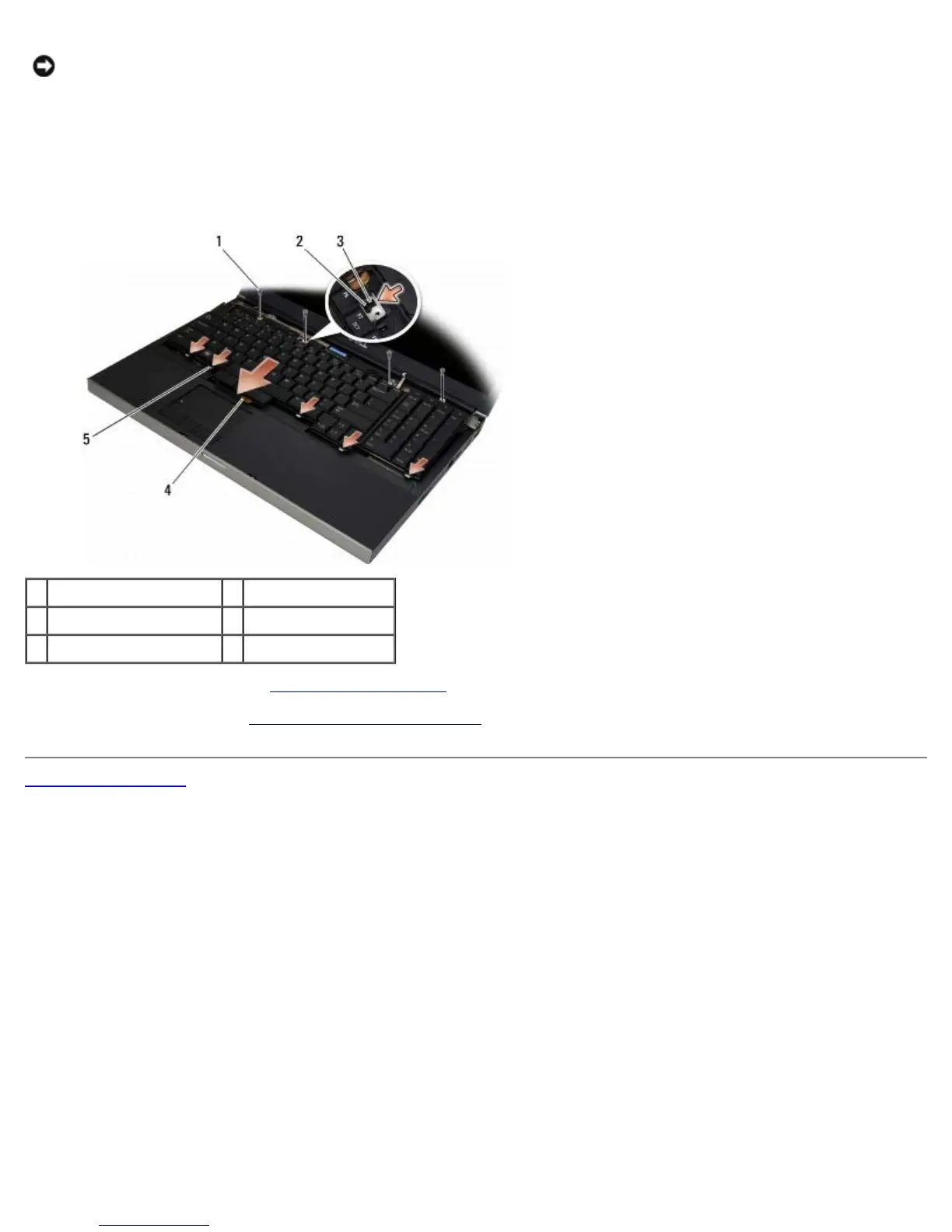
1. Align the notch on the center metal pull tab with the alignment tab on the computer.
2. Slide the keyboard toward the front of the computer ensuring that the alignment tab on the computer remains engaged
and the tabs and keyboard connector slide under the palm rest.
3. Replace the four M2 x 3-mm screws on the keyboard.
1 M2 x 3-mm screws (4) 2 alignment tab
3 notch 4 keyboard connector
5 tabs (5)
4. Replace the LED cover (see Replacing the LED Cover
).
5. Follow the procedures in After Working on Your Computer
.
Back to Contents Page















 To Next Page