Coin-Cell Battery: Dell Precision M6400 Service Manual
file:///T|/htdocs/systems/wsm6400/en/sm/coinbatt.htm[11/16/2012 10:26:43 AM]
Back to Contents Page
Coin-Cell Battery
Dell Precision™ M6400 Service Manual
Removing the Coin-Cell Battery
Replacing the Coin-Cell Battery
Removing the Coin-Cell Battery
CAUTION: Before working inside your computer, read the safety information that shipped with your
computer. For additional safety best practices information, see the Regulatory Compliance Homepage on
www.dell.com at: www.dell.com/regulatory_compliance.
1. Follow the procedures in Before Working on Your Computer
.
2. Remove the base assembly cover (see Removing the Base Assembly Cover
).
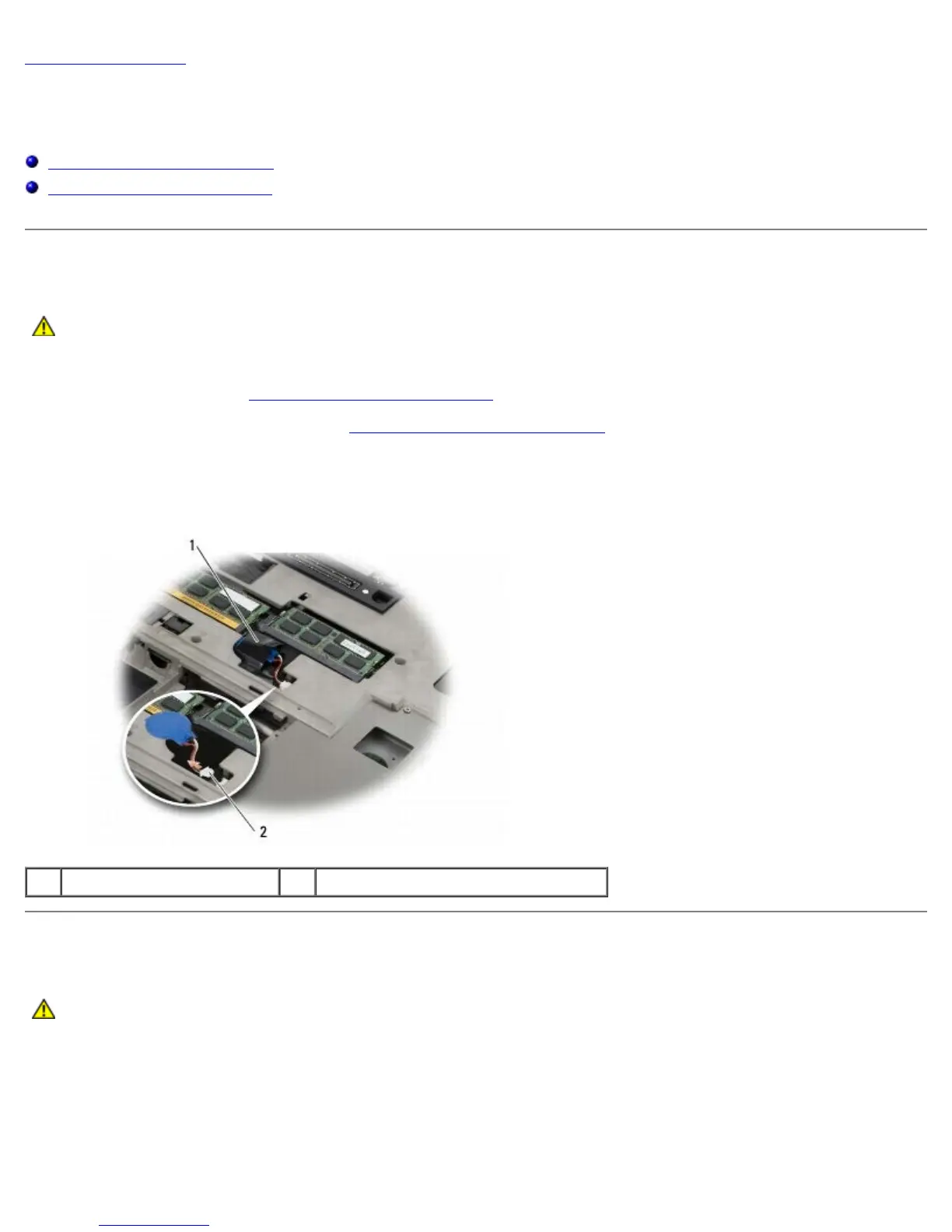
3. Slide the coin-cell battery out of the mylar sleeve.
4. Disconnect the coin-cell battery cable from the system board.
1 coin-cell battery 2 coin-cell battery cable
Replacing the Coin-Cell Battery
CAUTION: Before working inside your computer, read the safety information that shipped with your
computer. For additional safety best practices information, see the Regulatory Compliance Homepage on
www.dell.com at: www.dell.com/regulatory_compliance.
1. Connect the coin-cell battery cable to the system board.
2. Slide the coin-cell battery into the mylar sleeve.















 To Next Page