System Board: Dell Precision M6400 Service Manual
file:///T|/htdocs/systems/wsm6400/en/sm/sysboard.htm[11/16/2012 10:27:29 AM]
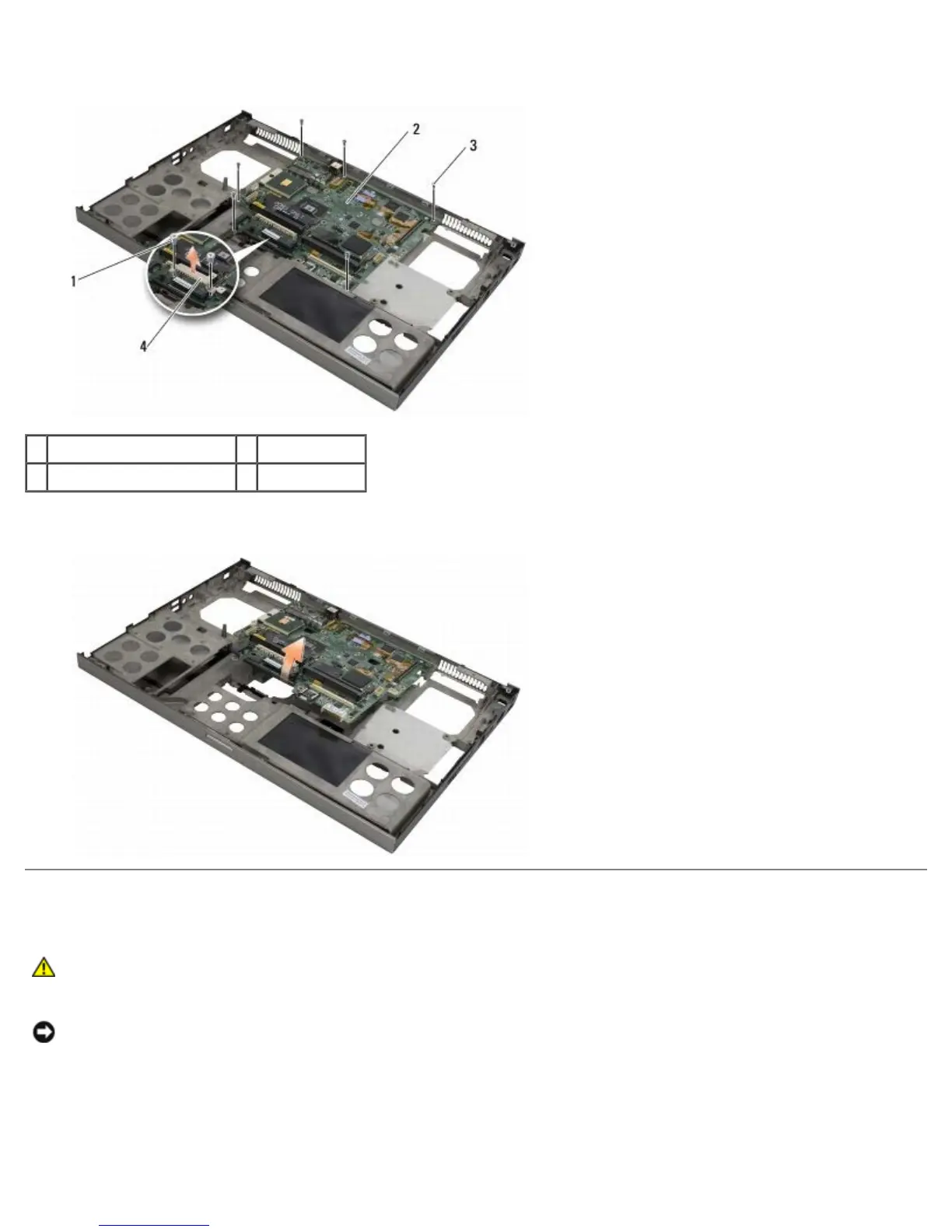
23. Remove the two M2.5 x 8-mm screws from the bracket and remove the bracket.
1 M2.5 x 8-mm screws (2) 2 system board
3 M2.5 x 5-mm screws (8) 4 bracket
24. Lift the system board out of the base assembly.
Replacing the System Board
CAUTION: Before working inside your computer, read the safety information that shipped with your
computer. For additional safety best practices information, see the Regulatory Compliance Homepage on
www.dell.com at: www.dell.com/regulatory_compliance.
NOTICE: Ensure that any loose cables do not get caught beneath the system board.
1. Place the system board into the base assembly.
2. Replace the bracket with the two M2.5 x 8-mm screws.
3. Replace the eight M2.5 x 5-mm screws on the system board in the holes labeled with white arrows.















 To Next Page