34 Using Your Projector
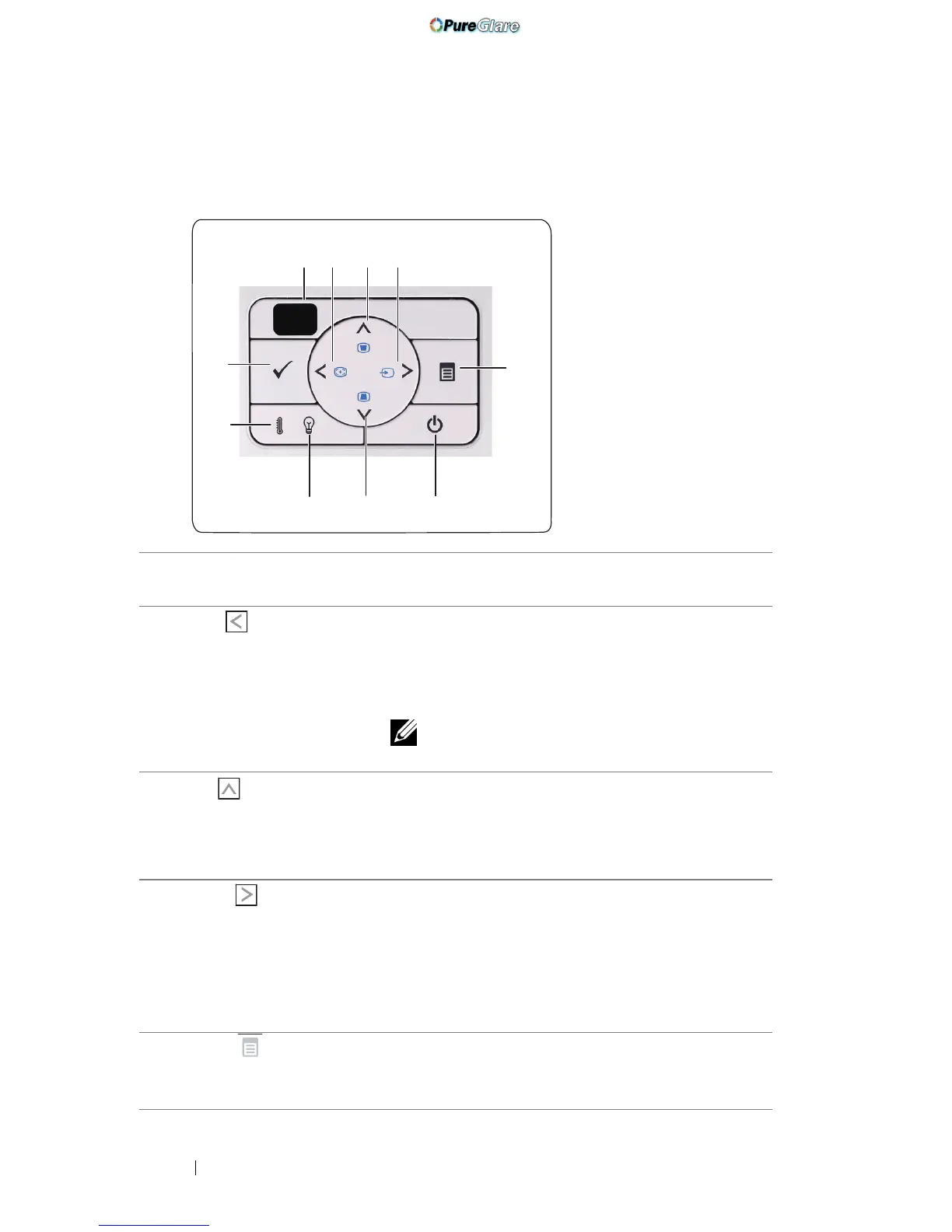
Using the Control Panel
1 IR Receiver Point the remote control towards the IR receiver
and press a button.
2 Left / Auto Adjust Press to navigate through the On-Screen Display
(OSD) Menu items.
Press to synchronize the projector to the input
source.
NOTE: Auto Adjust does not operate if the
on-screen display (OSD) is displayed.
3 Up / Keystone
adjustment
Press to navigate through the On-Screen Display
(OSD) Menu items.
Press to adjust image distortion caused by tilting
the projector (+40/-35 degrees).
4 Right / Source Press to navigate through the On-Screen Display
(OSD) Menu items.
Press to toggle through Analog RGB, Composite,
Component (YPbPr via VGA), HDMI, and
S-Video sources when multiple sources are
connected to the projector.
5 Menu Press to activate the OSD. Use the directional
keys and the Menu button to navigate through
the OSD.
1 3
5
2
10
4
7
6
9
8
http://www.pureglare.com.au



 To Next Page