Dell SonicWALL Directory Services Connector 3.7
Administration Guide
33
5For Appliance Port, type in the port on which the SSO Agent will communicate with the appliance. The
default is 2258.
6For Friendly Name, enter a descriptive name for the appliance.
7For Shared Key, do one of the following:
• Type in the key (password) to use.
• Click Generate Key to automatically create a key.
8 Optionally select the Check to show Shared Key as clear Text checkbox. The key is displayed in
readable text in the above field.
9Click OK.
Adding domain controllers
Only machines configured with a domain controller role can be set as the domain controller in the Directory
Connector Configuration Tool.
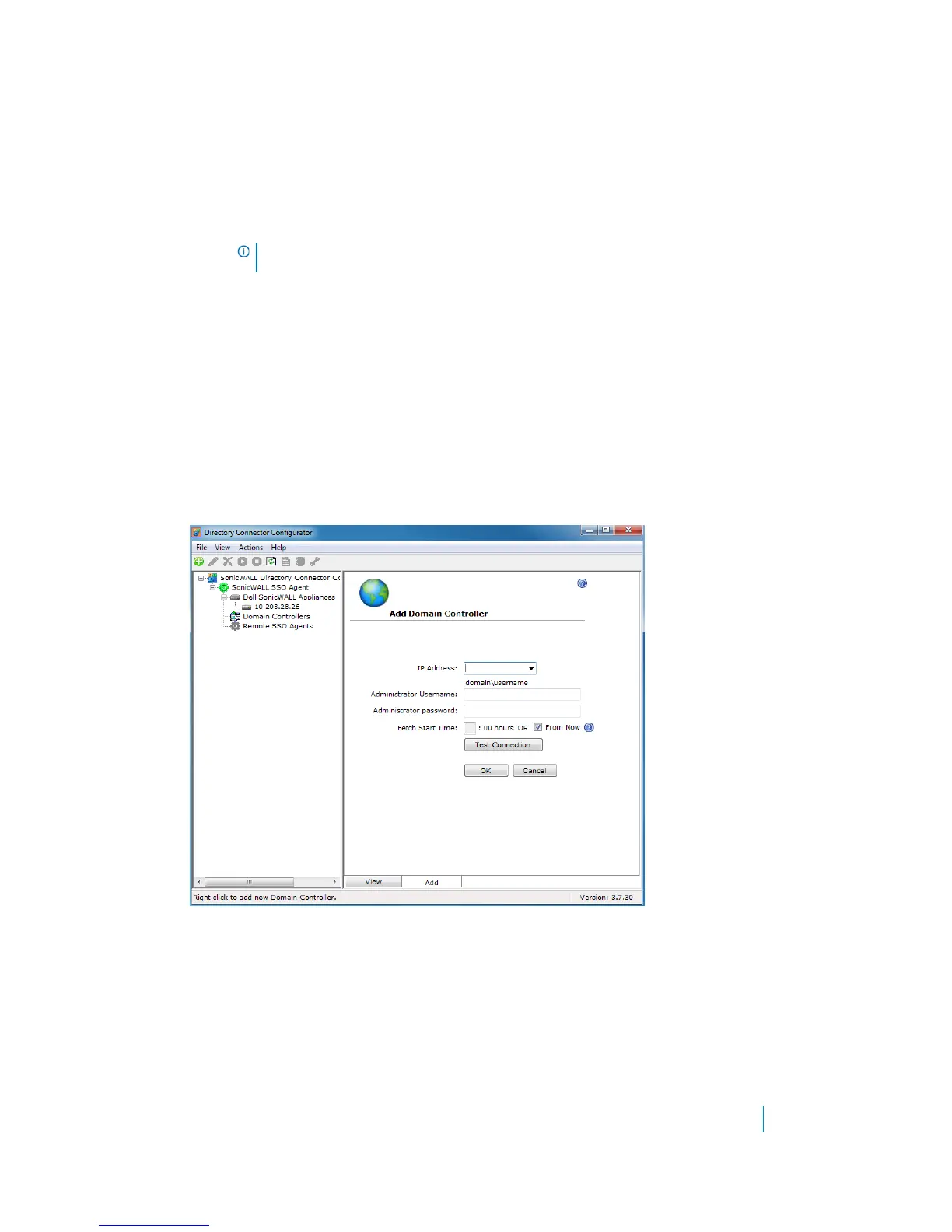
1 In the Directory Connector Configuration Tool, right-click Domain Controllers in the left pane.
2Select Add.
3 In the right pane, type the domain controller IP address in the IP Address field.
4In the Administrator Username field, enter the domain administrator user name.
5In the Administrator password field, enter the domain administrator password.
6The Fetch Start Time is the start time from which the agent starts fetching all event logs from the DC
during the service start up. It fetches all logs for a specified time until the service start time.
7Click Test Connection to check the connectivity to the domain controller.
8Click OK.
IMPORTANT: You must enter the same Shared Key in SonicOS when configuring the appliance
for Single Sign-On.











 To Next Page