EasyManua.ls Logo

Dell Studio 1535 - Removing the Coin-Cell Battery; Replacing the Coin-Cell Battery

Dell Studio 1535
41 pages
Print Icon
To Next Page IconTo Next Page
To Previous Page IconTo Previous Page
Loading...
Back to Contents Page
Coin-Cell Battery
Dell™Studio1535/1536ServiceManual
Removing the Coin-Cell Battery
1. Follow the instructions in Before You Begin.
2. Remove the base cover (see Removing the Base Cover).
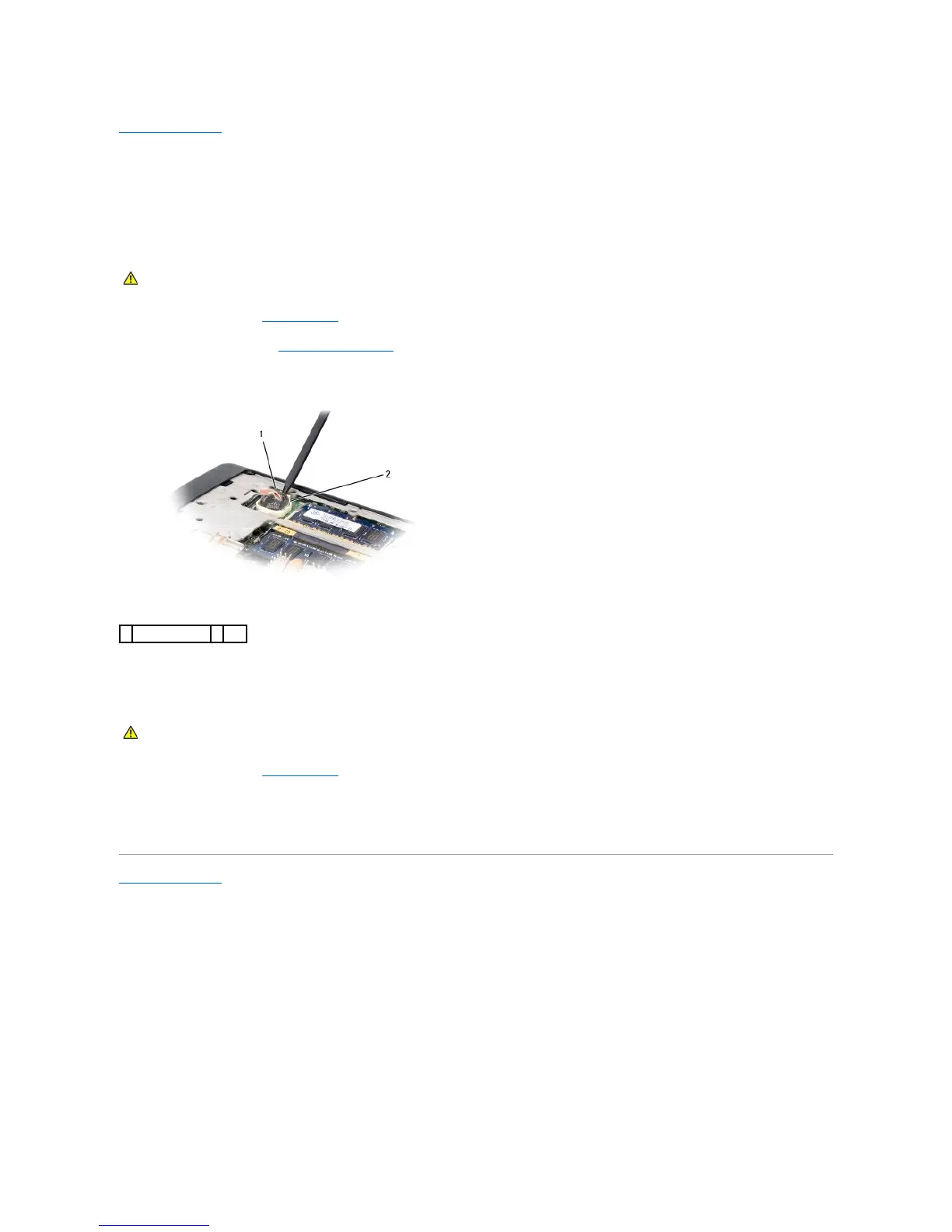
3. Use a plastic scribe to pry up the coin-cell battery from the slot.
Replacing the Coin-Cell Battery
1. Follow the instructions in Before You Begin.
2. Hold the coin-cell battery with the positive side up.
3. Slide the coin-cell battery into the slot and gently press until it snaps to the slot.
Back to Contents Page

CAUTION: Before you begin any of the procedures in this section, follow the safety instructions that shipped with your computer.
1
coin-cell battery
2
slot
CAUTION: Before you begin the following procedure, follow the safety instructions that shipped with your computer.

Other manuals for Dell Studio 1535

Related product manuals