EasyManua.ls Logo

Dell U3425WE - Monitor Resolution for Daisy Chain Setup

Dell U3425WE
110 pages
Print Icon
To Next Page IconTo Next Page
To Previous Page IconTo Previous Page
Loading...
28 About your monitor
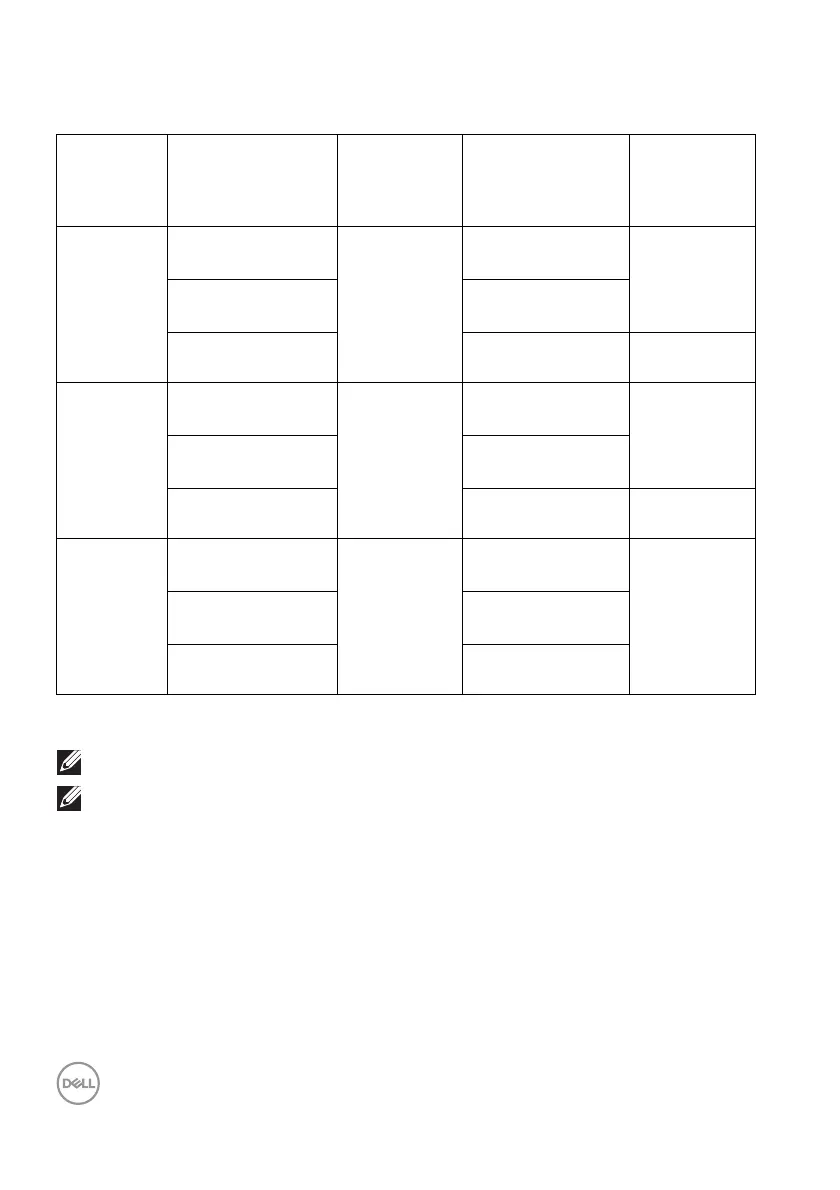
Monitor resolution for daisy chain setup
*Purchased separately.
NOTE: Monitor daisy chain only via Thunderbolt™ port.
NOTE: Set the OSD for “Thunderbolt Daisy Chain” to “Optimized” to
get 3440 x 1440@120
Hz on both monitors.
Host
capability
Cable type used on
Thunderbolt™ 4
upstream port
Maximum
resolution for
primary
monitor
Cable type used on
Thunderbolt™ 4
downstream port
Maximum
resolution for
secondary
monitor
TBT4
Thunderbolt™
4
passive cable
3440 x 1440 @
120
Hz
Thunderbolt™
4
passive cable
3440 x 1440 @
120
Hz
Thunderbolt™
4
active cable*
Thunderbolt™ 4
active cable*
USB Type-C to USB
Typ e- C cab l e*
USB Type-C to USB
Typ e- C cab l e*
Not supported
TBT3
Thunderbolt™
4
passive cable
3440 x 1440 @
120 Hz
Thunderbolt™ 4
passive cable
3440 x 1440 @
120
Hz
Thunderbolt™
4
active cable*
Thunderbolt™ 4
active cable*
USB Type-C to USB
Typ e- C cab l e*
USB Type-C to USB
Typ e- C cab l e*
Not supported
USB-C
(MFDP)
Thunderbolt™
4
passive cable
3440 x 1440 @
120
Hz
Thunderbolt™
4
passive cable
Not supported
Thunderbolt™
4
active cable*
Thunderbolt™ 4
active cable*
USB Type-C to USB
Typ e- C cab l e*
USB Type-C to USB
Typ e- C cab l e*

Table of Contents

Related product manuals