56 │ Setting up the monitor
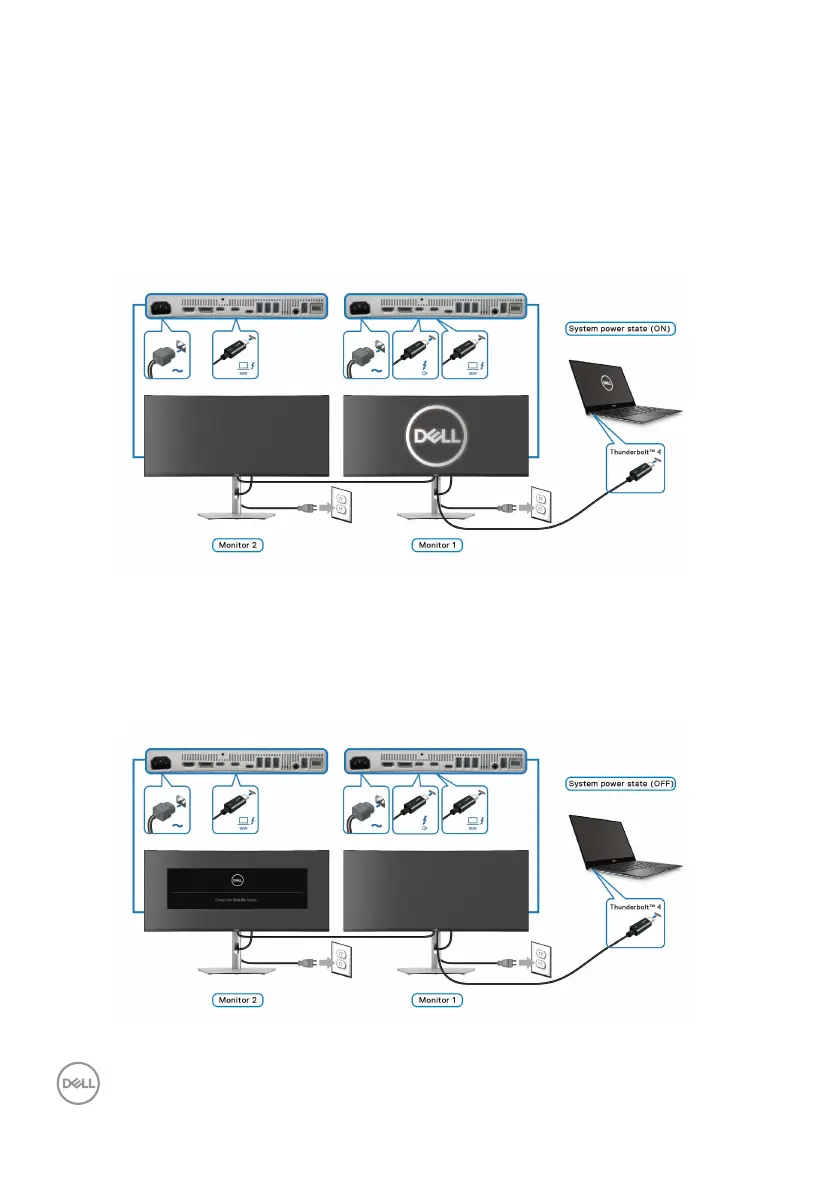
Connecting the monitor for Thunderbolt™ daisy chain function in DPBS
mode
A PC is connected to two monitors in an initially OFF power state, and the PC
system power state is in sync with the power button on Monitor 1. When you press
the power button on
Monitor 1 or PC, both Monitor 1 and PC are turned ON.
Meanwhile, Mon
itor 2 will remain OFF. To turn ON Monitor 2, you have to manually
press the power but
ton on it.
Similarly, a PC is connected to two monitors in an initially ON power state, and the
PC system power state is in sync with the power button on Monitor 1. When you
press the power button on
Monitor 1 or PC, both Monitor 1 and PC are turned OFF.
Meanwhile, Mo
nitor 2 will be in Standby mode. To turn OFF Monitor 2, you have to
m
anually press the power button on it.












 To Next Page