About your monitor │ 37
Driver installation
Install the Realtek USB GBE Ethernet Controller Driver available for your system.
This is available for download at
www.dell.com/support under the “Driver and
download” section.
Network (RJ45) data rate through USB-C/Thunderbolt max speed is 2500 Mbps.
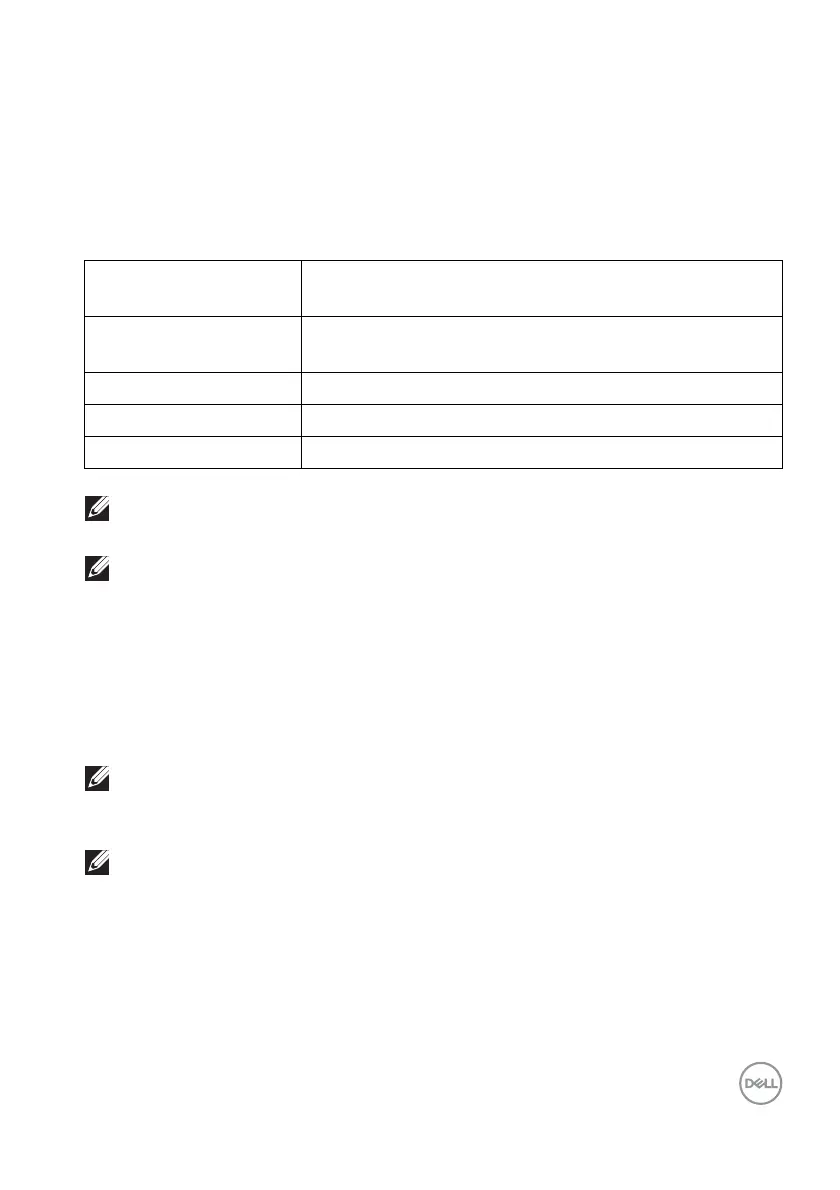
Wake-on-LAN behavior
NOTE: The computer BIOS must be configured to enable WOL function
first.
NOTE: This LAN port is 1000Base-T IEEE 802.3az compliant,
supporting Mac Address (Printed on model label) Pass-thru (MAPT),
Wake-on-LAN (WOL) from standby mode (S3) and UEFI* PXE Boot
function [UEFI PXE Boot is not supported on Dell Desktop PC’s (except
for OptiPlex 7090/3090 Ultra Desktop)], these 3 features depend on
BIOS settings and version of the OS. Functionality may vary with non-
Dell PC’s.
*UEFI stands for Unified Extensible Firmware Interface.
NOTE: WOL S4 and WOL S5 are capable only with Dell Systems that
support DPBS and are with Thunderbolt/USB-C (MFDP) interface
connection.
NOTE: Any issue related to WOL, users should debug the computer
without the monitor. After the problem is solved, then connect to the
Monitor.
Computer power
save state
System behavior after receiving Wake-on-Lan
(WOL) command
Modern Standby (S0ix) Computer and monitor remain in Standby mode but the
network communication is enabled.
Standby/Sleep (S3) Both the computer and monitor are turned ON.
Hibernate (S4) Both the computer and monitor are turned ON.
OFF/Shutdown (S5) Both the computer and monitor are turned ON.












 To Next Page