5. Route the cable properly to prevent the cable from being pinched or crimped. For detailed cable routing instructions, see the
cable routing section.
Steps
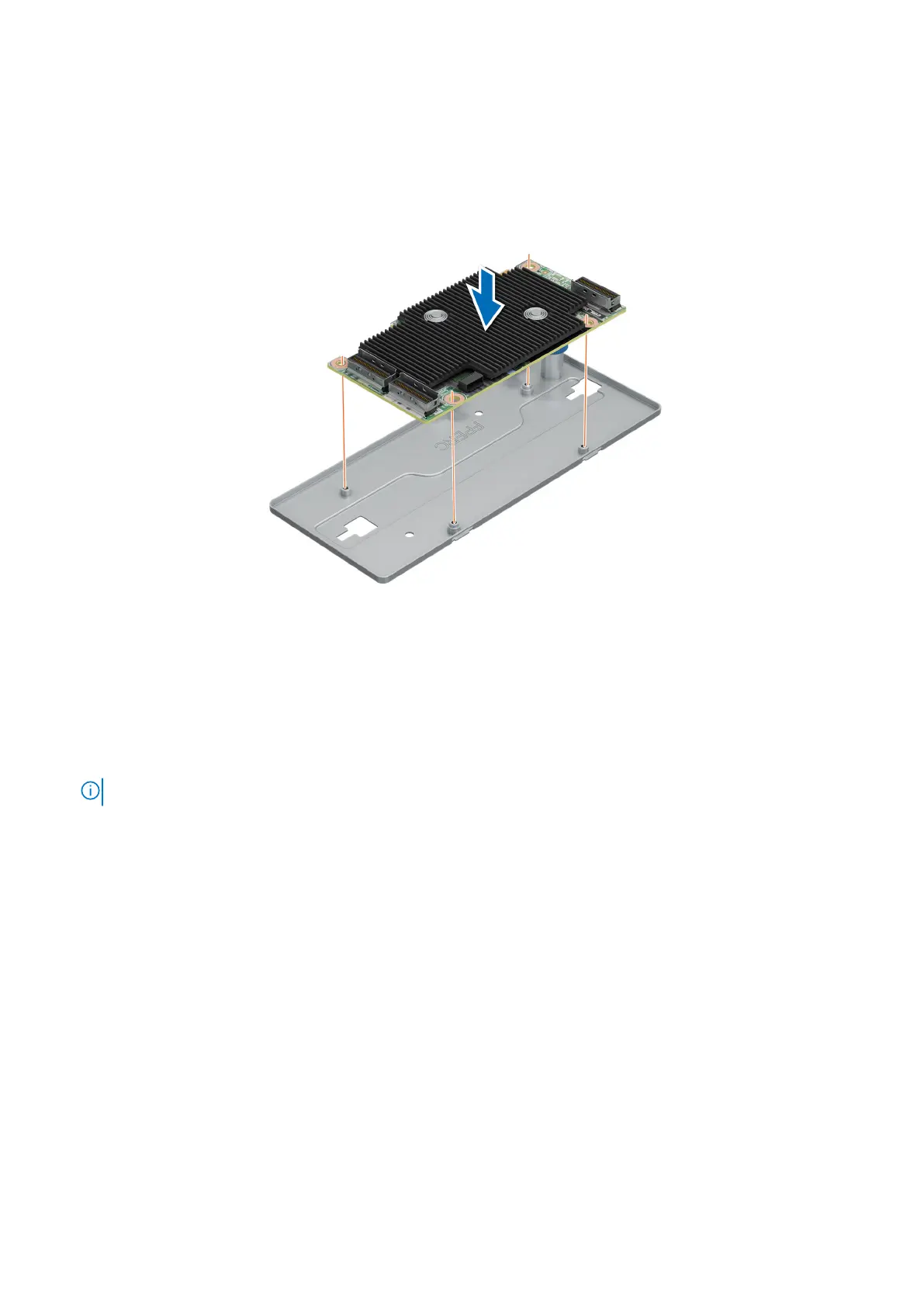
1. Align the holes on front PERC card to the guides on the PERC mounting tray.
2. Install the front PERC card on the PERC mounting tray.
Figure 49. Installing the front PERC card to the PERC mounting tray
3. Connect PERC power cable to the front PERC card.
4. Align the holes on the PERC power cable bracket with the holes on the PERC mounting tray.
5. Using a Phillips #2 screwdriver, replace the two screws on the PERC power cable bracket.
6. Align the PERC mounting tray until the tray touches the guide slots in the system. Slide the front PERC card towards the
lock to secure it and ensure the plunger is engaged in to the hole on the system.
7. Connect the power cable to the backplane. For detailed cable routing instructions, see the cable routing section.
NOTE: The numbers on the image do not depict the exact steps. The numbers are for representation of sequence.
72 Installing and removing system components



 To Next Page