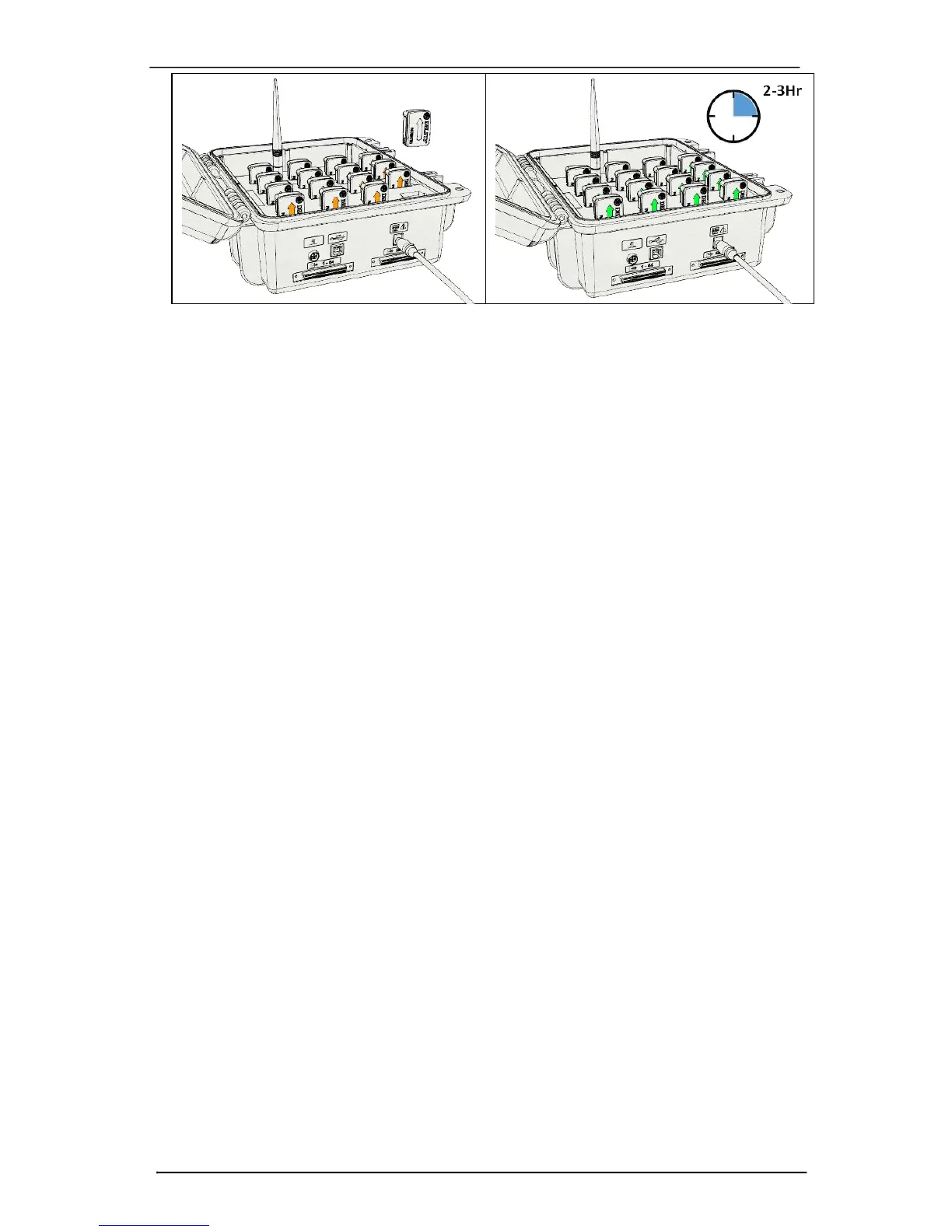
Figure 3: Docking a sensor in the charge cradle (left). When docked, sensors will turn off
and begin battery charging indicated by an amber LED indicator. Once fully charged, the
sensor LED indicator shows green (right).
Battery Performance
Battery performance and longevity is subject to a myriad of factors, which
include charge/discharge conditions, usage scenarios, number of
charge/discharge cycles, environmental temperature factors, and cell
manufacturing parameters which are subject to statistical variations. Typical
industry expectations assume an 80% charge capacity derating after 2-years or
300 charge/discharge cycles. Sensors are equipped with battery charge
monitoring and automatic sensor turn off when charge is depleted to avoid
deep discharge scenarios. Storage at temperature outside the 5-45°C may
damage the battery.
Turning the Sensor ON
Trigno Galileo sensors are automatically turned on when they are removed
from a powered charging dock. The sensors must be docked for a minimum of
3 seconds in the charge cradle, however, for the self-powering scheme to
initiate upon undocking. Once undocked, the arrow illuminates to white and
the sensor must be tapped on the cradle magnet to complete the power up
sequence. The arrow will fade to black within 6 seconds and the sensor will turn
off if not tapped on the cradle magnet. See Figure 4 for a pictorial
representation of the power-on sequence.



 To Next Page