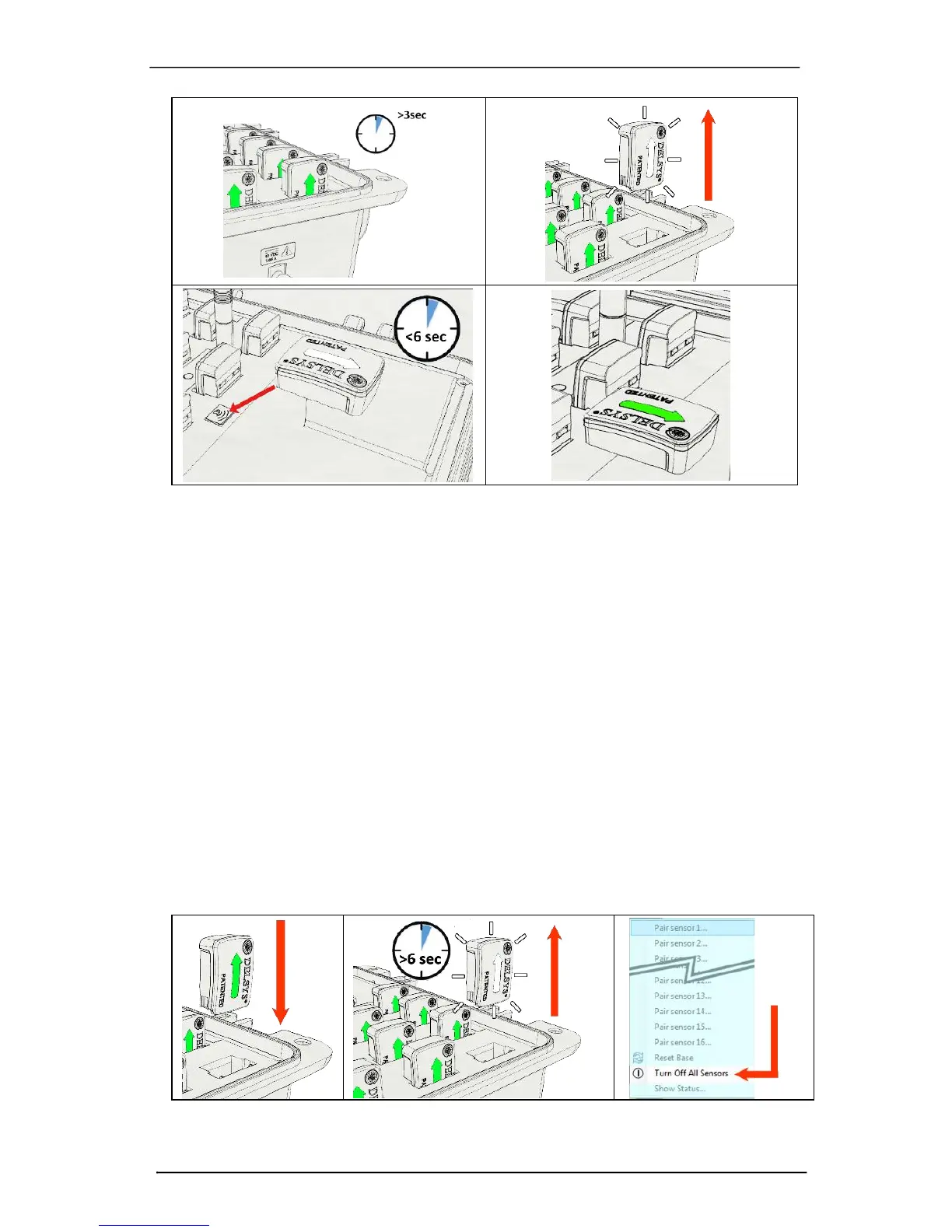
Figure 4: To turn sensors on: a) dock for 3 seconds or more, b) remove from cradle, c) tap
sensor on magnet within 6 seconds to (d) complete power-up sequence.
Turning the Sensors OFF
There are 3 mechanisms that will turn the sensors off:
a) Dock Sensors in Charger: docking the sensors in the charge cradle will
automatically turn the wireless communication system of the sensor off and
engage the battery charging circuit.
b) Undock Sensors, No Magnet: Undocking the sensors to initiate the power up
sequence and allowing the 6-second magnetic activation window to lapse will
turn off the sensors. Unplugging the base station will turn off all docked sensors.
c) Software Issued Command: Sensors that are paired with the base station and
are communicating with the host software application can be turned off by way
of an “off” command sent from the software application. Please refer to the
software user guide for more information.
Figure 5: To turn sensors off: a) dock initiate charging, b) remove from cradle and let the
6-second magnetic activation window lapse, c) initiate a software off command.



 To Next Page