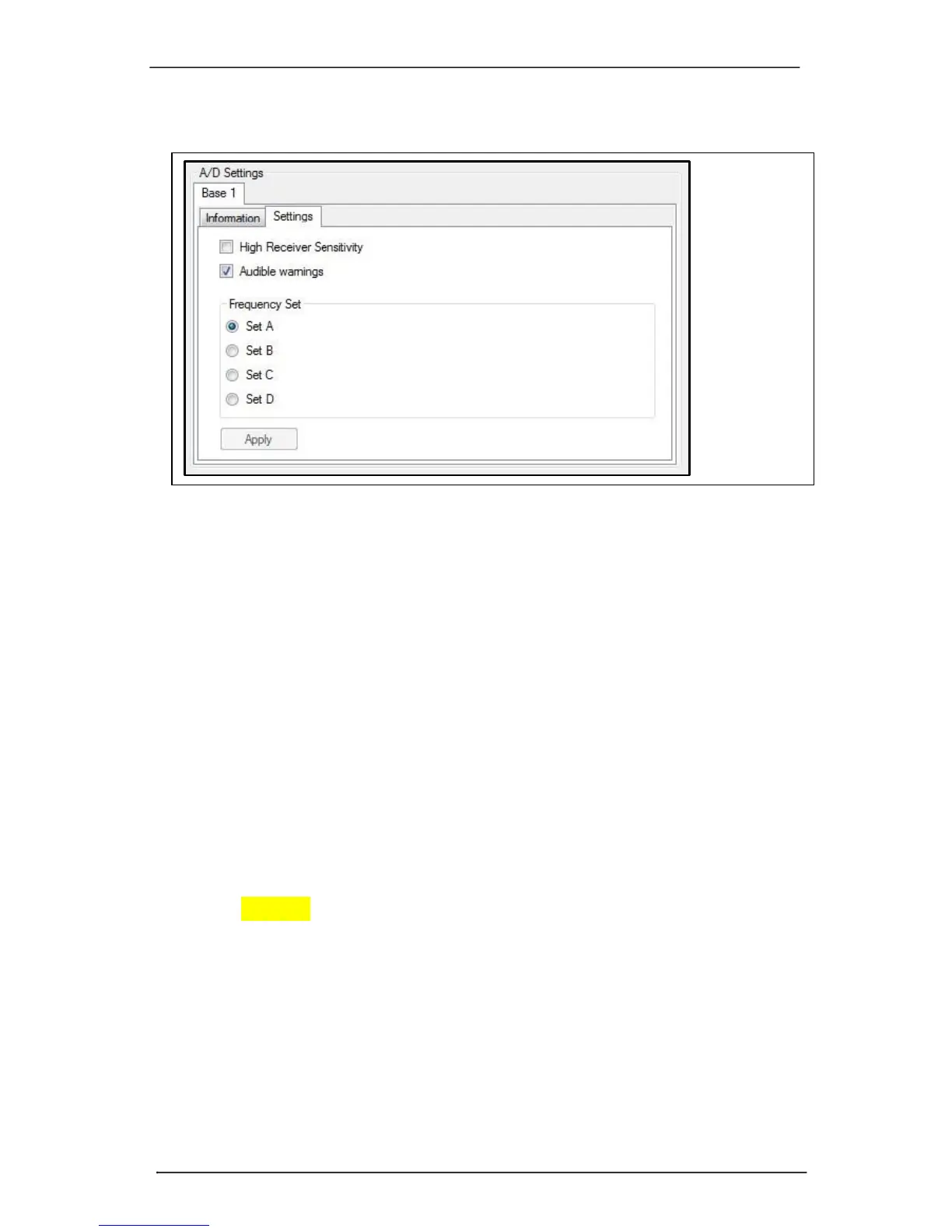
Frequency Set
Use this setting to change the frequencies being used for wireless
communication. The default set is “A”. The frequency set should only be
changed if nearby sources are interfering with Trigno communications or the
particular operating environment is causing significant path loss on the current
frequency set. Note that changing the communication frequency set will
require sensor re-pairing. Frequencies within the sets are defined by the system
and cannot be changed by the User.
Audible Warnings
This option will generate an audible “ping” along with a small message,
whenever a sensor falls out of range or it’s battery is excessively low.
Using the Base Station Trigger Functions
The Base Station supports 4 key triggering functions through the Trigno Trigger
Module (SP-XXX) which is connected to the base station via the Trigger Port
indicated in the figure below. The supported trigger functions for data
acquisition are:
Trigger Start Input: Data collection starts when an external digital input is
received.
Trigger Stop Input: Data collection stops when an external digital input is
received.
Trigger Start Output: A digital pulse for external devices toggles when data
acquisition starts.
Trigger Stop Output: A digital pulse for external devices toggles when data
acquisition stops.



 To Next Page