EasyManua.ls Logo

Delta DPM-D510 - User Manual

Delta DPM-D510
57 pages
Print Icon
To Next Page IconTo Next Page
Loading...
www.deltaww.com
Digitized Automation for a Changing World
2
3523
*We reserve the right to change the information in this catalogue without prior notice.
Industrial Automation Headquarters
Taiwan: Delta Electronics, Inc.
Taoyuan Technology Center


TEL
:

-
-
-

:

-
-

-

Asia
China: Delta Electronics
(
Shanghai
)
Co., Ltd.



-

-
-

-

-
-


-
-

Japan: Delta Electronics
(
Japan
)
, Inc.

-
-

-
ku

-


-
-

-

-
-

-

Korea: Delta Electronics
(
Korea
)
, Inc.

-

-



-
-

-

-
-

-

Singapore: Delta Energy Systems
(
Singapore
)
Pte Ltd.

-


-

-

-

-

India: Delta Electronics
(
India
)
Pvt. Ltd.



-

-

-

-

Thailand: Delta Electronics
(
Thailand
)
PCL.

(
E. P.Z
)




-

-

-

-
Australia: Delta Electronics
(
Australia
)
Pty Ltd.


Mail: 

Americas
USA: Delta Electronics
(
Americas
)
Ltd.


-
-

-

-
-

-

Brazil: Delta Electronics Brazil Ltd.



-

-
-

-

-
-

Mexico: Delta Electronics International Mexico S.A. de C.V.




-

-

-

EMEA
EMEA Headquarters: Delta Electronics
(
Netherlands
)
B.V.




-



(
)

BENELUX: Delta Electronics
(
Netherlands
)
B.V.



(
)

DACH: Delta Electronics
(
Netherlands
)
B.V.

-



(
)

France: Delta Electronics
(
France
)
S.A.




(
)

Iberia: Delta Electronics Solutions
(
Spain
)
S.L.U



(
)



Italy: Delta Electronics
(
Italy
)
S.r.l.

(
CO
)



Russia: Delta Energy System LLC




Turkey: Delta Greentech Elektronik San. Ltd. Sti.
(
Turkey
)

-



MEA: Eltek Dubai
(
Eltek MEA DMCC
)




(
)


User Manual
Question and Answer IconNeed help?

Do you have a question about the Delta DPM-D510 and is the answer not in the manual?

Overview

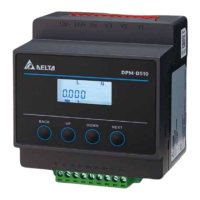
The Delta Din-rail Power Meter DPM-D510 is a multifunction power meter designed for power monitoring and control in various sectors, including power systems, industrial mining supply companies, and public facilities. This user manual provides comprehensive instructions for its installation, operation, and maintenance.

Function Description

The DPM-D510 measures and displays a wide range of electrical quantities, including voltage, current, power, power factor, frequency, and energy. It supports various wiring configurations, including 1-phase 2-wire, 1-phase 3-wire, 3-phase 3-wire (delta connection), and 3-phase 4-wire (Y connection). The device can be integrated into a Modbus RTU communication network, allowing for remote monitoring and control.

Important Technical Specifications

Measurement Accuracy:

  • Voltage, current, real power, electric energy (real): ±0.5%
  • Reactive power, electric energy (reactive): ±2%
  • Power factor, frequency: ±1%

Input:

  • Voltage Connection:
    • 1PH2W, 1 CT
    • 1PH3W, 2 CT
    • 3PH3W, Δ connection, 3 CT, No PT
    • 3PH3W, Δ connection, 2 CT, No PT
    • 3PH3W, Δ connection, 3 CT, 2 PT
    • 3PH4W, Y connection, 3 CT, No PT
    • 3PH4W, Y connection, 3 CT, 3 PT
    • 3PH4W, Y connection, 2 CT, 3 PT
  • Rated Voltage:
    • Line voltage: 35 to 690 VAC (L-L)
    • Phase voltage: 20 to 400 VAC (L-N)
    • Measurement CAT III
    • Y connection (3P4W): 400 Vac (line-to-neutral) / 690 Vac (line-to-line)
    • Δ connection (3P3W): 600 Vac (line-to-line)
  • Rated Current: Nominal: 1A / 5A
  • Range of Current Measurement: 20mA ~ 6A (meets IEC62053-22 with accurate range: 50mA~)
  • Start Current: 20mA
  • Frequency: 50 / 60 Hz
  • Voltage Input: OVERVOLTAGE CAT II

Power:

  • Operating range: 100 ~ 240 VAC (maximum power: 4.6 W)
  • Operating frequency: 50/60 Hz

Communication:

  • Interface: RS-485 port
  • Protocol: Modbus-RTU
  • Baud rate: 9600 / 19200 / 38400 bps
  • Max. Communication Distance: 1200 m
  • Max. Connection Number: 32
  • Data Length: 8-bits
  • Parity: None, Odd, Even
  • Stop Bits: 1

Mechanical Characteristics:

  • Dimension (W x H x D): 90 * 90 * 66.7 mm
  • IP Degree of Protection: IP20

Environment:

  • Ambient operating temperature: -20 °C ~ +60°C (-4°F ~ +140°F)
  • Storage temperature: -30 °C ~ +70°C (-22°F ~ +158°F)
  • Relative Humidity: 5 ~ 95% RH
  • Altitude: Below 2000 meters
  • Pollution level: 2

Electromagnetic Compatibility:

  • Electrostatic Discharge: IEC 61000-4-2
  • Immunity to Radiated Fields: IEC 61000-4-3
  • Immunity to Fast Transients: IEC 61000-4-4
  • Immunity to Impulse Waves: IEC 61000-4-5
  • Conducted Immunity: IEC 61000-4-6
  • Immunity to Magnetic Fields: IEC 61000-4-8
  • Immunity to Voltage Dips: IEC 61000-4-11
  • Radiated Emissions: FCC Part 15 Class A, EN55011 Class A
  • Conducted Emissions: FCC Part 15 Class A, EN55011 Class A
  • Harmonics Emissions: IEC 61000-3-2
  • Flicker Emissions: IEC 61000-3-3

Usage Features

Display and Navigation: The DPM-D510 features an LCD display with a white backlight. Navigation is done via four buttons: BACK, UP, DOWN, and NEXT.

  • BACK Key: Returns to the previous screen without saving settings in setting mode; goes to the menu or previous screen in basic mode.
  • UP Key: Selects item or page; decrements/increments numbers in setting mode.
  • DOWN Key: Selects item or page; decrements/increments numbers in setting mode.
  • NEXT Key: Goes to setting mode; confirms settings and moves to the next setting.

Homepage Display: The homepage displays key measurement data:

  • V: Average voltage (L-L for 1PH3W, 3PH3W; L-N for 1PH2W, 3PH4W)
  • I: Average current value
  • P: Total real power

Menu Tree and Settings: The device offers a comprehensive menu for configuration and information access:

  • HOME: Displays average voltage, average current, and total real power.
  • VLN: Phase voltage values (L1N, L2N, L3N).
  • VLL: Line voltage values (L12, L23, L31).
  • Current: Phase current values (IL1N, IL2N, IL3N).
  • PF/F: Total power factor and frequency.
  • Power: Total active power, total reactive power, and total apparent power.
  • Active Power: Active power per phase (L1N, L2N, L3N).
  • Reactive Power: Reactive power per phase (L1N, L2N, L3N).
  • Apparent Power: Apparent power per phase (L1N, L2N, L3N).
  • Energy: Positive active energy (Wh+), positive reactive energy (var+), positive apparent energy (VA+), reversed active energy (Wh-), reserved reactive energy (var-), and reserved apparent energy (VA-). (Reversed energy supported by firmware v1.02 and after).
  • PASS (Password Setup): Default password is 0000. Allows setting a 4-digit password.
  • COM (Communication Setup): Configures device ID (Addr), baud rate (bAud), and parity (Prty).
  • tyPE (Wiring Type): Selects connection type (3P4W, 3P3W, 1P2W, 1P3W).
  • VT CT (VT and CT Setup): Configures number of VT/CT, VT ratio (Pri/Sec), and CT ratio (Pri/Sec).
  • rSt (Reset): Options to not reset (nonE), restore to default settings (dEF), or reset energy values (E).
  • PCHG (Edit Password): Allows changing the password.
  • inFo (Meter Information): Displays firmware version (VEr) and firmware release date (dAtE).

External Transformers:

  • For currents higher than the device's rated specification, an external Current Transformer (CT) is required.
  • For voltages higher than the device's rated specification (line voltage: 35-690V AC L-L, phase voltage: 20-400V AC L-N), an external Potential Transformer (PT) is required.
  • The manual provides tables for compatible DCTMC, DCTCS, DCT1000, and DCT2000 series CTs with their specifications.

Modbus Communication: The DPM-D510 supports Modbus RTU protocol for communication.

  • Supported Function Codes: 0x03 (Read Holding Registers), 0x06 (Preset Single Registers), 0xFE (Read Data Log).
  • The packet format for floating point numbers uses IEEE754, 2's complement.

Maintenance Features

Installation Notes:

  • Install in a clean, dry, and controlled environment, free of water vapor, corrosive, and flammable gases.
  • Ambient temperature range: -30 ~ 70°C (-22 ~ 158°F).
  • Relative humidity: 5-95%, non-condensing.
  • Avoid heat-radiating elements, corrosive gases/liquids, airborne dust/metallic particles, or high electromagnetic radiation.
  • Mount on a solid and durable surface.
  • Must be installed in a suitable insulated and fireproof enclosure.
  • DIN-Rail mounted in the appropriate final enclosure.

Safety Precautions:

  • Only qualified electrical workers should install and maintain the equipment.
  • Always disconnect all electric power sources before inspections, tests, or maintenance.
  • Use a properly rated voltage sensing device to confirm power is off.
  • Do not work alone.
  • Do not disassemble or alter wiring when power is on.
  • Do not touch terminal areas when power is on.
  • Ensure proper grounding according to regulations.
  • Never short the secondary of a PT.
  • Never open circuit a CT.
  • Ensure CT secondary winding is fixed securely.
  • Use UL2808 listed CTs in America and Canada that meet IEC61869-2 accuracy.
  • Connect only one cord to one plug on the quick connector.
  • If accidentally unplugged, check connection and restart.
  • Do not use liquid containing acid and alkali on the power meter.
  • Insulation tests or high-stress tests on the device are forbidden.

Wiring Recommendations:

  • Use AWG 10-22 wire diameters for operating power/voltage measurement and current measurement/RS-485.
  • Screw turning torque: 5.0 kgf-cm (0.5 N·m).
  • Wire heat resistance: > 70°C.
  • Install a breaker switch on the power cord.
  • Use shielded twisted-pair cables for RS485 communication.
  • Connect D+ terminals together and D- terminals together on the twisted pair cable.
  • Ground the cable shield.
  • Install a terminal resistor on the terminal device.
  • Use cables with a diameter of 14-20 AWG.

General Maintenance:

  • Regularly check for mounting looseness.
  • Prevent foreign objects (oil, water, metal powder, drill shavings) from entering the device.
  • Insulate connections at wiring terminals.
  • Ensure communication wiring is done properly.
  • Check for conductive and flammable objects inside the meter.
  • Reduce electromagnetic interference if electronic devices nearby experience it.
  • Check correct voltage level for power supply.
  • Check if power indicator light is lit.
  • Check communication between devices.
  • For abnormal responses, contact distributor or customer service center.
  • When cleaning, unplug all external power sources. Use a dry cloth to clean the exterior. Do not open the equipment or touch internal wiring. Do not use aerosol sprays, solvents, or abrasives.

Delta DPM-D510 Specifications

General IconGeneral
BrandDelta
ModelDPM-D510
CategoryMeasuring Instruments
LanguageEnglish

Related product manuals