Chapter 4 Operation
4- 7
Steps:
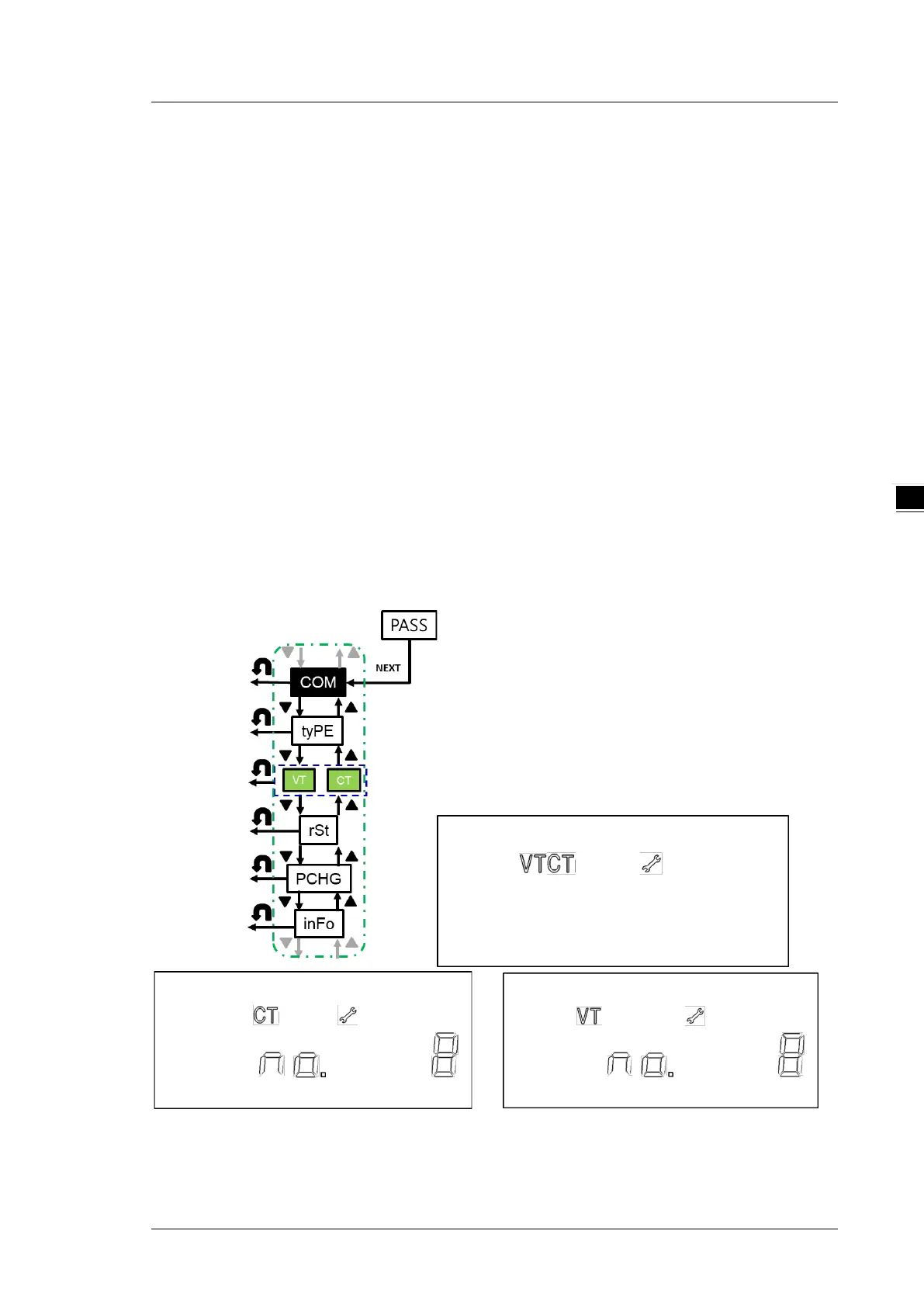
1. When VT CT is shown on the display, press NEXT key to enter the setting menu under VT CT and
VT would be shown on the display.
2. Use UP and DOWN keys to select the number of VT (VT no.) and CT (CT no.), VT ratio (VT Pri / VT
SEC), CT ratio (CT Pri / CT SEC).
3. Press NEXT when VT no. is displayed. When the option starts blinking, you can use UP and
DOWN keys to select the number of voltage transformers you need.
4. Press NEXT when CT no. is displayed. When the option starts blinking, you can use UP and
DOWN keys to select the number of current transformers you need.
5. Press NEXT when VT Pri or VT SEC is displayed. When the option starts blinking, you can use UP
and DOWN keys to select the desired VT ratio.
6. Press NEXT when CT Pri or CT SEC. is displayed. When the option starts blinking, you can use UP
and DOWN keys to select the desired CT ratio.
7. In steps 3-5, y
ou are allowed to set only one digit at a time by using UP and DOWN key to
choose each digit and press NEXT to confirm the setting.
*Note: You can go back to the previous setting item by pressing BACK key anytime, whether you have
completed or canceled the setting.


 To Next Page