EasyManua.ls Logo

Delta RPI-M20A - User Manual

Delta RPI-M20A
154 pages
Print Icon
To Next Page IconTo Next Page
Loading...
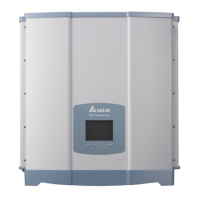
RPI-M15A/M20A
Operation and Installation Manual
Grid-tie Transformerless Solar Inverter
The power behind competitiveness
www.deltaww.com
English 1
53
103
简体中文
繁體中文

Table of Contents

Other manuals for Delta RPI-M20A

Questions and Answers

  • J
    james55Sep 12, 2025
    What does 'HW COMM2' mean on my Delta Inverter?
    • T
      Todd HurstSep 12, 2025
      A 'HW COMM2' error on your Delta Inverter may indicate that the Red. CPU is idling, so check reset and crystal in Red. CPU. It could also mean that the communication connection is disconnected, so check the connection between Red. CPU and DSP.
  • C
    christinahuffAug 25, 2025
    Why does my Delta RPI-M20A show 'AC Volt High'?
    • D
      Danielle TorresAug 25, 2025
      A 'AC Volt High' error on your Delta Inverter can occur if the actual utility voltage exceeds the OVR setting. Check the utility voltage on the inverter terminal. It can also happen if the utility voltage exceeds the Slow OVR setting during operation, so check that as well. An incorrect country or Grid setting could also be the cause, so verify those settings. Finally, a detection circuit malfunction could be responsible; in that case, check the detection circuit inside the inverter.
  • B
    Brian BrownAug 25, 2025
    Why is my Delta RPI-M20A showing 'AC Volt Low'?
    • A
      Angela AshleyAug 26, 2025
      The 'AC Volt Low' error on your Delta Inverter may be triggered by several factors. First, the actual utility voltage might be below the UVR setting; if so, check the utility voltage connection at the inverter terminal. Second, incorrect country or Grid settings can cause this, so check these settings. Third, there may be wrong connections in the AC plug, so verify the connection in the AC plug. Lastly, a detection circuit malfunction could be the cause; in that case, check the detection circuit inside the inverter.
  • H
    Haley WilliamsSep 23, 2025
    What does 'Grid Quality' mean on my Delta RPI-M20A Inverter?
    • B
      brandon00Sep 23, 2025
      The 'Grid Quality' error on your Delta Inverter is caused by Non-linear load in Grid and near to inverter. Grid connection of inverter need to be far away from non-linear load if necessary.
  • W
    williamsbrianSep 12, 2025
    What to do if my Delta RPI-M20A shows 'HW Connect Fail'?
    • R
      rodriguezshannonSep 12, 2025
      If your Delta Inverter displays 'HW Connect Fail', it may be due to a power line being disconnected inside the inverter, so check the power lines inside the inverter. It may also be caused by a defective current feedback circuit, so check the current feedback circuit inside the inverter.
  • N
    Natalie RodriguezSep 18, 2025
    What does 'HW CT A Fail' mean on my Delta RPI-M20A?
    • C
      Chase JacksonSep 18, 2025
      A 'HW CT A Fail' error on your Delta Inverter may be caused by a broken test current loop, so check the connection of WC3 to CNC16. It may also indicate that CSC1 is defective, so replay CSC1 with new one. Finally, a detection circuit malfunction could be the reason; in that case, check the detection circuit inside the inverter.
  • J
    Jeffrey WhiteSep 5, 2025
    What does 'HW NTC2 Fail' mean on my Delta RPI-M20A?
    • S
      Sean NelsonSep 5, 2025
      If your Delta Inverter is showing a 'HW NTC2 Fail' error, it may indicate that the ambient temperature is above 90 degrees or below -30 degrees. Check the installation ambient and environment. Another possible cause is a detection circuit malfunction, so check the detection circuit inside the inverter (RTB1).
  • S
    Savannah DavisSep 6, 2025
    What does 'HW NTC3 Fail' indicate on my Delta RPI-M20A Inverter?
    • S
      Scott HarrisSep 6, 2025
      A 'HW NTC3 Fail' error on your Delta Inverter may indicate that the ambient temperature is above 90 degrees or below -30 degrees. You should check the installation ambient and environment. It could also be due to a detection circuit malfunction, so check the detection circuit inside the inverter (RTG1).
  • S
    Sarah DennisSep 18, 2025
    What does 'HW CT B Fail' mean on my Delta Inverter?
    • R
      rbrownSep 18, 2025
      A 'HW CT B Fail' error on your Delta Inverter could be caused by a broken test current loop, so check the connection of WC3 to CNC16. It may also indicate that CSC2 is defective, so replace CSC2 with new one. Finally, a detection circuit malfunction could be the reason; in that case, check the detection circuit inside the inverter.
  • M
    Michael HamiltonAug 30, 2025
    What to do if Delta RPI-M20A Inverter shows 'Solar1 Low' error?
    • Y
      Yolanda BassAug 30, 2025
      If your Delta Inverter displays a 'Solar1 Low' error, first check the Solar1 voltage connection to the inverter terminal, as the actual Solar1 voltage may be under the limit. If the actual Solar1 voltage is close to "0", some devices inside the inverter may be damaged, so check all switching devices in boost1. Finally, a detection circuit malfunction could also be the cause; in that case, check the detection circuit inside the inverter.

Summary

Safety Instructions

General Safety Precautions

Outlines important safety instructions, including cautions, warnings, and danger notices.

1. General Information

1.1. About this Manual

Provides explanation and procedures for installing, operating, maintaining, and troubleshooting solar inverters.

1.2. Product Description

Describes the 3-phase grid-tied solar inverter and its operation illustration.

1.3. Additional Information

Provides information on where to find more product details online.

2. Product Overview

2.1. Unpack the Inverter

Details the unpacking procedure for the RPI-M15A / M20A inverter.

2.2. Checking Unit and Accessories

Instructs users to check for damage and verify all included accessories.

2.3. Product Label

Explains how to identify the inverter's model and specifications from its label.

2.4. Exterior Objects

Illustrates the inverter's exterior components and input/output interfaces.

3. Installation

Wall Mounting Procedure

Details the steps for securely mounting the inverter onto a wall using brackets and screws.

Installation Guidelines and Clearance

Provides recommended installation orientation, clearance requirements, and environmental considerations.

4. Wiring

4.1. Preparation Before Wiring

Covers precautions and checks before commencing any wiring tasks.

4.2. AC Grid Connection

Explains the procedures and requirements for connecting the inverter to the AC grid.

4.3. DC Connection (from PV Array)

Details how to connect the DC input from the PV array to the inverter.

4.4. Communication Module Connections

Describes how to connect communication modules for data transfer and control.

4.4.1. RS-485 Connection

Explains the pin definitions and connection methods for RS-485 communication.

4.4.2. EPO and Dry Contact Connections

Details the connections for Emergency Power Off and Dry Contact features.

5. Turn On PV Inverter

5.1. LCD and Panel Indicators

Explains the inverter's LCD display and LED indicators for status.

5.2. First Startup

Guides the user through the initial setup and configuration process.

5.2.1. Home Page

Describes the main display screen showing output power, status, and energy data.

5.2.2. Power Meter

Details how to view AC and DC voltage, current, and power readings.

5.2.3. Energy Log

Explains how to access historical energy generation data on yearly, monthly, and daily bases.

5.2.4. Event Log

Describes how to view recorded error and fault events.

5.2.5. Operation Data

Explains how to view historical maximum and minimum operating data.

5.2.6. Inverter Information

Lists information such as serial number, firmware version, and inverter ID.

5.2.7. Settings

Introduces the section for adjusting various inverter functions and parameters.

5.2.7.1. Personal Settings

Allows adjustment of language, date, time, screen saver, and display contrast.

5.2.7.2. Coefficient Settings

Enables setting CO2 saving, earning value, and communication baud rates.

5.2.7.3. Install Settings

Covers advanced settings for installers, including ID, insulation, and country configurations.

5.2.7.4. Active;Reactive Power Control

Introduces functions for controlling active and reactive power output based on regulations.

5.2.7.5. FRT (Fault Ride Through)

Explains how to keep the inverter connected to the grid during voltage dips as per regulations.

6. Maintenance

6.1. Clean Fan

Provides instructions on how to clean the inverter's fans.

6.2. Replace Fan

Details the procedure for replacing a faulty fan unit.

6.3. Clean Air Outlets

Explains how to clean the air inlet and outlet filters.

7. Error message and Trouble Shooting

8. De-Commissioning

De-Commissioning Procedure

Outlines the procedures for safely removing the inverter from operation for maintenance or storage.

9. Technical Data

10. Assembly Note

Assembly Torque Specifications

Details screw torque specifications for fan and air inlet components.

Component Assembly Details

Provides details on AC wire, AC plug, rubber rings, MC4 wire, and communication module assembly.

Delta RPI-M20A Specifications

General IconGeneral
BrandDelta
ModelRPI-M20A
CategoryInverter
LanguageEnglish

Related product manuals