MATRIX control panel Commissioning and testing
PR-2011-0110-GB • Subject to modifications • R9-03-2016 27
6.5 Testing operation
• Switch on the power supply of the unit.
6.5.1 Testing MATRIX control panel
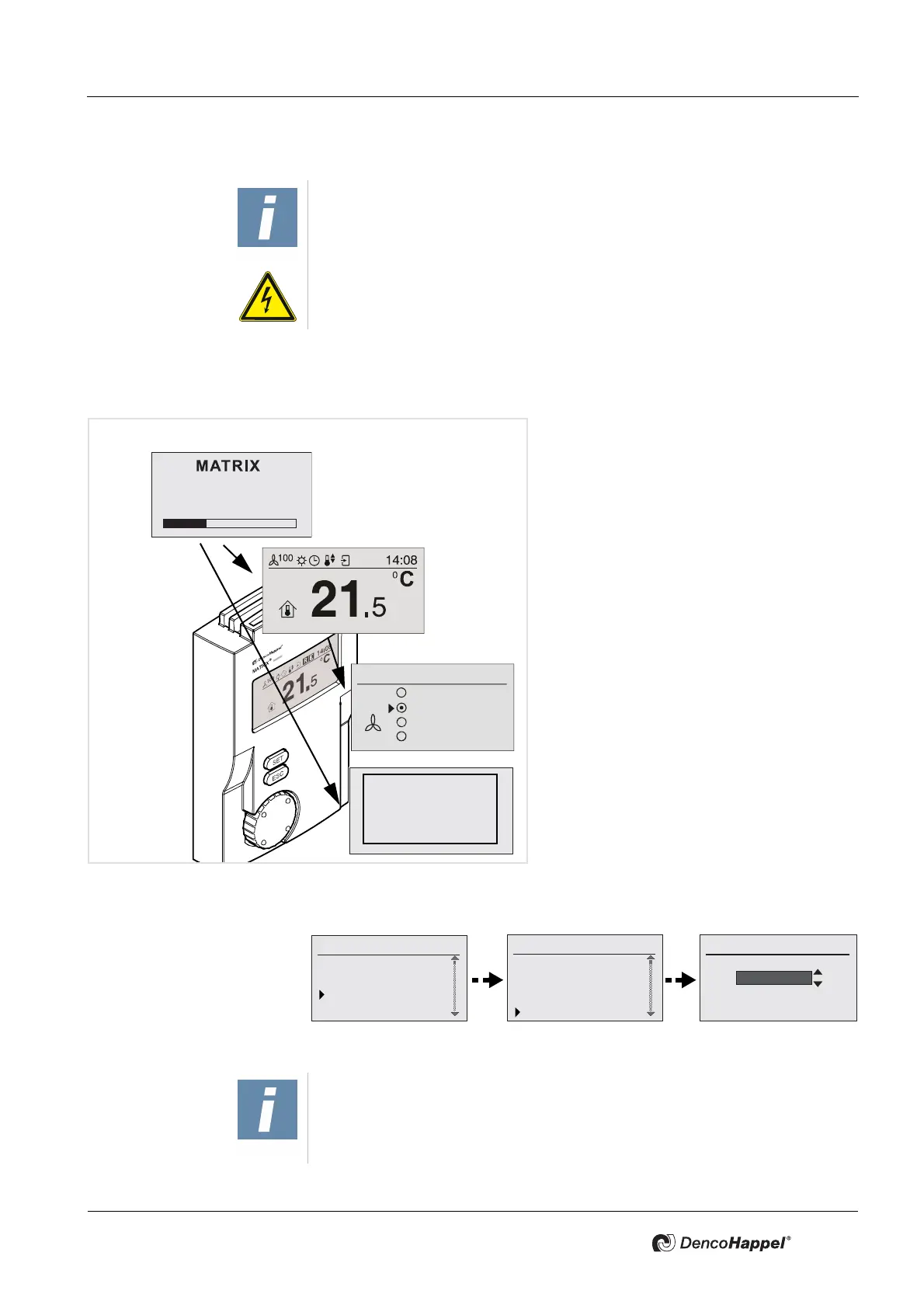
9 If the control panel is connected correctly,
the network test begins and the "start-up"
indicator is displayed. At this stage the
control panel type is displayed. It then
changes to the basic display.
• Should there be no display, switch off im-
mediately by powering down and check
the wiring first.
• If no unit groups are found in the MA-
TRIX.Net after approx. 70 seconds have
elapsed, the error message "No groups
were found in the group" is displayed. In
this situation de-energize the unit and
check if the set group addresses are the
same, the data cable is connected correct
-
ly and the terminating resistors are set
correctly (see also
"Operation messages
and troubleshooting" on page 82).
• Select your language - proceed as follows:
• Change the fan mode from "OFF" to "Automatic mode".
IMPORTANT NOTICE!
The power supply of the control panel is performed through the power section
of the unit to which the control panel is connected.
ELECTRICAL HAZARD!
Therefore switch on the power supply or power circuitry of the units only after
all installation work has been completed!
Fan mode
OFF
Automatic
Automatic (mute)
Speed
Problem:
No units
were found
in the group
Control panel OP51C
Version 1.00
Other menus
Clock timer
Actual values
System
Settings
System
Backlight
Temperature unit
Date/time
Language
Select language
Dutch
NOTE!
Possible errors are displayed by letter “E” in the status display. Refer to
"Operation messages and troubleshooting" on page 82 for detailed information.


 To Next Page