Assembly and Installation MATRIX control panel
20 PR-2011-0110-GB • Subject to modifications • R9-03-2016
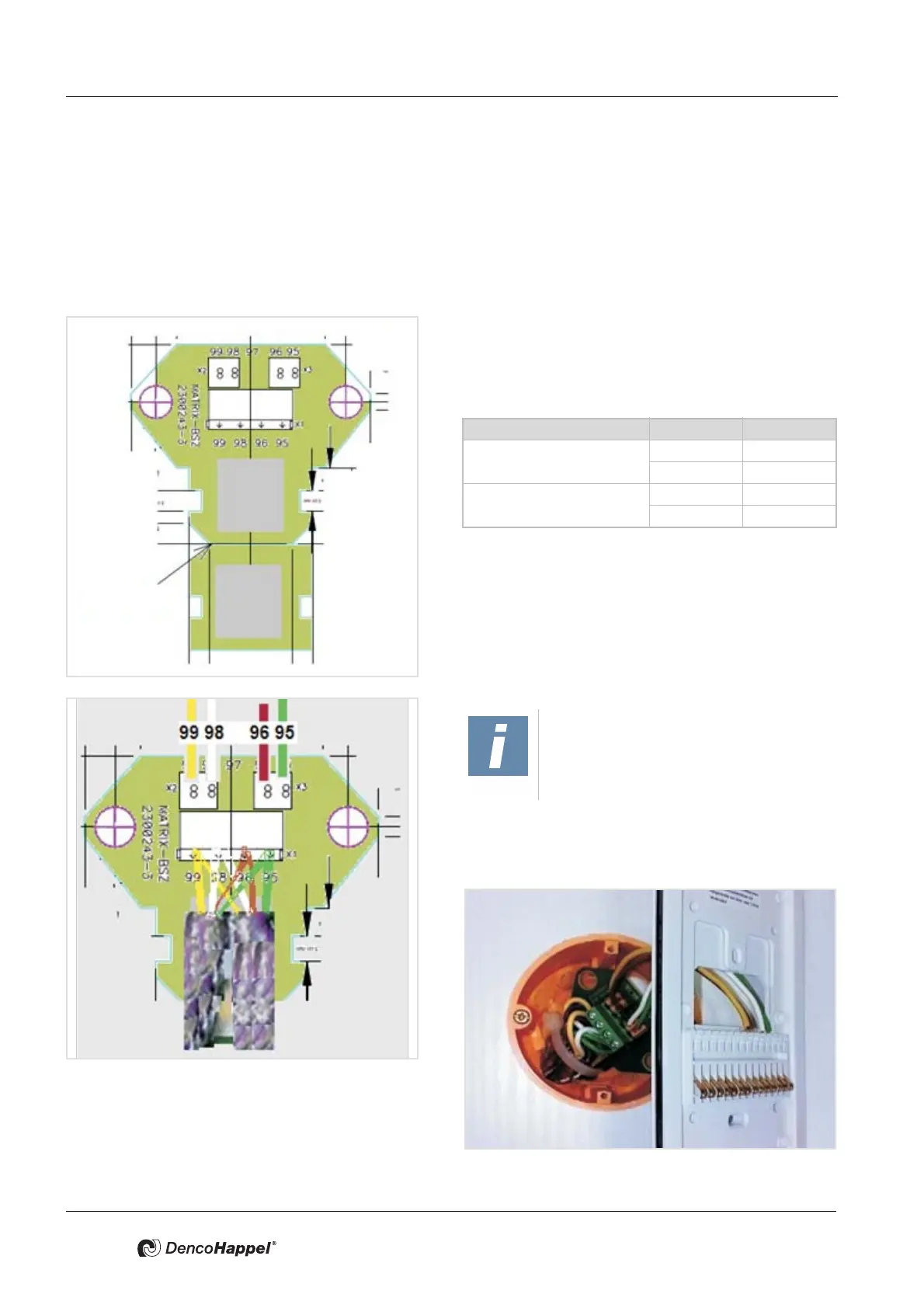
5.3 Integration of MATRIX BSZ circuit board
The MATRIX BSZ circuit board is an intermediate terminal to be used if two wires
are connected using one terminal in MATRIX OP5x (IP20 and IP54) control pan
-
els (necessary for loop-through of the network).
5.3.1 Mounting MATRIX BSZ in the flush-mounted socket
• Use the groove to break off the bottom part of the circuit
board and place it in the flush-mounted socket.
• Route the wires through the flush-mounted socket and
connect the bus cable (refer to
5.5 Cable recommenda-
tions MATRIX.Net) as follows:
Tab. 5-1: Terminal designation
• Use the supplied cable to connect the circuit board with
the terminals of the mounting plate of the MATRIX
OP5XC control panel, as illustrated in
Table 5-1 on
page 20.
Klemme Signal
Supply voltage 95 GND
99 Vcc
MATRIX.Net 96 Low
98 High
NOTE!
A cable strap is used to provide cable
strain relief and shielding.



 To Next Page